Yes. Health app data on iPhone is encrypted on-device and locked behind your passcode, Face ID, or Touch ID, so it stays unreadable to anyone without those credentials. iCloud sync can also be end-to-end encrypted once two-factor authentication is active. The real variable isn't Apple's engineering. It's which third-party apps you've granted access to, and whether you've ever checked what they're doing with it.
TL;DR:
- Health app data on iPhone is protected by encryption and lock-based access, but third-party app permissions and user settings determine actual privacy levels.
- End-to-end encrypted iCloud sync requires active two-factor authentication to maintain data security and privacy.
- Regularly auditing app permissions and disabling unnecessary data access prevents permission creep and limits third-party data collection.
- Medical ID is accessible from the lock screen without unlocking the device, which is a deliberate privacy exception for emergencies.
- Using on-device privacy-first apps reduces data exposure by avoiding cloud storage altogether and provides stronger guarantees against data leaks.
Table of Contents
- What Protects Health Data Privacy on iPhone by Default
- Who Can Actually Access Your Health Data
- How iCloud and Backups Change Your Privacy Posture
- How to Audit and Revoke App Access to Your Health Data
- The Exceptions Worth Knowing About
- What Third-Party Apps Are Actually Allowed to Do With Your Data
- How to Verify an App's Privacy Claims Yourself
- Why We Build On-Device Privacy-First Apps
- A Practical Next Step If You Want Fewer Apps to Audit
- Sources
What Protects Health Data Privacy on iPhone by Default
Apple built HealthKit around a security concept called Data Protection classes, and the one that governs most of your Health data is called "Protected Unless Open." In plain terms, that data becomes cryptographically inaccessible the moment your iPhone locks, and the keys needed to decrypt it live in memory only while the device is unlocked. Even more notably, Apple's security documentation confirms that access is programmatically relinquished after a short period after locking for a subset of HealthKit data, regardless of whether the phone was actively being used moments before.
That mechanism sits inside a broader framework Apple calls its privacy pillars, laid out in the Health privacy white paper. Four principles drive it:
-
Data minimization. Apps and Apple's own features request only the data types they genuinely need to function.
-
On-device processing. Calculations like Cycle Tracking predictions and Health Trends happen locally rather than being uploaded for server-side analysis, a design choice confirmed in Apple's developer documentation on protecting user privacy.
-
Transparency and control. You see exactly which app requested which data type, and you can revoke it.
-
Security. Encryption at rest and in transit, tied to your device passcode.
iCloud sync adds a separate layer. Health data synced to iCloud is end-to-end encrypted, meaning not even Apple holds the decryption key, but only when two-factor authentication is enabled and your devices run a supported iOS version. Skip 2FA, and that encryption guarantee doesn't apply.
Who Can Actually Access Your Health Data
Three distinct actors touch your Health data, and each operates under different rules.
Third-party apps need explicit, per-data-type permission before they can read or write anything. A sleep tracker requesting heart rate and sleep analysis has to ask for each category individually, and you approve or deny them separately. Apple's Health and Fitness Apps privacy overview requires apps to explain why they want that data at the moment of the request, not buried in a terms-of-service document nobody reads.
Healthcare providers work through a different channel entirely. When you use Health Records to pull data from a hospital or clinic, that information downloads directly from the provider's system to your Health app over an encrypted connection. According to Apple Support's documentation on health record privacy, this data never passes through Apple's own servers, and once stored, it's encrypted inside HealthKit like everything else.
Apple itself is the third actor, and its access is narrower than most people assume:
- Apple's privacy policy limits what the company can view or use from your Health data.
- End-to-end encryption on iCloud sync prevents Apple from reading synced Health data.
- On-device processing means many computations never generate a payload that Apple could see in the first place.
How iCloud and Backups Change Your Privacy Posture
Syncing Health data to iCloud is convenient. It's also a decision point that shifts where your data lives and who theoretically could ever touch it.
- Confirm two-factor authentication is on. Without it, Health data synced to iCloud loses its end-to-end encryption guarantee. Check this under Settings, then your name, then Sign-In & Security.
- Understand the backup distinction. A standard iCloud backup and an encrypted local backup through Finder or a computer behave differently. Local encrypted backups keep everything, including Health data, under a password only you control, with no cloud dependency at all.
- Export or remove data deliberately. You can export your entire Health record as a set of files, or delete specific data types and sources through the Health app. Apple Support's guide to managing Health data walks through disabling iCloud sync for Health entirely, which keeps your history local to that one device.
The tradeoff is real: turn off sync and you gain a stronger privacy boundary, but you lose the convenience of your data appearing automatically on a new device or an Apple Watch you set up later.
How to Audit and Revoke App Access to Your Health Data
Most people grant Health permissions once, during setup, and never look again. That's the gap worth closing.
- Open Settings, then Privacy & Security, then Health.
- Tap any listed app to see exactly which data categories it can read or write, then toggle off anything that doesn't need to be there.
- Check App Privacy Report, also under Privacy & Security, to see which domains an app has actually contacted and what data categories it accessed recently. This feature has to be enabled once before it starts logging.
- Revoking access takes effect immediately. The app loses the ability to read new data going forward, though anything it already copied off-device is outside Apple's control at that point.
Beyond Health-specific settings, four habits close most of the remaining gaps: a strong passcode instead of a simple four-digit one, two-factor authentication active on your Apple ID, iOS kept current, and App Privacy Report switched on so you're not auditing blind.
Pro Tip: Run through your Health permissions list every time you install a new fitness or medical app, not just once a year. Permission creep happens one app at a time, and most people only notice it when they're specifically looking.
The Exceptions Worth Knowing About
Default protections have a few carve-outs, and they're worth understanding rather than being surprised by later.
- Medical ID is viewable from the lock screen without unlocking the phone, by design, so emergency responders can see allergies, conditions, and emergency contacts. You control exactly what appears there under the Health app's profile settings.
- The 10-minute window on Protected Unless Open data means certain HealthKit information stays briefly accessible after locking, not instantly sealed off.
- Workout session APIs are an intentional exception. Apple lets fitness apps extend access during an active workout so a locked screen doesn't kill your run tracker mid-session, using temporary journal files stored in a different protection class until the device unlocks again.
- Temporary files tied to active sessions can complicate full data deletion if an app hasn't finished syncing that session before you remove it, so deleting an app mid-workout isn't a guaranteed clean wipe.
What Third-Party Apps Are Actually Allowed to Do With Your Data
Apple's developer rules draw a firm line here. Per the Health privacy white paper, apps using HealthKit are prohibited from using that data for advertising, marketing, or selling it to data brokers, and they must disclose why they're requesting each data type at the moment they ask.
That prohibition is a policy rule, not a technical one, and enforcement depends on Apple's review process catching violations after the fact rather than before.
- App Privacy labels on the App Store page summarize what data categories an app collects, but they're self-reported by the developer.
- App Privacy Report shows real network activity, which is a stronger signal than a label because it reflects what the app actually did, not what it claims to do.
- The practical risk starts the moment you tap "Allow." From there, what happens to your data depends entirely on that developer's own privacy policy, not Apple's platform rules, which is why permission creep is the single biggest privacy risk most people underestimate.
For a closer look at how this plays out with workout data specifically, this guide to keeping gym logs private walks through the HealthKit permission model in a real-world scenario.
How to Verify an App's Privacy Claims Yourself
Any app can say "your data stays on your device." Few readers have a way to check that claim, and most never try.
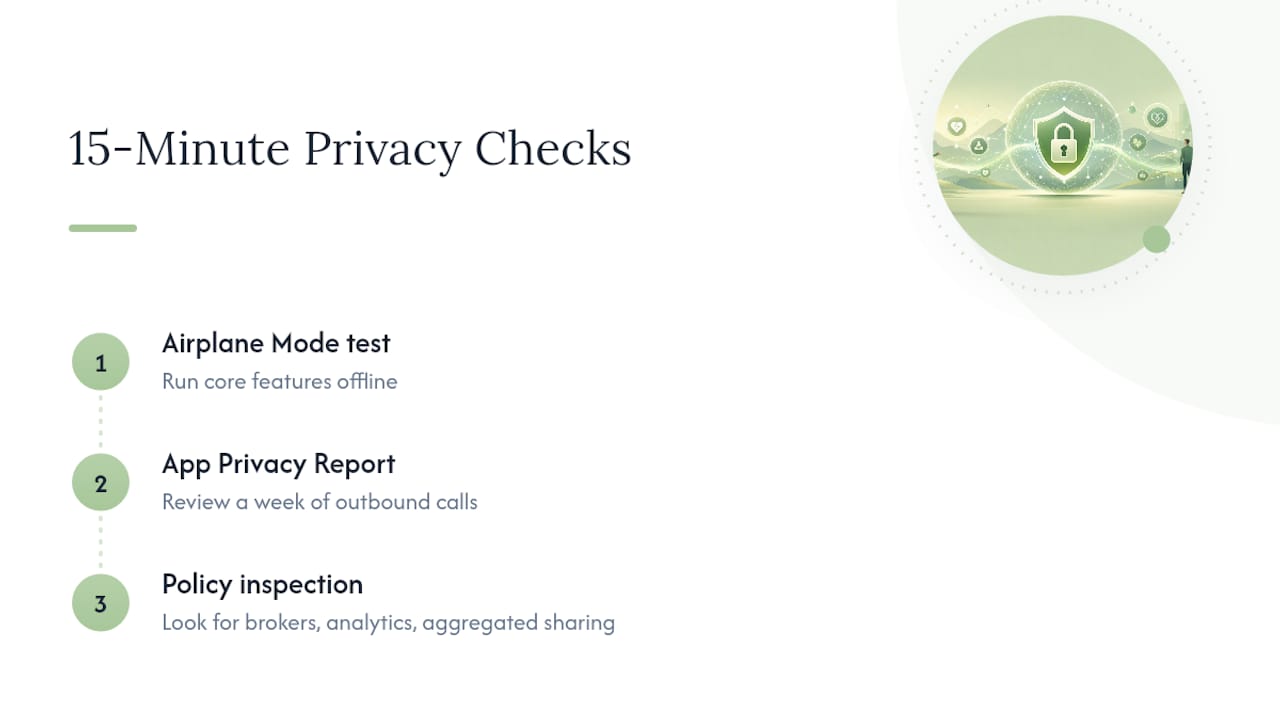
Three checks take fifteen minutes and tell you more than a privacy policy will. First, put your iPhone in Airplane Mode and run the app's core features. If something that's supposed to be local suddenly breaks, that's a strong sign it depends on a server somewhere. Second, check App Privacy Report after a week of normal use. An app claiming on-device processing shouldn't show a stream of outbound calls to unfamiliar domains. Third, read the actual privacy policy for language about data brokers, third-party analytics SDKs, or "aggregated" data sharing, since that phrasing is often where cloud dependency hides.
Pro Tip: A technical breakdown of on-device AI privacy walks through this exact verification process in more depth if you want to run it against an app you're already using.
Why We Build On-Device Privacy-First Apps
We built Obsidianridgelabs around a simple frustration: most software asking for your health data offers policy promises instead of technical guarantees. Apple's platform gives developers the tools to keep data local. Very few actually build that way. This piece reflects that focus. If you want to go deeper on verification methods, the on-device privacy verification guide covers the same checks in more technical detail.
— Alex
A Practical Next Step If You Want Fewer Apps to Audit
Every audit step above works, but it only solves half the problem. You can lock down permissions perfectly and still be trusting a dozen apps with health, fitness, and personal data you never fully vetted. A different approach is private, on-device AI apps for Apple devices, designed so your transcription, journaling, finance tracking, and coaching data remain local without a cloud version to worry about.

That means no server logs to leak, no data-broker fine print to read, and no App Privacy Report surprises, because there's rarely a network call to catch. Each app states when an optional connection exists and what it's for, rather than burying it. If you're tired of running the verification checks above on every new app, start by browsing Obsidianridgelabs's private AI apps and see which one replaces a cloud-dependent tool you're currently using.
Sources
Everything in this guide traces back to Apple's own documentation rather than secondhand summaries. The Health privacy white paper covers the technical and policy architecture behind HealthKit in full. Apple Support's guide to protecting access to health data details the encryption model and lock-state behavior referenced throughout this article. For hands-on settings changes, Apple's guide to managing Health data walks through every toggle mentioned above. Developers and technically curious readers can also review Apple's developer documentation on protecting user privacy for the engineering details behind on-device processing.
For a broader look at permission hygiene before adopting any AI tool, fixing your permissions before rolling out AI offers a useful framework that applies well beyond Health data specifically.
This article is general information, not a substitute for advice from a qualified doctor. Consult a qualified healthcare professional about your own circumstances before acting on anything here.
- Protecting access to users' health data - Apple Support
- Health privacy white paper (May 2023) - Apple