
Apple's iPhone AI is designed with privacy as a structural constraint, not an afterthought. For most users, Apple Intelligence processes requests on-device first and routes more complex queries through Private Cloud Compute, a stateless cloud architecture that Apple says deletes your data after each response. The single most important action you can take right now: enable Advanced Data Protection for iCloud, which raises end-to-end encrypted iCloud categories from 14 to 23 and removes Apple's ability to decrypt your stored data.
Two trust signals worth knowing upfront:
- On-device-first processing: Apple Intelligence runs smaller models locally using AFM 3 Core, so many everyday requests never leave your device.
- Private Cloud Compute: When a request requires more compute, it routes through PCC nodes that Apple says are stateless, cryptographically verifiable, and run on Apple silicon with Secure Enclave protections.
Two immediate actions you can take in under five minutes:
- Go to Settings → [your name] → iCloud → Advanced Data Protection and turn it on. You will need to set a recovery contact or recovery key first.
- Go to Settings → Privacy & Security → Apple Intelligence Report to export a log of recent AI requests.
The architecture holds up well for everyday use. Where it gets more complicated is when PCC runs on Google Cloud infrastructure with Nvidia GPUs, a change Apple confirmed in 2026 that introduces supply-chain questions even with cryptographic mitigations in place.
Key Takeaways
Apple Intelligence is private for most everyday use cases, but the expansion of Private Cloud Compute to Google Cloud and Nvidia hardware means the trust model now depends on cryptographic mitigations across a broader supply chain, making Advanced Data Protection and regular audit steps more important than ever.
| Point | Details |
|---|---|
| Enable Advanced Data Protection | Raises E2EE iCloud categories to a higher number; Apple loses the ability to decrypt your stored data. |
| Export your Apple Intelligence Report | Go to Settings → Privacy & Security → Apple Intelligence Report to audit PCC-routed requests. |
| Limit Siri history now | Manage retention under Settings → Apple Intelligence & Siri → Siri History; iOS 27 will add auto-delete. |
| Avoid AI for regulated data | Medical, legal, and financial content warrants extra caution; cloud exposure may conflict with HIPAA obligations. |
| Obsidianridgelabs for zero-cloud AI | On-device apps from Obsidianridgelabs keep all core processing local, eliminating PCC routing entirely. |
Table of Contents
- How does Apple Intelligence handle your data on iPhone?
- What does Apple officially claim it collects and stores?
- What do Google, Nvidia, and third-party infrastructure mean for your privacy?
- What security researchers say about Apple Intelligence privacy risks
- How to control or disable Apple AI on your iPhone
- How to generate and read your Apple Intelligence Report
- Why on-device AI apps offer a different privacy model
- The gap between Apple's privacy promise and what users actually verify
- Private AI on your iPhone, without the cloud routing question
- Sources
How does Apple Intelligence handle your data on iPhone?
Apple Intelligence routes every request through a three-tier decision process: on-device models first, then Private Cloud Compute for heavier tasks, and optionally third-party models like Google Gemini for requests you explicitly send to external AI.
The System Orchestrator and model tiers
The System Orchestrator is the component that decides where a request goes. It evaluates the complexity of your query and the capability of the on-device model before routing anything off your device. For most writing assistance, summarization, and basic Siri tasks, AFM 3 Core handles the request entirely on your iPhone. More demanding requests, such as detailed reasoning or longer document analysis, go to AFM 3 Cloud or AFM 3 Cloud Pro running on Private Cloud Compute, as documented by Ars Technica.
Device and hardware thresholds
Not every iPhone supports the full Apple Intelligence feature set. On-device models require an A17 Pro chip or later (iPhone 15 Pro and newer) or an M-series chip on iPad and Mac. Devices below that threshold cannot run AFM 3 Core locally and may rely more heavily on cloud inference. Apple has not published a precise RAM threshold, but the A17 Pro and M-series chips share a unified memory architecture that makes local model execution practical.
Data flow: what stays local vs. what goes to PCC
| Data type | Where it's processed | What Apple says happens |
|---|---|---|
| Short writing tasks, basic Siri queries | On-device (AFM 3 Core) | Never leaves the device |
| Complex reasoning, longer document tasks | PCC (AFM 3 Cloud/Pro) | Processed transiently, deleted after response |
| Siri voice requests | On-device transcription first, then routed per complexity | Audio is transcribed locally; text may go to PCC |
| Explicit third-party AI requests (e.g., Gemini) | Third-party cloud | Subject to that provider's privacy policy |
| Request metadata (size, duration) | Apple telemetry | Retained for performance monitoring |
Siri voice requests are transcribed on-device before the text is evaluated by the System Orchestrator. The audio itself does not leave your device. What may travel to PCC is the transcribed text, and only when the request exceeds on-device model capacity.
What does Apple officially claim it collects and stores?
Apple's official position is that PCC is stateless: your request data is used only to fulfill the request and is not stored, logged, or accessible to Apple after the response is returned. That claim rests on three architectural commitments described in Apple's security research blog.
Apple says it:
- Does not store the content of your PCC requests after the response is delivered.
- Does not use private request content to train its foundation models.
- Does not allow Apple employees to access PCC request data.
- Does collect limited telemetry: request size and duration metrics, not content.
- Does publish PCC software images so independent researchers can verify what code runs on PCC nodes.
The verification promise is meaningful. Apple commits to publishing signed software images for PCC nodes, and attestation checks mean your device will only send requests to nodes cryptographically confirmed to run that exact published software. Corellium and other independent security researchers have begun reviewing PCC node software under this framework.
One honest caveat: a published commitment to transparency is not the same as completed independent verification. The attestation architecture makes verification possible, but the depth of third-party auditing of PCC at scale is still developing. Apple's claims are architecturally sound and more auditable than most cloud AI providers, but treating them as fully verified would be premature.
What do Google, Nvidia, and third-party infrastructure mean for your privacy?
PCC was originally designed to run exclusively on Apple silicon nodes, which gave Apple direct control over the hardware trust chain. The Verge and Ars Technica reported in 2026 that Apple expanded PCC to run on Google Cloud using Nvidia GPUs, a significant architectural change that Apple says it has mitigated through cryptographic controls.
What Apple's technical mitigations cover
Apple maintains a cryptographically verifiable ledger of all hardware used in PCC, including third-party nodes. Before your device sends a request to any PCC node, it performs an attestation check: the node must prove it is running the exact signed software image Apple has published. Secure Boot and Secure Enclave protections apply at the node level. These controls are designed to prevent unauthorized code from running on PCC nodes, even when the underlying hardware is owned by Google or uses Nvidia GPUs.
Pro Tip: You can check Apple's published PCC software images and the transparency log yourself at security.apple.com. If a node's software does not match the published image, your device will not send requests to it.
Privacy tradeoffs: Apple-controlled vs. third-party PCC hardware
| Factor | Apple silicon PCC nodes | Google Cloud / Nvidia GPU nodes |
|---|---|---|
| Hardware supply chain | Apple-controlled end-to-end | Google Cloud and Nvidia supply chains involved |
| Software attestation | Cryptographically verifiable | Same attestation mechanism applies |
| Secure Enclave | Present on Apple silicon | Not present on Nvidia GPU hardware |
| Independent audit surface | Apple silicon architecture | Broader attack surface across vendors |
| Apple's stated privacy guarantee | Stateless, no data retention | Same guarantee; mitigations differ |
The residual risk is real and worth naming plainly. A longer supply chain means more parties whose security practices affect the integrity of the system, even when cryptographic attestation limits what those parties can do with your data in transit. Apple's mitigations are technically credible, but the trust model now depends on Google's and Nvidia's infrastructure security in ways the original PCC design did not.
What security researchers say about Apple Intelligence privacy risks
Apple's architecture is more privacy-protective than most cloud AI systems. That said, independent reporting and security analysis have identified several concerns that technically minded users should understand.
Key concerns from researchers and journalists:
- Supply-chain exposure: Google Cloud and Nvidia hardware introduce additional parties whose security posture affects PCC integrity, even with attestation in place.
- Transient data leakage: "Stateless" means data is not retained, but it still exists in memory during processing. A sufficiently sophisticated attack at the node level during that window is theoretically possible.
- Telemetry and metadata: Apple retains request size and duration metrics. Over time, metadata patterns can reveal behavioral information even without content.
- De-identified training ambiguity: Apple says it does not use private PCC content for training. The boundary between "de-identified aggregate signals" and "private content" is not always precisely defined in public documentation.
- Third-party model risk: When you explicitly route a request to Google Gemini through Apple Intelligence, that request leaves Apple's privacy architecture entirely and is subject to Google's data practices.
When to avoid using Apple AI for sensitive content:
- Medical records, diagnoses, or treatment details covered under HIPAA.
- Legal strategy, privileged communications, or attorney-client materials.
- Financial account details, tax records, or anything subject to fiduciary confidentiality.
- Any content where even transient cloud exposure would be unacceptable given your threat model.
For users whose threat model is "I want to keep my data away from any cloud processing," Apple's on-device-first approach reduces but does not eliminate cloud exposure. The practical answer for that threat model is covered in the section on on-device alternatives below.
How to control or disable Apple AI on your iPhone
The most effective combination is: disable Apple Intelligence entirely if you want zero AI data routing, or keep it enabled with Advanced Data Protection turned on and Siri history limited if you want AI features with stronger guardrails.
Step-by-step settings walkthrough
| Goal | Path | What it does |
|---|---|---|
| Disable Apple Intelligence entirely | Settings → Apple Intelligence & Siri → Apple Intelligence (toggle off) | Stops all Apple Intelligence processing, on-device and cloud |
| Enable Advanced Data Protection | Settings → [your name] → iCloud → Advanced Data Protection | Raises E2EE iCloud categories from 14 to 23; Apple loses key access |
| Limit Siri history | Settings → Apple Intelligence & Siri → Siri History | Controls what Siri interaction data is retained |
| Review app AI permissions | Settings → Privacy & Security → Apple Intelligence Report | Shows which apps have accessed Apple Intelligence features |
| Disable specific AI writing tools | Settings → Apple Intelligence & Siri → Writing Tools | Turns off AI writing assistance system-wide |
Before enabling Advanced Data Protection
Enabling ADP requires two-factor authentication on your Apple Account and updated software on all devices signed into that account. Before you turn it on:
- Set up a recovery contact (a trusted person with an Apple device) or generate a recovery key and store it somewhere secure and offline.
- Sign out of or update any older Apple devices on your account that cannot run the required software version.
- Understand that iCloud.com web access to your data is disabled by default after enabling ADP; you can re-enable it per session from a trusted device.
Apple cannot recover your data if you lose access and have no recovery method. That is the tradeoff for removing Apple's key access.
Pro Tip: Keep your recovery key in a password manager like 1Password or Bitwarden, and separately on paper in a physically secure location. Losing both means permanent data loss, not just inconvenience.
Regarding Siri's upcoming privacy controls: Bloomberg reported that iOS 27 will add auto-deleting Siri chat history as a built-in option, which will make it easier to limit Siri interaction retention without manually managing history settings.
How to generate and read your Apple Intelligence Report
You can generate an Apple Intelligence Report directly from Settings to see a log of what requests were routed to PCC and when. This is the primary audit tool Apple provides for reviewing your AI data path.
Steps to export your Apple Intelligence Report
- Open Settings on your iPhone.
- Tap Privacy & Security.
- Tap Apple Intelligence Report.
- Tap Export Activity to save the report as a JSON file (
Apple_Intelligence_Report.json). - Open the file in a text editor or a JSON viewer app to read the entries.
What the report includes
Each entry in the report logs the timestamp of the request, which app or feature triggered it, whether the request was handled on-device or routed to PCC, and the model tier used. It does not include the content of your requests.
If you see unexpected entries, such as apps you do not recognize or a higher volume of PCC-routed requests than expected, the recommended next steps are:
- Review and revoke Apple Intelligence permissions for the flagged app under Settings → Privacy & Security.
- Change your device passcode and review Face ID or Touch ID enrollments.
- Enable Advanced Data Protection if you have not already done so.
One important limit: Apple Support notes that when Advanced Data Protection is enabled, Apple cannot assist with data recovery or deletion of E2EE content. For non-E2EE data, you can submit a data deletion request through Apple's Privacy Portal at privacy.apple.com.
Why on-device AI apps offer a different privacy model
On-device AI apps eliminate the cloud routing question entirely. When all core processing runs locally, there is no PCC request to log, no attestation check to trust, and no third-party infrastructure in the data path. That is the architectural difference, not a marketing claim.
Obsidianridgelabs builds private AI applications exclusively for Apple devices, with all core processing performed on-device. The product suite covers transcription, finance management, personal journaling, digital wardrobe, strength coaching, study tools, home inventory, focus and task management, and relationship management. None of these require a cloud connection for their core functions. For users whose threat model includes "I do not want any AI request leaving my device," this architecture satisfies that requirement in a way that Apple Intelligence with PCC does not.
Pro Tip: Before trusting any app's "private" or "on-device" claim, check its App Store privacy nutrition label under "Data Not Collected" and monitor its outbound network connections using a tool like Little Snitch or the built-in Screen Time network activity log. A genuinely on-device app should show no AI-related network traffic during normal use. Obsidianridgelabs publishes its privacy-first design philosophy for exactly this kind of verification.
On-device AI vs. cloud AI: practical privacy tradeoffs
| Factor | On-device AI (e.g., Obsidianridgelabs) | Cloud AI (Apple Intelligence + PCC) |
|---|---|---|
| Data leaves the device | No, for core processing | Yes, for complex requests via PCC |
| Third-party infrastructure | None | Google Cloud, Nvidia GPUs for PCC at scale |
| Auditability | Network monitoring confirms no outbound traffic | Cryptographic attestation; requires trust in Apple's ledger |
| Feature scope | Defined by on-device model capability | Broader, with access to large cloud models |
| Recovery complexity | No cloud account dependency | ADP recovery contact/key required |
| Verification method | Monitor network traffic, review App Store entitlements | Review PCC transparency log, Apple security blog |
For a deeper look at verifying on-device AI behavior on your iPhone, including how to audit network traffic and App Store entitlements, Obsidianridgelabs publishes a technical verification guide covering those steps.
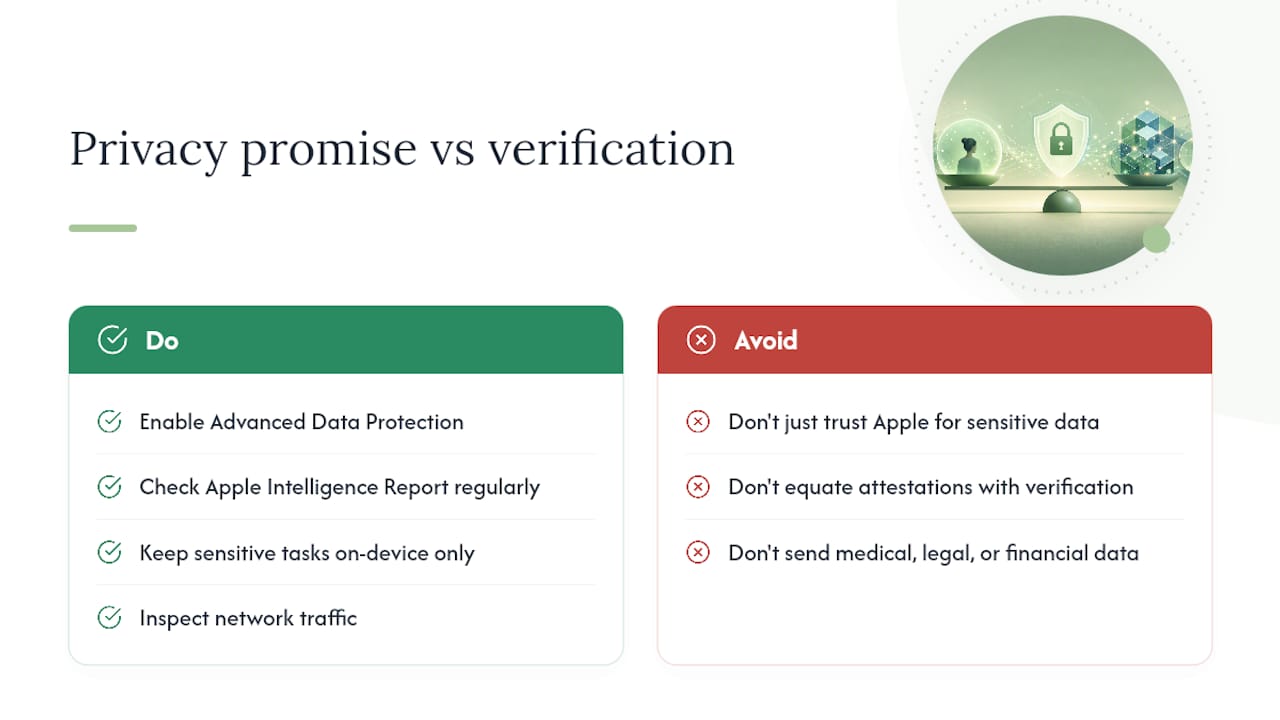
The gap between Apple's privacy promise and what users actually verify
Apple's privacy architecture for iPhone AI is genuinely more rigorous than what most cloud AI providers offer. The on-device-first model, the stateless PCC design, the cryptographic attestation, the published software images — these are real technical commitments, not just marketing language. The conventional advice to "just trust Apple" is not entirely wrong for low-sensitivity use.
Where that advice falls short is in treating Apple's architectural commitments as equivalent to independently verified outcomes. The attestation framework makes verification possible, but most users and even most security researchers have not run that verification at scale against the expanded Google Cloud and Nvidia infrastructure. The transparency log exists; the auditing is still catching up.
The practical implication is this: for everyday tasks, writing assistance, and general Siri queries, Apple's protections are adequate for most threat models. For anything touching medical, legal, or financial content, the residual cloud exposure, however small, is worth taking seriously. The right response is not to abandon Apple Intelligence but to pair it with Advanced Data Protection, use the Apple Intelligence Report regularly, and route genuinely sensitive AI tasks to on-device-only tools where no cloud routing is architecturally possible.
The deeper issue is that "private AI" has become a brand claim as much as a technical specification. Verifying it requires looking at network traffic, not just privacy policies. That gap between claim and verification is where users who care about iPhone data security should focus their attention.
Private AI on your iPhone, without the cloud routing question
The most direct way to remove cloud AI risk from your daily workflow is to use apps that never route requests off your device in the first place. Obsidianridgelabs builds private AI apps for Apple devices with that constraint as a design requirement, not a feature toggle.

Where Apple Intelligence routes complex requests through PCC on Google Cloud infrastructure, Obsidianridgelabs apps handle transcription, journaling, finance tracking, and other sensitive tasks entirely on your iPhone. There is no PCC request to audit, no attestation chain to trust, and no third-party infrastructure in the data path. For users who have worked through the settings and audit steps in this article and still want a stronger guarantee, that architectural difference is the concrete answer.
The Echo Chamber transcription app is a practical starting point: it keeps all transcription processing local, with no network traffic during normal use. You can verify that yourself with any network monitoring tool. Browse the full suite of private AI apps to find the tools that fit your workflow.
Sources
The sources below are the primary references used in this article. They fall into two categories: official Apple documentation and independent technical reporting. Both are worth bookmarking if you want to verify claims or go deeper on specific topics.
The Apple Intelligence Report (generated from your own device) and the Apple Security Research blog are the two sources you can interact with directly, not just read.
- Private Cloud Compute: A new frontier for AI privacy in the cloud - Apple Security Research
- Advanced Data Protection for iCloud
- Apple says its AI is still private, even when it's running on Google's servers - Ars Technica
- Apple private cloud compute coverage - The Verge
- Apple Intelligence privacy guarantees - 9to5Mac
- Bloomberg newsletter: iOS 27 Siri app to have auto-deleting chats