
For privacy-conscious iPhone users who share a household budget, the safest route is an app built on-device or synced through Apple-managed iCloud with Advanced Data Protection, ideally paired with explicit end-to-end encryption or a zero-knowledge design. That combination keeps financial data out of a developer's reach while still letting both partners see the same ledger. The checklist below tells you exactly what to verify before you commit to one.
TL;DR:
- Using iCloud with Advanced Data Protection and end-to-end encryption minimizes who can access shared budget data, unlike developer cloud syncs that control backups and encryption keys.
- About 60% of popular budgeting apps share user data with third parties, making manual entry or storage on-device preferable for privacy-aware couples.
- Verifying app privacy claims requires checking for explicit end-to-end encryption and understanding where and how your data and encryption keys are stored.
- On-device workflows, such as using Shortcuts or encrypted notes, prevent full transaction history from leaving your device, reducing exposure risk.
- Full bank account linking, even with encryption, increases data exposure unless you minimize linked accounts and regularly review permissions.
Table of Contents
- How Does Shared Budgeting Sync Work on iPhone?
- What Do Budgeting Apps Actually Collect?
- A Practical Privacy Checklist for a Shared Budget on iPhone
- What iPhone-Native Workflows Cut Down Data Exposure?
- The Case for On-Device Processing in Shared Finances
- The iPhone-First Privacy Playbook Most Couples Skip
- Try a Privacy-First Approach to Your Shared Ledger
- Sources
- FAQ
How Does Shared Budgeting Sync Work on iPhone?
The mechanism behind "shared" is the part most people skip, and it's the part that determines whether a stranger at a budgeting startup can technically read your transaction history. Three sync models dominate the App Store, and each one carries a different privacy profile.
Apple-managed iCloud sync routes your data through Apple's own infrastructure rather than a third-party server. Turn on Advanced Data Protection for iCloud, and Apple extends end-to-end encryption to more data categories, which shrinks what's accessible even to Apple itself on its servers. Some finance apps lean entirely on this model. PayShare, for instance, advertises iCloud-only storage with granular sharing controls, meaning your shared ledger never touches a company-owned database at all.
Developer cloud sync is the more common setup, and it works differently. The app's own servers store your account, and the company controls backups, retention, and often the encryption keys. That doesn't automatically mean bad behavior, but it does mean the developer has technical access to your data unless they've specifically engineered around it. Retention policies vary widely, and many apps keep data long after you delete your account, buried in a backup somewhere you can't audit.
End-to-end encryption and zero-knowledge architectures solve the access problem directly. Apps like CoFinance encrypt data on your device before it ever leaves, using keys the developer never sees. If the company gets subpoenaed, breached, or simply curious, there's nothing readable to hand over.
How do you tell these apart before downloading? Check for these signals:
- The App Store listing or privacy policy explicitly says "end-to-end encrypted" or "zero-knowledge," not just "bank-level security" (that phrase usually only means encryption in transit).
- The privacy policy names where data is stored: iCloud, the developer's servers, or exclusively your device.
- Support documentation describes key management. If keys live only on your devices, the developer built for zero access by design.
- Marketing language that emphasizes "secure servers" without naming an encryption model is often developer cloud sync in disguise.
What Do Budgeting Apps Actually Collect?
Most shared budgeting apps collect more than the transaction list you see on screen. Financial data typically includes account balances, merchant names, spending categories, and sometimes account numbers if you've linked a bank. Layered on top: device identifiers, usage analytics, and occasionally advertising identifiers used to build a profile of your behavior separate from your money.
The distinction between bank linking and manual entry matters more than most reviews admit. Linking a bank account through an aggregator typically grants read access to months of transaction history across every connected account, not just the categories you actually track. Manual entry or transaction-by-transaction import gives you control over exactly what enters the shared ledger.
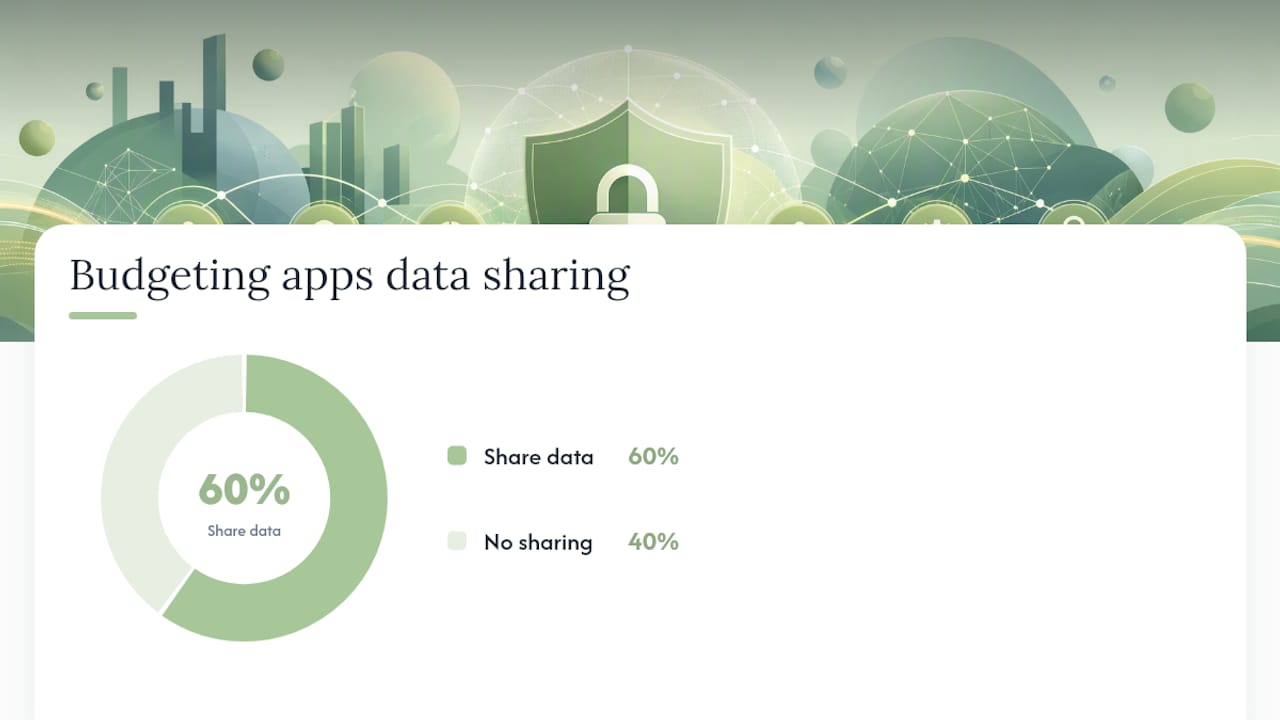
Independent research puts a number on this exposure. Incogni's research on budgeting apps found that roughly 60% of a sample of 20 popular budgeting apps share some user data with third parties. That's not a fringe result, it's a majority of the category. When you check an App Store listing, focus on the "Data Linked to You" section, which is where these disclosures live in plain sight.
A few things to look for and avoid:
- Financial Info linked to identity: means transaction data is tied to your name or account, not anonymized.
- Identifiers shared with analytics or advertising: a sign the app monetizes usage patterns, even if it doesn't sell raw transactions.
- "Data Linked to You" categories beyond the basics: entries like YNAB's App Store privacy label list Financial Info, Identifiers, and Usage Data, which is worth comparing against apps that disclose far less.
- Vague retention language: "we may retain data as needed" without a stated timeframe is a red flag, not boilerplate.
Read-only aggregation is a meaningfully different risk than an app that stores your actual bank credentials. Entries for apps like Monarch Money describe "private and secure" access alongside their own Data Linked to You disclosures, so read the label, not just the marketing copy above it.
A Practical Privacy Checklist for a Shared Budget on iPhone
Before you and your partner commit to a shared budgeting app, run through this sequence. It takes about fifteen minutes and it will tell you more than any star rating.
- Confirm the storage model first. Is data local-only, synced through iCloud, or stored on developer-owned servers? This single answer eliminates most of the guesswork about who can technically see your ledger.
- If it's iCloud-based, verify it works with Advanced Data Protection turned on. Some apps quietly fall back to standard protection for certain data types, so check the developer's documentation, not just Apple's general claim.
- Look for an explicit E2EE or zero-knowledge statement, not just "encrypted" or "secure." Encrypted in transit is standard and says nothing about who can read the data at rest.
- Check the analytics disclosure. Minimal or no third-party analytics usually means a smaller attack surface and fewer parties with a copy of your spending habits.
- Test the sharing controls before adding real data. Can you grant your partner access to specific categories or the whole ledger only? Granular sharing is a sign the developer thought about privacy as a feature, not an afterthought.
- Email support with three direct questions: How long is deleted data retained in backups? Who holds the encryption keys? Is any data shared with analytics or advertising partners, even anonymized?
Every one of these items carries a usability trade-off. Full end-to-end encryption sometimes means slower cross-device sync or the loss of a "forgot password" recovery option, since the developer genuinely cannot recover your data. That's a fair trade for most privacy-conscious couples, but it's worth knowing going in.
Pro Tip: Ask support the retention question in writing, not through a chat widget. A written answer about backup retention and key management is something you can hold the company to later, and vague or evasive replies tell you almost as much as a straight answer would.
What iPhone-Native Workflows Cut Down Data Exposure?
You don't need to hand a company your full transaction history to keep a shared budget current. Apple's own tools give privacy-conscious couples a middle path between spreadsheets and full bank aggregation.
Shortcuts can capture a single transaction, tag it, and add it to a shared note or file without ever connecting to your bank. Apple's own Shortcuts guide documents automation options built for exactly this kind of selective, on-device task. Build a Shortcut triggered by an Apple Wallet transaction notification, and you can log the amount and category to a shared iCloud note in two taps, no account linking required.
iCloud sharing through a shared note, shared Reminders list, or a Numbers spreadsheet in a shared folder keeps the ledger inside Apple's ecosystem instead of a third-party server. It's less polished than a dedicated app, but the data never leaves an infrastructure you're already trusting with your photos and messages.
Manual exchange methods still have a place:
- AirDrop a CSV export monthly for a household that reconciles budgets in batches rather than in real time.
- Encrypted Notes (Apple Notes supports a locked note) for a running tally that only needs occasional updates.
- A shared spreadsheet with formulas doing the categorization, avoiding any third-party processing entirely.
Limited bank linking still makes sense for some households, particularly ones tracking many accounts. If you accept it, minimize exposure by linking only the accounts you actively budget from, disabling any optional analytics sharing in the app's settings, and revisiting those permissions every few months rather than setting them once and forgetting them.
The Case for On-Device Processing in Shared Finances
Some companies build private AI applications for Apple devices on a simple premise: core processing happens locally, and any network connection is optional and clearly explained before it happens. No advertising profiles, no mandatory account creation, no quiet data transfer sitting behind a "secure servers" claim. That's the same standard this checklist has been walking through, applied to an entire product line rather than one feature.
A workable shared-budget setup that follows this logic looks like this:
- Choose an app or workflow where the primary ledger lives on-device or in iCloud with Advanced Data Protection enabled, never on an unnamed developer server.
- Use Shortcuts to log transactions individually rather than granting blanket bank access, keeping the data trail short and visible.
- Reserve full bank aggregation for a single reference account if you need it, and keep the shared budget itself built on manual or automated entries you control.
- Revisit the app's privacy policy twice a year. Data practices change with updates, and a policy that was clean at signup isn't guaranteed to stay that way.
The strength of this approach isn't that it's more convenient. Full bank aggregation will always sync faster with less manual effort. The strength is that it removes the question of trust from the equation entirely. If your data never leaves the device, there's no developer database to breach, no third-party analytics partner to worry about, and no policy update six months from now that quietly expands what gets shared. For a deeper look at how on-device apps hold up under scrutiny, the Obsidian Ridge Labs site walks through the verification approach behind that claim.
The iPhone-First Privacy Playbook Most Couples Skip
Most advice on shared budgeting privacy stops at "read the privacy policy," which is technically correct and practically useless. Privacy policies are written by lawyers to permit maximum flexibility, not to tell you what actually happens to your data day to day. The App Store's Data Linked to You label is more honest, and it takes thirty seconds to check.
The bigger blind spot is assuming that avoiding bank linking automatically means avoiding privacy risk. It doesn't. An app with zero bank connections can still store your manually entered transactions on an unencrypted developer server, and an app with full aggregation can still be end-to-end encrypted. Storage location and key management are the variables that matter, not whether you typed the numbers in yourself.
If you take one thing from this, prioritize the sync model over every other feature. A beautiful interface with developer-held keys is a worse privacy bet than a plain spreadsheet in an encrypted iCloud note. Convenience is negotiable. Who holds the key to your household's finances shouldn't be.
— Alex
Try a Privacy-First Approach to Your Shared Ledger
Some companies build on-device AI apps for Apple hardware specifically to keep household budget data on devices to stay synced. Every checklist item covered above, local processing, opt-in network connections, no hidden analytics, is the design standard typically used, not an exception made when asked.

Echo Chamber Pro applies that same philosophy to personal finance tracking, keeping processing local and making any optional connection explicit rather than buried in a settings menu three layers deep. It's available for $2.99 per month, $29.99 per year, or a $79.99 one-time purchase, depending on how you prefer to pay. If you want to see how the on-device model holds up to outside scrutiny before you commit, the privacy verification guide walks through the same kind of checks this article just covered, applied directly to the app. Start there, then decide if it fits how you and your partner already manage money.
Sources
Apple's own Advanced Data Protection documentation explains exactly which iCloud data categories gain end-to-end encryption. Incogni's budgeting app research quantifies how widespread third-party data sharing is in the category. For hardware-level context on the security these protections build on, see the iPhone 16 Pro product page.
- Advanced Data Protection for iCloud - Apple Support
- Good for your wallet but not for your privacy: 60% of 20 popular budgeting apps share your data
- PayShare — iCloud-first personal finance app
- CoFinance — shared finances with end-to-end encryption
FAQ
Which Budgeting App Can Link With Your Spouse?
Several iPhone budgeting apps support shared access, but the safer question is how that sharing is architected. Look for apps offering iCloud-based sharing or explicit end-to-end encryption, such as the PayShare or CoFinance models described above, rather than choosing based on shared access alone.
Do Budgeting Apps Sell Your Data?
Outright sale is less common than data sharing with third-party analytics or advertising partners, but the practice is widespread. Incogni's research found that about 60% of 20 popular budgeting apps share some user data with third parties, so checking the App Store's Data Linked to You section before downloading matters more than trusting marketing copy.
What Is the 50/30/20 Rule for Couples?
The 50/30/20 rule splits after-tax household income into 50% needs, 30% wants, and 20% savings or debt repayment, applied to combined income when a couple budgets jointly. It's a budgeting framework, not a privacy standard, so pairing it with a privacy-first sync model like the ones covered in this article keeps the numbers accurate without exposing the underlying transaction data unnecessarily.
Can I Share My Budget With My Spouse Securely?
Yes, through iCloud-based sharing with Advanced Data Protection enabled, an end-to-end encrypted app, or manual workflows like a shared encrypted note or a Shortcuts-driven ledger. Each option lets both partners see the same numbers without routing full transaction history through a third-party server you can't audit.
Does Obsidianridgelabs Offer a Private Budgeting App?
Yes. Echo Chamber Pro processes finance data on-device with opt-in network connections only, available for $2.99 per month, $29.99 per year, or a $79.99 one-time purchase.