
For most privacy-conscious Apple users, the best Mint alternative is Vault by Obsidian Ridge Labs: an on-device, zero-knowledge budgeting app that processes your financial data locally on your iPhone, never sending it to a cloud server. If you prioritize keeping your transaction history off third-party servers, Vault is the recommendation here. If you need fully automated bank aggregation with minimal manual input, a cloud-first tool may suit you better, though that convenience comes with a real data-exposure tradeoff.
Since Mint shut down in 2024, the replacement market has split into two clear camps: cloud-based aggregators that link your accounts automatically, and privacy-first apps that keep data local. This guide covers how to choose between them, how to migrate your data, and why the on-device model is worth understanding before you commit.
Table of Contents
- How do the best Mint alternatives compare on privacy?
- Why does on-device processing change your privacy risk?
- How do you choose the right privacy-first budgeting app?
- How do you migrate your data from Mint safely?
- What do you gain and give up with on-device budgeting?
- What is the final verdict on Mint alternatives for Apple users?
- Key Takeaways
- The case for on-device budgeting is stronger than most guides admit
- Vault keeps your financial data on your iPhone, not on someone else's server
- Useful sources
How do the best Mint alternatives compare on privacy?
The table below maps the key dimensions Apple users should evaluate. Generic category labels are used to avoid naming cloud-based competitors directly.
| Dimension | Cloud-first aggregator | Hybrid (read-only linking) | On-device / zero-knowledge (e.g., Vault) |
|---|---|---|---|
| Privacy model | Server-side processing | Partial local, partial cloud | Fully local, no cloud transfer |
| Bank/account linking | Automatic, broad permissions | Read-only, limited scope | Manual CSV import (optional linking) |
| Automation & categorization | Cloud AI | Cloud AI, some local rules | On-device AI |
| CSV import/export | Varies | Usually supported | Supported |
| Encryption | Server-side | Mixed | Local, device-level |
| Pricing | Free (ad/data-supported) or subscription | Subscription | One-time purchase or subscription |
| Apple integrations | Limited | Moderate | Biometrics, Shortcuts, native UX |
Quick scan for your situation:
- Fully private, manual import: On-device apps with CSV support give you complete data control with no third-party exposure.
- Some automation, limited exposure: Hybrid apps with read-only bank linking reduce permissions but still route data through external servers.
- Full automation, cloud-based: Cloud-first aggregators offer the most convenience but carry the broadest data-sharing surface.
- App Store trust signals: Check each app's App Store privacy label before downloading. Labels disclose data linked to you, data used to track you, and data not collected.
Independent roundups consistently show that the market spans free/freemium cloud tools to paid on-device options, and pricing structure often signals the monetization model.
Why does on-device processing change your privacy risk?
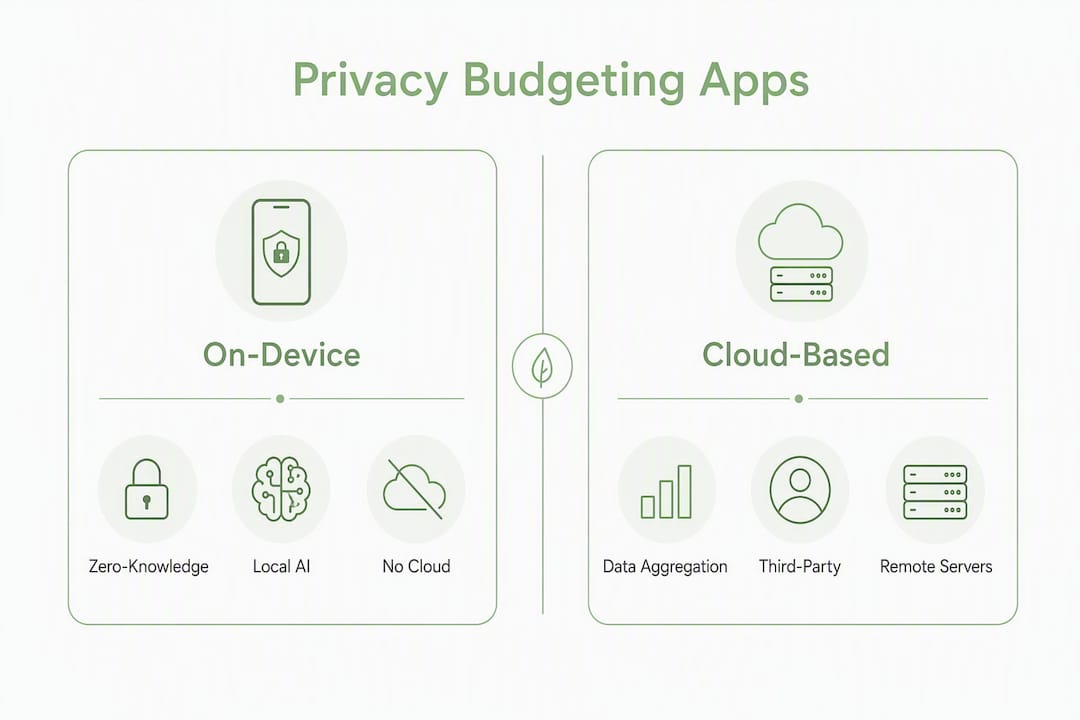
On-device processing means your transaction data never leaves your iPhone. No server receives it, no third party can aggregate it, and a breach at a vendor's data center cannot expose your financial history. That is a fundamentally different risk surface than cloud aggregation, where your data sits on infrastructure you do not control.
Since 2023, the market has shifted noticeably toward apps that offer manual control or on-device encrypted processing, reflecting growing awareness of how cloud-based free tools monetize user data.
Concrete differences between the two models:
- Data access: With on-device storage, only you can read your raw transactions. Cloud models give the vendor access by design.
- Third-party sharing: Cloud aggregators frequently share anonymized (or not fully anonymized) data with partners. On-device apps have no data to share.
- Advertising and profiling risk: Ad-supported free tools often use spending patterns to build profiles. Local apps have no mechanism for this.
- Breach blast radius: A credential leak at a cloud vendor can expose years of transaction history. A breach of your device exposes only what is on that device, protected by your own encryption.
Trust signals to verify in any app: an explicit on-device processing statement, zero-knowledge or local-encryption claims, a clear App Store privacy label showing "Data Not Collected," and a privacy policy that specifies what optional connections do and do not transmit.
Pro Tip: Open the app in Airplane Mode after setup. If core budgeting functions work offline, that is strong evidence that processing is genuinely local. An app that requires a network connection for categorization is routing data somewhere.
Obsidianridgelabs publishes a practical verification checklist for Apple users that walks through how to confirm on-device claims and read App Store privacy labels accurately.
How do you choose the right privacy-first budgeting app?
Choose by privacy model first, then by the features you actually use. Most people need budget creation, transaction categorization, and basic reports. Rarely do they need every feature a cloud tool offers.
Mandatory privacy checks:
- Does the app state explicitly that processing is on-device or local-only?
- What does the App Store privacy label disclose?
- Does the app support CSV export so you can leave without losing your data?
- What encryption standard protects local storage?
Feature checks:
- Can you create and edit budget categories manually?
- Does categorization work offline, or does it require a server call?
- Are scheduled reports or summaries generated locally?
Apple-specific checks:
- Does the app support Face ID or Touch ID for biometric unlock?
- Are Shortcuts integrations available for automation without cloud dependency?
- Is the interface optimized for iPhone and iPad natively?
Red flags to walk away from:
- Terms of service that include mandatory data-sharing clauses
- Privacy policies with vague language about "partners" or "service providers"
- Ad-supported monetization tied to spending-pattern analysis
- No CSV export option
- Missing or incomplete App Store privacy label
Obsidianridgelabs also outlines common red flags in finance apps worth reviewing before you connect any bank credentials. For users who need to confirm local bank support and import compatibility before committing, regional availability varies, so verifying institution support is a practical first step.
How do you migrate your data from Mint safely?
Export your Mint data as CSV or OFX immediately. WalletHub's migration guidance is direct on this point: once access ends, historical data is gone. Do not wait.
- Export from Mint. Download your full transaction history as CSV and your budget settings if available. OFX format works for some import tools; CSV is the most universally supported.
- Back up the export securely. Store the file on an encrypted local disk or in an encrypted folder. Do not leave raw financial CSVs in an unprotected cloud folder.
- Audit and clean categories. Open the CSV and map your old Mint categories to the category names your new app uses. A simple find-and-replace pass in a spreadsheet handles most of this in under an hour.
- Import into your chosen app. On-device apps like Vault accept CSV imports directly. If your new app does not support direct import, a spreadsheet-first approach (Google Sheets or a local Numbers file) works as an intermediate layer.
- Run a 30-day parallel period. Keep both your old records and the new app active for one month. Reconcile weekly to catch miscategorized transactions and confirm your opening balances are correct.
The full process takes one afternoon to prepare exports and roughly one week to complete re-categorization and parallel tracking.
Pro Tip: Treat the first 30 days after migration as a deliberate financial reset. Set new category rules and budget targets from scratch rather than replicating old ones. On-device AI can learn your patterns faster when the initial categories are clean and intentional.
What do you gain and give up with on-device budgeting?
Prioritizing privacy typically reduces automated bank aggregation and increases some manual work. That tradeoff is real and worth stating plainly.
What you give up:
- Automatic transaction pulls from linked accounts (most on-device apps rely on CSV import)
- Instant cross-account reconciliation without manual steps
- Some integrations common in cloud tools (bill-pay alerts, credit score monitoring)
- The "free" pricing model, since on-device apps are usually paid
What you gain:
- No third-party access to your raw transaction data
- No profiling or advertising based on spending patterns
- Lower exposure if a vendor suffers a data breach
- Full data portability: your CSV is yours, always
Free, cloud-based tools often monetize through data aggregation and third-party sharing. Verifying that an app makes explicit local-processing statements is the only reliable way to confirm it is not doing the same. Free and open-source options like GNUCash or spreadsheet templates exist for users who want zero cost, but they require the most manual work.
Pro Tip: A brief weekly reconciliation session, 10–15 minutes, keeps manual imports accurate and trains on-device categorization models when available. This habit recovers most of the convenience lost by moving away from automatic bank linking.
What is the final verdict on Mint alternatives for Apple users?
Vault by Obsidian Ridge Labs is the recommended choice for most privacy-first Apple users. It processes data locally, supports CSV import and export, uses biometric unlock, and integrates with Shortcuts. For users who genuinely need full cloud-linked automation and are comfortable with the associated data-sharing tradeoffs, a cloud-first tool may be more practical.
Immediate next steps:
- Export your Mint transaction history as CSV now, before access closes permanently
- Install Vault and run a 30-day parallel test alongside your exported data
- Verify the App Store privacy label and confirm zero-knowledge claims before subscribing
- Check CSV export availability in any app you evaluate, so you are never locked in
Key Takeaways
On-device, zero-knowledge budgeting is the most effective approach for Apple users who want to keep financial data off third-party servers, and Vault by Obsidian Ridge Labs is the recommended starting point.
| Point | Details |
|---|---|
| Export Mint data first | Download your full CSV or OFX history immediately; access ended |
| Privacy model is the first filter | Choose on-device processing before evaluating any other feature. |
| Red flags to reject | No CSV export, vague data-sharing terms, and ad-supported monetization tied to spending data. |
| Migration takes about one week | One afternoon for export prep, one week for re-categorization and parallel tracking. |
| Vault for privacy-first users | Obsidianridgelabs' Vault offers on-device AI categorization, biometric unlock, and CSV import on iPhone. |
The case for on-device budgeting is stronger than most guides admit
Most Mint-alternative roundups treat privacy as a feature checkbox, somewhere between "dark mode" and "investment tracking." That framing undersells what is actually at stake. When a free budgeting app has access to your full transaction history, it holds a detailed behavioral profile: where you shop, how often, what you spend on healthcare, subscriptions, and food. That data has commercial value, and the business model of ad-supported free tools is built around it.
The shift toward on-device processing is not a niche preference. It reflects a reasonable response to a decade of high-profile financial data breaches and increasingly opaque data-sharing agreements. The tradeoff is real: you do more manual work. But the manual work is bounded and predictable. A weekly 10-minute reconciliation session is a known cost. The cost of a data breach or a profiling-based ad ecosystem is not.
What most guides also miss is that on-device AI has closed the convenience gap considerably. Local categorization models can suggest transaction labels without a single byte leaving your device. That is not a compromise version of automation. For most personal budgeting use cases, it is sufficient.
The right question is not "which app has the most features?" It is "which app gives me the most control over data that is genuinely sensitive?" For Apple users, the answer points clearly toward on-device processing, and Vault is the most purpose-built option in that category.
Vault keeps your financial data on your iPhone, not on someone else's server
Your spending history is among the most sensitive data you generate. Vault by Obsidian Ridge Labs was built on that premise: on-device AI budgeting for iPhone that categorizes transactions locally, never transmitting your data to a cloud server.


Key capabilities: on-device AI categorization, CSV import and export, biometric unlock via Face ID or Touch ID, Shortcuts integration for local automation, local encryption, and App Store distribution with a transparent privacy label. No ad-supported model, no third-party data sharing.
The practical starting point: export your Mint CSV, import it into Vault, and run both in parallel for 30 days. That window is enough to confirm the categories are accurate and the workflow fits your habits. Visit the Obsidianridgelabs suite of private AI apps to see the full product range, then go directly to the Vault product page to check current pricing and download from the App Store.
Useful sources
- What Happened to Mint? Explanation & Best Replacements — WalletHub: neutral consumer guide covering Mint's shutdown and migration steps.
- The 5 Best Mint Alternatives to Replace the Budgeting App That Shut Down — Engadget: editorial roundup covering the market shift toward privacy-focused budgeting options.
- 8 Best Mint Budgeting App Alternatives (Free & Paid) — Rob Berger: independent roundup categorizing alternatives by strengths and pricing.
- Best Free Mint Alternatives for Budgeting — Single Parent Budget: consumer guide emphasizing free and open-source options with privacy and export notes.
- Private AI Apps for Apple — Obsidianridgelabs: brand page describing the on-device processing philosophy and product suite.
- Vault: Private AI Budgeting for iPhone — Obsidianridgelabs: product page with feature details including CSV import, biometric unlock, and Shortcuts support.
- 5 Budgeting Apps Compared by Bank-Data Privacy — Obsidianridgelabs: procedural guide to red flags in finance apps and privacy verification steps.
- On-Device AI on iPhone: A Privacy Verification Guide — Obsidianridgelabs: checklist for confirming on-device claims and reading App Store privacy labels.