
Whether a mental health journal stays private depends less on the promise in its App Store description and more on three technical choices: how it encrypts your entries, whether it processes text on your device or a company's server, and how strongly it locks the app itself. Encryption without on-device processing still means your words travel to a server somewhere. On-device processing without strong device authentication still leaves a stolen phone wide open. All three have to hold at once.
TL;DR:
- Apps relying on server-side processing or weak authentication can still risk exposing your entries despite encryption promises.
- Metadata such as timestamps, location, and device identifiers can re-identify you even if journal text is anonymized or encrypted.
- Most mental health apps lack clear, comprehensive privacy policies, and many request permissions or share data with third parties without transparency.
- On-device processing with strong encryption and biometric authentication offers the highest privacy protection by preventing data transmission and server breaches.
- Always verify an app's encryption claims, disable default cloud sync, and control third-party integrations to reduce exposure risks when using mental health journaling tools.
Table of Contents
- What Are the Main Privacy Risks in Mental Health Journal Apps?
- How Do Journaling Apps Actually Collect and Process Your Entries?
- Do Privacy Policies Actually Protect You?
- What Technical Protections Actually Reduce Your Risk?
- Why Privacy Failures Hit Vulnerable Users Hardest
- A Practical Checklist to Lock Down Your Journal
- Does HIPAA Protect Your Journaling App Data?
- How On-Device Design Actually Minimizes Exposure
- How Do Popular Journaling Apps Compare on Privacy?
- Who Actually Owns Your Journal Entries?
- What Are the Risks of Syncing Your Journal Across Devices?
- How Do You Migrate Journal Data Safely Between Apps?
- The Real Trade-Off Nobody States Plainly
- A Privacy-First Approach to Digital Journaling
- Sources
- FAQ
What Are the Main Privacy Risks in Mental Health Journal Apps?
The risk in a journaling app rarely comes from a single dramatic breach. It comes from a chain of smaller data flows, most of which are invisible to the person typing. A typical entry can pass through the app's own storage, an analytics software development kit, an advertising SDK, a cloud backup pipeline, and a server access log before it ever reaches "safe." Each hop is a separate point where entries can leak, get sold, or get subpoenaed.
A comprehensive empirical review of mental health app privacy practices applied the LINDDUN threat taxonomy, a framework built to classify privacy risks like linkability, identifiability, and non-repudiation, and found these risks show up consistently across the category rather than in a handful of bad actors. That matters because it means the problem is structural, not anecdotal.
The re-identification risk deserves specific attention because it is the one most people underestimate. Journal text itself rarely gets sold with your name attached. What gets sold, or shared with advertising partners, is metadata: how often you write, what time of day, your approximate location, your device identifier. Cross-reference that against other data brokers already hold, and a "de-identified" record can become identifiable again fast. Documented downstream harms from this kind of aggregation include employability or rental scoring built from health-adjacent data, the kind of invisible profiling that never shows up in a privacy policy's plain-language summary.
The scale of the underlying policy problem is worth naming directly.
Privacy policy gaps are the norm, not the exception. A study examining 61 prominent mental health apps found that 41% had no privacy policy at all, and many of the apps that did publish one still requested permissions unrelated to their stated function, along with sharing data with third parties in ways users had no practical way to trace.
The main entry points for risk break down into a short, specific list:
- First-party app storage: where the app itself keeps your entries, and whether that storage is encrypted at rest.
- Analytics SDKs: third-party code embedded to track app usage, often bundled by default and rarely disclosed in plain language.
- Advertising SDKs: code that profiles behavior for ad targeting, sometimes present even in apps with no visible ads.
- Cloud backup pipelines: automatic syncing to a vendor's servers, frequently on by default.
- Server access logs: records kept by the company itself, which become discoverable in litigation, breaches, or law enforcement requests regardless of what the app promises on the front end.
None of these require malice to become a problem. A single misconfigured analytics SDK, the kind of error that has surfaced repeatedly across the health app industry, can quietly route journal content to a third party that never appears in the privacy policy.
How Do Journaling Apps Actually Collect and Process Your Entries?
The single most consequential design decision an app makes is where your words get processed: on your device, or on a server somewhere else. On-device processing means the text of your entry never leaves your phone. Any analysis, search, or AI-assisted feature runs locally, using your device's own processing power. Cloud processing means your entry, or at minimum a portion of it, travels to a company's servers before you get a result back.
Most popular journaling apps use a hybrid model. Entries are stored locally for quick access but backed up to the cloud for cross-device sync, and any AI-powered feature (mood analysis, prompt generation, sentiment scoring) typically requires sending your text to a server running a language model. That's a meaningful trade-off: the feature works better with more processing power, but the privacy cost is your actual words leaving your control.
Metadata compounds the exposure even when the entry text itself stays protected. Common categories include:
- Timestamps: when you wrote, which can reveal sleep patterns or crisis timing.
- Device identifiers: unique strings that let a company (or a buyer of its data) link entries across sessions even without your name attached.
- Geolocation: sometimes collected for "local weather" or "nearby resources" features, often more granular than the feature requires.
- Usage metrics: how long you spend writing, how often you open the app, and which prompts you engage with.
A field study of an LLM-driven journaling tool built to support psychiatric patients found real clinical value in AI-assisted journaling, but flagged that these systems raise genuine data management and controllability concerns that demand strict protections and clinician oversight. The takeaway isn't that AI features are inherently unsafe. It's that any feature requiring text transmission needs a specific, auditable answer to "where does this go, and who can see it," not a vague assurance buried in a policy nobody reads.
Do Privacy Policies Actually Protect You?
Reading a privacy policy tells you almost nothing about whether an app is actually private. It tells you what the company is legally willing to admit to, phrased by lawyers to minimize liability, not to inform you. Research on mental health app users backs this up directly: a study of 346 U.S. users found that policy clarity strengthens a user's sense of privacy control, while emotional dysregulation amplifies how risky a policy feels, meaning the people most vulnerable to a bad policy are often the ones least equipped to parse it in the moment they need the app most.
That's the core problem with the current design of most consumer privacy policies. Complexity doesn't just obscure risk. It actively increases what researchers call privacy stress, a measurable sense of losing control that can make people write less honestly or stop journaling altogether, which defeats the purpose of a therapeutic tool. A policy that takes a law degree to parse isn't a compliance detail. It's a usability failure with clinical consequences.
A trustworthy policy tends to share a few concrete features:
- Granular opt-ins for each data use (analytics, backups, AI features) rather than one blanket "I agree."
- Specific retention periods stated in days or years, not vague language like "as long as necessary."
- Named third parties, not just categories like "service providers," when data is shared at all.
- A clear deletion path described in the policy itself, not buried in a support ticket workflow.
None of that substitutes for technical verification. A policy can promise "we don't sell your data" while an embedded SDK routes usage patterns to an ad network anyway, a gap several audits of health apps have documented. The policy is a starting claim, not proof.
Pro Tip: Before trusting any journaling app's privacy claim, check its App Store "Privacy Nutrition Label" against the actual policy text. A mismatch between the two, common even among well-reviewed apps, is one of the fastest ways to spot a policy that overpromises.
What Technical Protections Actually Reduce Your Risk?
Three technical choices do most of the real work in protecting a journal: encryption, on-device processing, and authentication. Each solves a different threat, and none of them substitutes for the others.
Encryption comes in two forms that matter separately. Encryption at rest protects your entries while they're sitting in storage, on your device or a server, so that a stolen hard drive or compromised database yields unreadable data. Encryption in transit protects data while it moves between your device and a server, typically through Transport Layer Security. True end-to-end encryption is a stronger, rarer guarantee: it means the company itself cannot read your entries, because only your device holds the decryption key. Many apps advertise "encryption" while only implementing transit encryption, which protects against interception but does nothing to stop the company itself, or anyone who compromises its servers, from reading stored entries.
On-device processing removes an entire category of risk by never sending your entry text off your phone in the first place. There's no server log to subpoena, no breach of a remote database to worry about, and no third-party SDK riding along with your data during transmission, because the transmission never happens. The realistic limitation is that some genuinely useful features, especially cross-device sync or heavier AI analysis, are harder to deliver purely on-device. Any app offering those features should make the cloud component an explicit, separate opt-in rather than a default, so you know exactly which parts of your journal ever leave your phone.
Secure backups deserve their own scrutiny, because "backup" is where privacy-conscious defaults quietly disappear. A backup that automatically syncs to a general-purpose cloud account, rather than an encrypted, app-specific vault, exposes years of entries the moment that broader account is compromised. The safer pattern is a local-only backup, stored encrypted on your own device or an external drive you control, with cloud sync treated as an explicit and reversible choice rather than a silent default.
Authentication is the layer that decides who can even open the app once it's on a device. Options rank roughly by strength:
- Biometric authentication (Face ID, Touch ID), fast and strong against casual access, though tied to device-level security rather than the app's own encryption.
- A dedicated app passcode, separate from your phone's lock screen, which protects against someone who already has your phone unlocked.
- Hardware security keys, the strongest option for the rare journaling setup that supports them, resistant to phishing and remote compromise in ways passcodes are not.
A randomized trial of privacy-preserving digital journaling, run across 507 participants over eight weeks, found modest reductions in anxiety alongside a working model for privacy-preserving behavioral phenotyping and real-time risk monitoring at scale. That result matters here because it shows privacy protection and clinical usefulness aren't opposing goals. The trial's design proved you can monitor risk signals without exposing raw entry content, which is exactly the trade-off most consumer apps get wrong by defaulting to broader data collection than the feature actually requires.
Pro Tip: If an app's marketing page doesn't specify "end-to-end encryption" by name, and only says "encrypted," assume it means transit encryption alone. Ask support directly, in writing, whether the company can technically read your stored entries. A vague or evasive answer is itself the answer.
Why Privacy Failures Hit Vulnerable Users Hardest
Privacy stress isn't an abstract discomfort. It changes what people are willing to write down, which undercuts the entire point of therapeutic journaling. Research on users with depression-related irrational beliefs found that emotional dysregulation amplifies perceived privacy risk, meaning the people most likely to benefit clinically from honest journaling are also the most likely to self-censor when they don't trust the tool. A journal that feels surveilled stops being useful exactly when it matters most.
Certain populations carry extra weight here. Minors journaling about self-harm or family conflict face risks that adults don't, since a data breach or a parent's device access can expose entries never meant for another reader. Survivors of abuse face a distinct danger: geolocation metadata or synced backups can put location and routine details into the wrong hands. And there's a meaningful legal distinction between a personal journaling app and clinical therapy notes. Therapist-authored notes fall under different confidentiality rules and, in specific circumstances, mandated reporting obligations. A personal journaling app carries no such duty, and most users don't realize their entries lack that legal protection entirely.
For clinicians recommending a journaling app to a patient, the responsible move includes a few concrete practices:
- Walk through the app's actual privacy settings together, not just its marketing claims.
- Ask directly whether AI features are enabled by default, and disable them if the patient doesn't want text leaving the device.
- Flag the legal gap between a personal app and protected clinical records explicitly, so patients aren't operating under a false assumption of confidentiality.
A Practical Checklist to Lock Down Your Journal
Securing a mental health journal, paper or digital, comes down to a short sequence of concrete steps rather than a vague sense of caution.
- Update your device operating system. Security patches close known vulnerabilities that attackers actively exploit; skipping updates leaves every layer above it weaker.
- Set a strong passcode and enable biometrics. Use both together: biometrics for speed, a passcode as the fallback that still needs to be genuinely strong.
- Confirm device-level encryption is on. Most modern phones encrypt storage by default, but it's worth verifying in settings rather than assuming.
- Verify the app's encryption claims directly. Look for "end-to-end encryption" by name in the app's documentation, not just the word "encrypted."
- Disable automatic cloud sync unless you specifically want it. Treat sync as an opt-in feature you turn on deliberately, not a default you never noticed.
- Review app permissions. Revoke access to contacts, photos, or location unless a specific feature genuinely requires it.
- Export entries periodically and store them locally. A local export you control is safer long-term than relying entirely on a vendor's cloud infrastructure.
- Check third-party integrations. Disconnect any linked service (calendar apps, health platforms, social logins) that isn't actively providing value.
- Know your deletion path before you need it. Confirm the app has an actual, working "delete my data" function, and test it on a throwaway entry.
Pro Tip: Run a simple network check after writing a new entry: put your phone in airplane mode, write and save an entry, then reconnect and watch whether the app immediately tries to sync. If it does, that's confirmation your "local" entries are being uploaded on a schedule you may not have chosen.
Does HIPAA Protect Your Journaling App Data?
The Health Insurance Portability and Accountability Act, commonly known as HIPAA, almost never applies to a consumer journaling app you download yourself. HIPAA covers "covered entities": healthcare providers, insurers, and their business associates. A therapist's clinical notes are typically protected. A personal wellness app you chose independently, even one recommended by a clinician, usually is not, unless the app is contracted directly by a covered entity as part of your care.
That gap leaves the Federal Trade Commission as the primary federal enforcer for most consumer health apps, acting against deceptive claims and unfair data practices under its general consumer protection authority. Several states have layered on their own consumer privacy laws that explicitly cover health-adjacent data, giving residents rights to access, delete, or restrict the sale of their information that federal law doesn't guarantee nationally.
Practically, verify any legal claim an app makes rather than trusting the label. Search the company's actual privacy policy for the specific words "HIPAA compliant," and if you find it, confirm what specific service that claim covers. A vague "we take your privacy seriously" is marketing language, not a legal commitment.
How On-Device Design Actually Minimizes Exposure
On-device architecture works by removing the transmission step entirely, not by encrypting data better after it leaves your phone. If your journal entries never travel to a server, there's no server-side breach to worry about and no third-party SDK riding along during upload, because there's no upload.
You can verify this yourself on an iPhone with a few reproducible checks. First, put the device in airplane mode and confirm the journaling app still opens and lets you write normally; a true on-device app works identically offline. Second, check Settings > [App Name] > iCloud Backup, and confirm exactly what, if anything, syncs to iCloud rather than assuming based on the app's marketing. Third, use a network monitoring tool to watch for outbound traffic while you write and save an entry; unexpected connections are the clearest sign that "on-device" isn't the whole story.
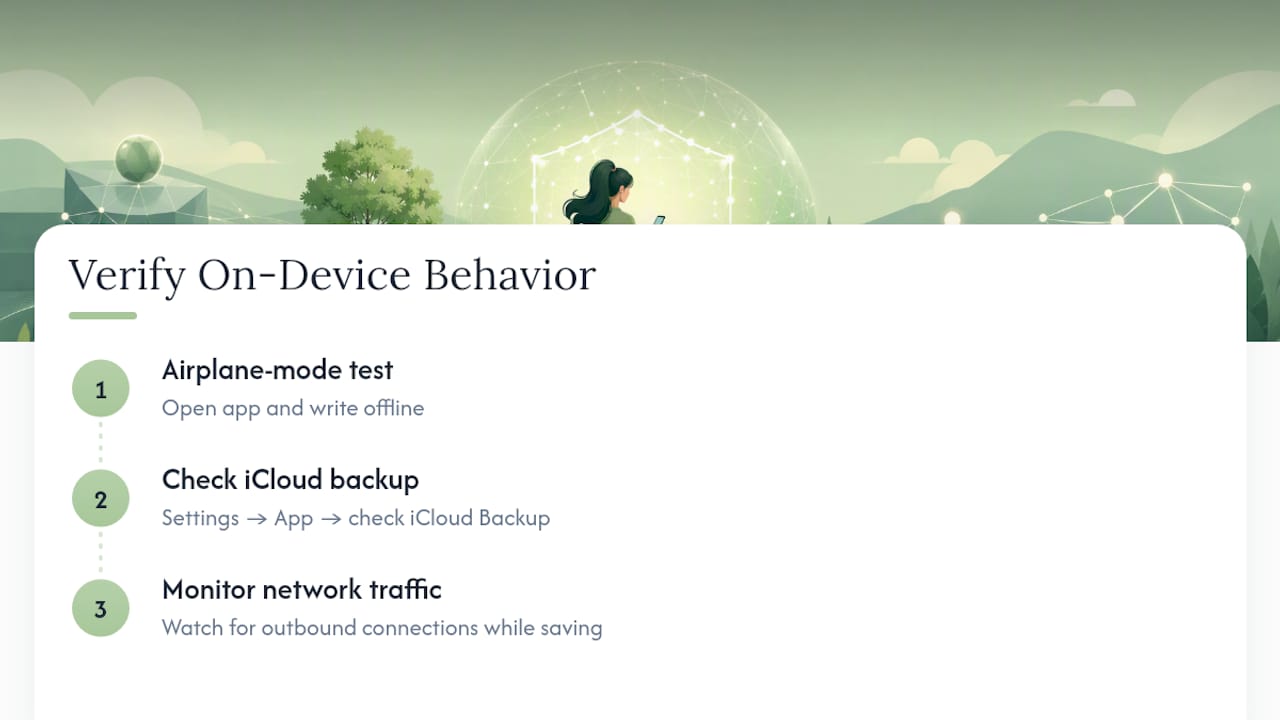
These steps come directly from internal testing guides on securing journal entries on iOS, including specific settings to check for photo attachments in particular, which carry their own separate metadata risks beyond the text itself.
How Do Popular Journaling Apps Compare on Privacy?
Mental health journaling apps generally fall into three architectural categories, and knowing which one you're using matters more than any individual feature list. Cloud-first apps store entries on company servers by default, often to enable AI features, cross-device sync, or web access. That model gets you convenience but means your text sits somewhere you don't physically control, subject to that company's own security practices and legal exposure to subpoenas or breaches.
Hybrid apps store entries locally but sync to the cloud for backup or multi-device access, usually as a default rather than a genuine opt-in. The privacy quality of a hybrid app depends almost entirely on how granular its sync controls are: can you disable cloud backup entirely and still use the app normally, or is sync baked in as a requirement?
On-device apps keep entries local by default and treat any cloud feature as a separate, explicit choice. This is the strongest architecture for privacy, though it can mean trading away some convenience features that require server-side processing power, like advanced AI analysis across years of entries at once.
Across all three categories, the recurring shortcoming documented in empirical research isn't the storage model itself. It's the gap between what a privacy policy claims and what the app's actual code does, which is why architecture verification matters more than policy language when you're evaluating a specific app. A detailed breakdown of private AI journal apps and their architectural trade-offs is useful for comparing specific options against these three models directly.
Who Actually Owns Your Journal Entries?
Ownership of journal data is murkier than most users assume, and the answer depends entirely on the terms of service you agreed to when you downloaded the app. Legally, you generally retain ownership of the content you write. What varies enormously is the license you've granted the company to use, store, and process that content, and that license is where the real control lives.
Many app terms include broad language granting the company a right to use your data for "service improvement," which can mean training future AI models on aggregated, supposedly de-identified journal text. That practice sits in a legal gray zone: you own the words, but the company may have granted itself wide latitude to learn from them.
Asserting real control means checking three specific things in an app's account settings: whether there's a functional data export tool that gives you your entries in a readable format, whether there's a genuine deletion function that removes data from company servers (not just your device), and whether the terms of service include a data-use license broad enough to cover AI training. If an app makes any of those three difficult to find or exercise, that's a meaningful signal about how seriously it treats your ownership claim in practice, regardless of what the marketing copy says.
What Are the Risks of Syncing Your Journal Across Devices?
Syncing a journal across a phone, tablet, and laptop multiplies convenience and multiplies risk in roughly equal measure, because every synced device becomes an additional point of potential exposure. A journal that's perfectly secure on one device is only as secure as the weakest device it syncs to. An old tablet with an outdated operating system, still logged into your account, can become the entry point for a breach that has nothing to do with your primary phone's security.
Cloud sync also introduces a company's server infrastructure as a permanent middle point between your devices, which is precisely the exposure on-device processing is designed to avoid. If sync is genuinely necessary for how you use a journal, look for apps that offer encrypted, direct device-to-device sync rather than routing everything through a general cloud account, and confirm whether that sync channel uses end-to-end encryption specifically, not just transit encryption.
A few concrete precautions reduce sync-specific risk meaningfully:
- Log out of the journaling account on any device you no longer actively use.
- Review connected devices periodically in the app's account settings, and revoke access to anything unfamiliar.
- Disable sync entirely for particularly sensitive entries when the app allows selective sync, rather than syncing everything by default.
How Do You Migrate Journal Data Safely Between Apps?
Switching journaling apps, whether for better privacy features or simply a different experience, creates a specific window of exposure that's easy to overlook: the export file itself. A plain-text or unencrypted PDF export sitting in your downloads folder is often less secure than the app you're leaving, because it has no access controls at all once it exists.
The safer migration sequence starts with checking whether the destination app supports direct, encrypted import rather than requiring an intermediate export file. When an export is unavoidable, generate it, complete the import immediately, and then permanently delete the export file rather than letting it linger in cloud storage or an email attachment. Encrypt the export file itself if the app offers that option, and never email an unencrypted journal export as a transfer method, since email is one of the least secure channels available for sensitive text.
Before deleting your account with the old app, confirm the deletion is genuinely complete on their servers, not just hidden from your view, and get that confirmation in writing if the app's interface doesn't provide clear proof. A comparison of privacy-relevant sync and export behaviors across several popular journaling tools is a useful reference point for what a genuinely secure migration path should look like before you commit to a new app.
The Real Trade-Off Nobody States Plainly
The honest tension in mental health journaling isn't privacy versus features. It's clinical usefulness versus data exposure, and pretending otherwise does readers a disservice. An app that reads your patterns to flag a crisis needs to process your words somehow; the only real question is where that processing happens and who can see the result. The best path forward isn't avoiding helpful tools. It's choosing tools deliberately, ideally with a clinician in the conversation, rather than accepting whatever a default setting decided for you.
— Alex
A Privacy-First Approach to Digital Journaling
Every protection covered in this article, encryption, on-device processing, strong authentication, and transparent opt-ins, is the design foundation behind Echo Chamber Pro, Obsidianridgelabs's journaling app built exclusively for Apple devices. Entries are processed locally by default, with no advertising profiles, no mandatory account creation, and no hidden data transfers to a remote server. Optional network connections exist, but they're opt-in and clearly explained rather than switched on by default, which is the exact gap this article flags in most competing journaling apps.

Because Echo Chamber Pro runs on Apple's own hardware security features rather than a generic cross-platform framework, you get the kind of deep, verifiable integration described in Obsidianridgelabs's on-device privacy verification guide. Echo Chamber Pro is available for $2.99 per month, $29.99 per year, or as a one-time purchase of $79.99, all through the Echo Chamber Pro page, where you can review the current plan details before deciding which fits your journaling habits.
This article is general information, not a substitute for advice from a qualified doctor. Consult a qualified healthcare professional about your own circumstances before acting on anything here.
Sources
- On the privacy of mental health apps
- How private is your mental health app data? An empirical study of mental health app privacy policies and practices
- Digital journaling enables privacy-preserving behavioral phenotyping and real-time risk monitoring at scale
- MindfulDiary: Harnessing Large Language Model to Support Psychiatric Patients’ Journaling
FAQ
Is My Mental Health Journal App Covered by HIPAA?
Almost certainly not, unless it's provided directly through your healthcare provider as part of your care. Most consumer journaling apps fall outside HIPAA's scope entirely, leaving the Federal Trade Commission and state privacy laws as the main legal protections.
Is Cloud Sync Safe for a Mental Health Journal?
Cloud sync is safe only when it uses genuine end-to-end encryption and remains an explicit opt-in rather than a default. Without both conditions, syncing multiplies the number of points where your entries could be exposed.
How Do I Verify an App's Encryption Claims?
Look for the specific phrase "end-to-end encryption" in the app's documentation, not just "encrypted," since transit-only encryption leaves stored entries readable by the company. You can also test this directly by putting your device in airplane mode and confirming the app still functions normally offline.
Does Obsidianridgelabs's Echo Chamber Pro Meet These Privacy Standards?
Echo Chamber Pro processes journal entries locally on Apple devices by default, with optional cloud connections that are opt-in and clearly disclosed rather than automatic. Pricing runs $2.99 monthly, $29.99 yearly, or $79.99 as a one-time purchase, detailed on the Echo Chamber Pro page.
Can Journaling Apps Sell My Data to Advertisers?
Some can, particularly through embedded analytics or advertising SDKs that operate separately from the app's main privacy promises. A study of prominent mental health apps found 41% had no privacy policy at all, which means many users have no documented protection against this happening.