
The safest way to keep a gratitude journal private is to store entries locally on your device or inside a private iCloud (CloudKit) container, never on a developer's own servers. Two actions matter right now, before you write another entry: turn on your device passcode with Face ID or Touch ID, and choose an app that keeps data local or in a private iCloud container rather than a company database. Apple's NSFileProtectionComplete file protection class encrypts app data at rest while your device is locked, and companies like Obsidianridgelabs build their journaling tools around exactly this model.
- Enable a passcode plus Face ID/Touch ID before installing any journaling app.
- Confirm the app stores entries locally or in a private iCloud container, not on a company server.
- Check the privacy policy for explicit "no account, no data selling" language before you trust it with anything personal.
Key Takeaways
The most private way to keep a gratitude journal is an app with no account requirement, on-device or private iCloud storage, and a documented refusal to collect or sell personal data.
| Point | Details |
|---|---|
| Verify the storage model | Confirm whether an app uses local-only storage, private CloudKit, or a developer server before trusting it. |
| Lock the device first | Enable a passcode and Face ID or Touch ID before installing any journaling app. |
| Watch backup behavior | Some apps sync to CloudKit but still appear in general device backups unless files are excluded. |
| Write weekly, not daily | Less frequent journaling, such as once per week sustained over a period, tends to show stronger well-being benefits compared to daily journaling. |
| Choose on-device design | Obsidian Ridge Labs's Cove app stores entries locally with no account and optional private iCloud sync. |
Table of Contents
- What Makes a Gratitude Journal App Actually Private?
- Local Storage, Private iCloud, or a Developer's Server?
- How Do You Lock Down a Gratitude Journal Step by Step?
- What Could Actually Go Wrong With a Private Journal?
- How Obsidianridgelabs Builds Privacy Into Journaling by Design
- Why Most Privacy Advice on This Topic Misses the Point
- Where to Find a Privacy-First Gratitude Journal Built for This
- Sources
What Makes a Gratitude Journal App Actually Private?
Most privacy claims in an app store listing are marketing, not evidence. You need a short checklist, and you need to apply it before you type a single entry, not after you've written six months of personal reflections into something that turns out to sync to a stranger's server.
Start with the account question. An app that requires no account at all has far less to leak, because there's no username, email, or login token tying your entries to an identity a server can log or a breach can expose. Some journaling apps make this explicit, storing entries only on the device and using Face ID or Touch ID for access instead of a password, as Gratu's privacy approach demonstrates.
Next, look for a specific claim: "the developer cannot read your entries." That sentence means nothing on its own. Look for the mechanism behind it, usually a private iCloud (CloudKit) container where Apple manages encryption and the app's own servers never see your text, as outlined in Gratefulness.org's private journal model.
Data collection deserves scrutiny too. Some minimal, anonymized crash reporting is normal and low-risk. Analytics that track how often you write, what you write about, or that tie usage to an advertising identifier is not. A well-written policy will spell out exactly what's collected and what third parties, if any, receive it, the way Gratitude First's privacy policy itemizes storage and third-party disclosures.
Here's the fast version, in order of what to check:
- Does the app require an account, or does it work with none at all?
- Does the privacy policy name the specific mechanism (local storage, private CloudKit, zero-access encryption) behind any "we can't read your data" claim?
- What data, if any, goes to third parties, and is it anonymized?
- Is data encrypted both at rest (on your device) and in transit (TLS 1.3, for any network calls)?
- What's the backup model, private CloudKit or a developer-hosted server, and what happens to your entries if you lose your phone?
- Does the app lock automatically after a short timeout, independent of your phone's own lock?
Pro Tip: Search the privacy policy page for the words "sell" and "third party" using your browser's find function. A policy that never mentions selling data isn't necessarily silent by accident, but one that explicitly rules it out is a stronger signal than one that simply avoids the topic.
Local Storage, Private iCloud, or a Developer's Server?
Three storage models cover almost every gratitude journal app on the market, and each carries a different risk profile.
Local-only apps write entries directly to your device's storage and nothing else. This is the strongest privacy posture available: there's no server to breach, no account to compromise, and no company employee who could theoretically access your data even under a court order, because the data never left your phone. The tradeoff is real, though. If your phone is lost, stolen, or destroyed without a backup, your entries are gone with it.
Private iCloud (CloudKit) splits the difference. Apple encrypts your data and ties it to your Apple ID, and when an app is configured correctly, the developer never sees your journal text, only Apple's infrastructure handles it. This gets you sync across your iPhone, iPad, and Mac without a third-party server in the loop. The catch is that your overall security now depends on your Apple ID and iCloud account, so anyone who compromises that account gains a path to your backups.
Developer-hosted servers are the model to scrutinize hardest. Some companies genuinely run zero-access, end-to-end encrypted infrastructure, but the claim needs verification, not assumption. Some online gratitude journal platforms are web-based by design, which means your entries likely live on someone else's server rather than your device.
- Single-device use favors local-only storage with no sync risk at all.
- Multi-device Apple users get the best balance from private CloudKit.
- Anyone wanting portability across platforms should demand documented zero-access encryption before trusting a server-based tool.
- Encrypted local containers or volumes offer a manual middle ground for readers managing exported files themselves.
How Do You Lock Down a Gratitude Journal Step by Step?
Setting this up correctly takes about ten minutes, and most of the work happens once.
- Turn on your device passcode and biometric lock. Go to Settings, enable Face ID or Touch ID, and set a passcode with more than four digits. This is the single control that protects your journal if your phone is ever picked up by someone else.
- Set a short auto-lock timeout. A phone that stays unlocked for five minutes after last use is an open journal in your pocket.
- Inside the app, disable analytics if that option exists, and confirm sync is set to local-only or private iCloud rather than any developer account.
- Review permissions. A gratitude journal has no legitimate need for contacts, location, or microphone access unless you're using voice entries, in which case confirm transcription happens on-device.
- Decide on iCloud backups deliberately. If you want zero cloud footprint, you can disable iCloud backups for that app specifically rather than turning off backups system-wide, and note that some apps sync to CloudKit but still land in general iCloud backups unless the developer marks files as excluded.
- Export a copy periodically, encrypted if the app supports it, and store that file somewhere offline rather than in an unencrypted cloud drive. Services built for secure long-term storage, like My Affairs in Order's digital vault, offer a reasonable model for keeping sensitive personal records outside everyday cloud sync.
- Practice basic device hygiene. Know how to trigger a remote wipe through Find My, change your Apple ID password periodically, and revoke access for any device you no longer use.
Pro Tip: If you ever share a device, even briefly, check that your journal app requires its own biometric unlock separate from the phone's lock screen. A shared unlocked phone otherwise exposes everything.
What Could Actually Go Wrong With a Private Journal?
Technical safeguards solve one half of the problem. The other half is behavioral, and it's easy to overlook.
Frequency matters more than most people assume. Research from the Greater Good Science Center found that writing once a week for six weeks produced stronger, more sustained well-being gains than writing daily, likely because daily entries invite adaptation and rote repetition. Streak-driven apps that push daily reminders may work against the very benefit they promise.
- Comparison or sharing features can turn a private reflection habit into a performance, generating guilt rather than gratitude.
- Accidental cloud backups of "local" apps happen when a phone's general backup settings sweep up app data the developer never intended to leave the device.
- Exported files sent over unencrypted email or messaging apps defeat every privacy protection built into the app itself.
- Physical device theft remains the most common real-world threat, ahead of any remote server breach, for a journal that stores entries locally.
Your realistic threat model usually breaks down to three actors: the app's developer (mitigated by no-account, local-first design), a cloud provider (mitigated by proper CloudKit configuration), and a physical attacker with your device (mitigated by passcode, biometrics, and auto-lock).
How Obsidianridgelabs Builds Privacy Into Journaling by Design
Obsidianridgelabs designs its journaling tools around on-device processing as the default, not an optional setting buried in a menu. That single architectural choice avoids the developer-server problem covered above entirely, because there's no company database holding your entries to begin with.
- Entries are processed and stored on-device, with no requirement to create an account.
- Privacy policy language states plainly what is and isn't collected, avoiding vague reassurances in favor of specifics.
- Biometric unlock and iOS data protection are used as standard technical safeguards, not premium add-ons.
- Optional private iCloud sync is available for readers who want cross-device access without introducing a third-party server.
This approach suits privacy-first Apple users specifically, people who want their reflections to sync between an iPhone and an iPad without ever routing through infrastructure they can't verify. Readers can review the technical details in Obsidian Ridge Labs's private AI journal comparisons.
| Point | Details |
|---|---|
| Storage model | On-device processing avoids developer-accessible servers by default. |
| Account requirement | No account is needed, reducing the identity data available to leak. |
| Sync option | Private iCloud sync is optional for cross-device use without a third-party server. |
| Device security | Biometric unlock and iOS data protection classes are standard, not premium extras. |
Why Most Privacy Advice on This Topic Misses the Point
The conventional advice on gratitude journal privacy fixates almost entirely on encryption jargon, "military-grade," "bank-level," terms that describe nothing verifiable. What actually protects your entries is architecture: does the app need a server at all, and if so, can it actually read your text? Most reviews skip that question entirely.
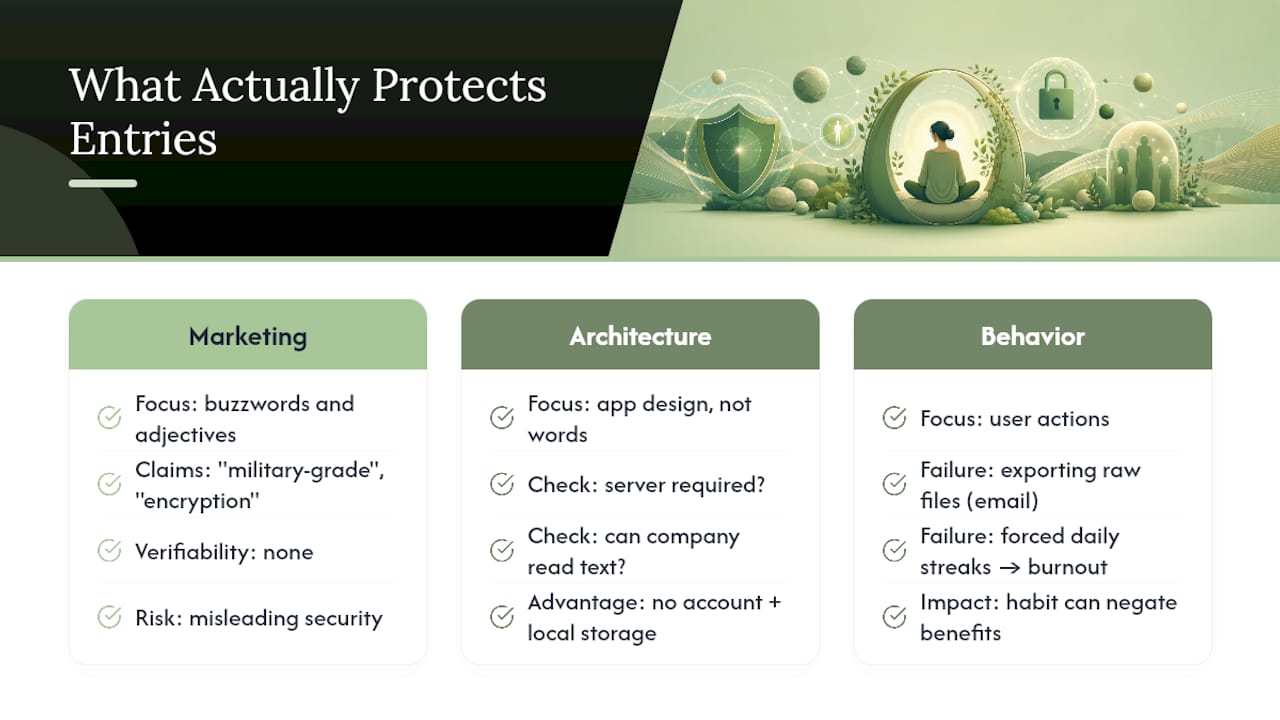
The bigger blind spot is behavioral. People lock down their apps with Face ID and then undermine the whole effort by exporting a raw text file and emailing it to themselves, or by writing daily out of obligation until the habit collapses. The research on journaling frequency suggests that streak culture doesn't just risk burnout, it may actively work against the psychological benefit the practice is supposed to deliver.
If you take one thing from this, prioritize architecture over adjectives. An app with no account and local storage beats one that advertises "encryption" while still routing your entries through a company server. Verify the mechanism, not the marketing language sitting next to it.
— Alex
Where to Find a Privacy-First Gratitude Journal Built for This
Obsidianridgelabs builds its journaling tool the way this article recommends verifying: on-device processing, no account required, and no developer server standing between you and your own reflections. That's a real structural difference from web-hosted "private" journals that still route your entries through someone else's infrastructure.

The company's Cove app applies this same architecture specifically to gratitude and reflective journaling, pairing local storage with biometric unlock and optional private iCloud sync for readers who use more than one Apple device. If the checklist in this article matters to you, the fastest way to see it in practice is to review Cove's privacy-first journal design and compare its setup against whatever app you're currently using.
Sources
- Tips for keeping a gratitude journal — Greater Good Science Center
- Free Online Gratitude Journal - Your Private Journal at Gratefulness.org