
Yes, you can generate accurate, actionable meeting minutes from an audio recording. Expect a short summary, timestamped decisions, action items with named owners, and a searchable, speaker-labeled transcript. High accuracy is achievable, but a five-minute human review pass remains part of any reliable workflow. For confidential meetings, on-device processing is the safer default over sending audio to a cloud server.
TL;DR:
- High-accuracy meeting minutes require a review pass to verify key decisions, action items, speaker labels, and domain-specific terminology.
- Using a lossless recording format, controlling background noise, and having attendees state their names improve transcript quality and diarization accuracy.
- On-device processing is the safest privacy option, especially for confidential meetings, with controls like deletion, encryption, and no model training using your data.
- The workflow typically takes under 30 minutes for a 45-minute meeting, with most time spent on human review of actions and decisions.
- Privacy considerations outweigh model accuracy for sensitive meetings, making local or on-device tools the preferred choice over cloud-based platforms.
Table of Contents
- What Should Meeting Minutes From Audio Actually Include?
- How Does the AI Pipeline Turn Audio Into Structured Minutes?
- How Do You Check the Accuracy of Automated Minutes?
- What Recording Setup Produces the Cleanest Transcript?
- Cloud or On-Device: What Are the Real Privacy Trade-Offs?
- What Is the Step-by-Step Workflow From Audio to Finalized Minutes?
- On-Device App, Cloud SaaS, or Self-Hosted Pipeline?
- Why Privacy-First, On-Device Minutes Generation Is Gaining Ground
- What Legal and Compliance Rules Apply to Meeting Recordings?
- The Real Gap in How People Approach Automated Minutes
- Try a Privacy-First Way to Turn Recordings Into Minutes
- Where to Verify the Technical Details
- Sources
What Should Meeting Minutes From Audio Actually Include?
A minutes deliverable that only lists "topics discussed" isn't doing its job. Automated meeting minutes exist to replace the person who used to scribble notes by hand, and that means the output needs to be specific enough to act on without replaying the recording.
A complete package includes:
- An executive summary. One paragraph covering the meeting's purpose and outcome, written for someone who wasn't there.
- Timestamped decisions with rationale. Not just "we chose vendor B" but why, and at what point in the recording.
- Action items with owners and deadlines. A task with no assigned name is a suggestion, not a commitment.
- Open questions and parking-lot items. Things raised but not resolved, so they don't quietly disappear.
- A speaker-labeled transcript with timestamps mapped to actual attendee names, not generic "Speaker 1" tags.
- Export formats covering DOCX or PDF for distribution, CSV for action items feeding a tracker, and SRT if the recording needs captions.
Some mainstream meeting-note apps already bundle live transcription, speaker labels, and summaries as standard features, which tells you this is now baseline functionality, not a premium add-on.
How Does the AI Pipeline Turn Audio Into Structured Minutes?
Converting a recording into usable minutes runs through three distinct stages, and the quality of each one determines whether the final document is trustworthy or just plausible-sounding.
Speech-to-text (STT) comes first. Models in the Whisper family are common choices, and the size you pick trades accuracy against speed. A larger model catches more nuance in accents and jargon; a smaller one returns results faster but with more transcription slips. Every downstream step inherits whatever errors happen here.
Speaker diarization comes next, assigning consistent labels to each voice so "Speaker 2" in minute three is still "Speaker 2" in minute thirty. Poor diarization is one of the most common failure points in group calls with overlapping voices.
Summarization closes the loop. An LLM or rules-based system maps transcript spans into structured fields, decisions here, action items there, rather than producing a loose paragraph. Projects that combine Whisper for transcription with Pyannote for diarization and an LLM for structuring show this three-stage pipeline works reliably outside a lab setting, provided each stage is tuned to the audio quality it receives.
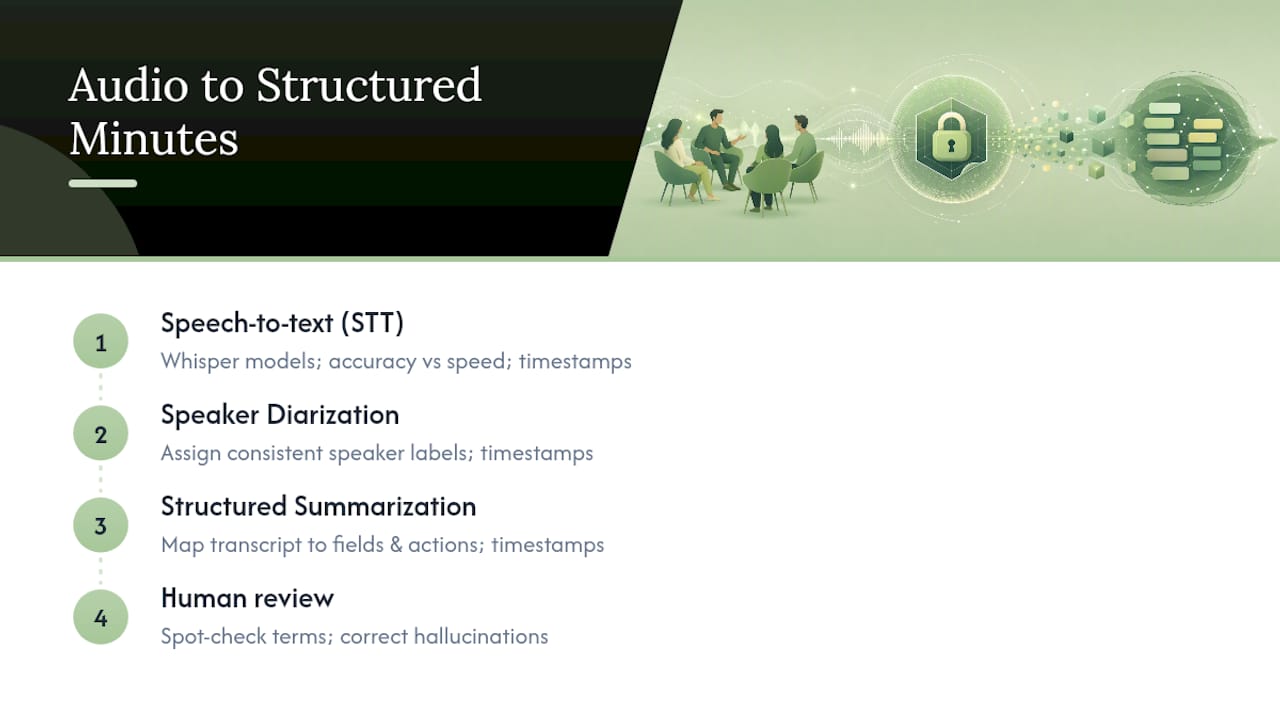
Timestamps thread through all three stages, anchoring every decision and action item back to a specific moment in the original audio.
Pro Tip: Skim the transcript's first two minutes before trusting the rest. If diarization mislabels speakers early, it usually keeps mislabeling them for the whole meeting.
A short human-in-the-loop review catches hallucinated details and fixes industry-specific terms the model doesn't recognize, which is cheaper than discovering the error after minutes go out.
How Do You Check the Accuracy of Automated Minutes?
Run this five-step check before any minutes document leaves your inbox:
- Spot-check three to five key timestamps against the audio itself. Play ten seconds before and after each one.
- Confirm every action item has an owner and a due date. If either is missing, the model guessed rather than extracted.
- Verify speaker labels map correctly to your actual attendee list, not just internally consistent placeholder tags.
- Scan for invented facts or decisions. Summarization models occasionally state a conclusion that sounds reasonable but was never actually reached in the room.
- Check domain terms and punctuation. Product names, acronyms, and technical vocabulary are where general-purpose STT models slip most often.
Schema-constrained output, where the model is forced to fill defined fields rather than write free text, meaningfully cuts down on the kind of invented action items that plague looser summarization approaches. That structural constraint is worth asking about when you evaluate any tool, because it's the difference between a document you can trust and one you have to re-verify line by line.
Budget a short human review pass for this whole checklist on a typical meeting. That's a fraction of the time manual minute-taking used to cost.
What Recording Setup Produces the Cleanest Transcript?
The quality of your minutes is capped by the quality of your audio. No summarization model fixes a recording where three people talk over each other next to a rattling air vent.
Before the meeting starts:
- Export in a lossless or high-bitrate format like WAV or FLAC when the recording tool allows it. Heavy compression throws away exactly the frequency detail that STT models rely on.
- Ask attendees to state their names at the start of the call and to avoid talking over one another, which gives diarization a clean reference point for each voice.
- Use dedicated microphones or per-speaker channels in hybrid and remote setups. Recording each participant on a separate channel dramatically improves how accurately voices get mapped to attendees later.
- Cut background noise where you can. Air conditioning hum and hallway chatter degrade transcription more than most people expect.
- Attach metadata to the file. A short note with the attendee list, agenda, and any unusual terminology gives the pipeline useful context before it starts transcribing.
Pro Tip: If your video platform doesn't support per-speaker channels, at minimum record in a quiet room and enforce a "one voice at a time" rule. It costs nothing and fixes most diarization errors before they happen.
Cloud or On-Device: What Are the Real Privacy Trade-Offs?
The single biggest privacy decision in this whole workflow is where the audio physically goes after you hit stop.
On-device processing keeps the recording and every downstream transcript on your own hardware. Nothing travels to a remote server, which removes an entire category of exposure risk. Cloud-based platforms, by contrast, process audio on servers you don't control, and that raises real concerns for legal, medical, HR, or board-level conversations where confidentiality isn't optional. Local pipelines built around tools like Whisper for transcription and a local LLM for summarization can run entirely offline, producing the same structured brief a cloud service would, without the audio ever leaving the machine.
Before choosing a cloud vendor for sensitive meetings, verify:
- Deletion controls. Can you permanently remove audio and transcripts on demand, and how quickly?
- Audit logs. Is there a record of who accessed a given recording or transcript?
- Encryption at rest and in transit. Is this stated explicitly, not just implied?
- A written "no training" policy. Does the vendor commit, in writing, to not using your recordings to train its models?
Practitioners handling regulated or confidential material increasingly default to local or offline processing specifically to sidestep these questions altogether. When compliance rules or client confidentiality obligations are strict enough, an air-gapped, on-device workflow isn't a preference, it's the only defensible option.
What Is the Step-by-Step Workflow From Audio to Finalized Minutes?
Here's a practical sequence for a typical 45-minute meeting:
- Collect the audio and attendee metadata. Grab the recording file along with the attendee list and agenda. Two minutes.
- Transcribe and diarize. Run the audio through STT and speaker diarization. Fifteen to twenty minutes for a 45-minute recording, depending on model size and hardware.
- Generate the minutes brief. The summarization layer produces the summary, decisions, and action items in structured form. A few minutes, running in parallel with diarization on most pipelines.
- Human review. Spend five to ten minutes focused specifically on action items and decisions, the two sections most likely to carry real consequences if wrong.
- Export and push tasks. Send the DOCX or PDF to attendees and push the CSV action items directly into your task tracker.
Total elapsed time typically lands under 30 minutes of active human involvement for a 45-minute meeting, most of it review rather than manual note-taking.
For auditability, keep the original audio file, the transcript, and the final minutes stored together with matching timestamps. If a decision is ever disputed months later, that trio is what lets you settle it.
On-Device App, Cloud SaaS, or Self-Hosted Pipeline?
The right delivery model depends on how sensitive your meetings are and how much infrastructure you're willing to run.
An on-device app fits sensitive, single-user or small-team workflows best, since privacy is the deciding factor and audio never leaves the device. A cloud SaaS platform makes more sense when you need heavy integrations across a large team, multiple calendars, and shared dashboards, and the sensitivity of the content is moderate. A self-hosted pipeline, built from components like those in open-source diarization and summarization projects, gives you full control over the schema and data path, but demands real infrastructure and someone to maintain it.
Whatever you choose, run it through a short procurement checklist: what SLA is offered, what export formats are supported, what the data retention policy actually says, how pricing scales with volume, and which integrations are native versus bolted on. Teams evaluating AI tooling more broadly have found the productivity gains can be substantial once the right delivery model is matched to the actual workflow.
Why Privacy-First, On-Device Minutes Generation Is Gaining Ground
Some companies build private AI applications exclusively for Apple devices, with on-device processing as a core design principle rather than a feature bolted on later. Its transcription app, Echo Chamber, applies that same local-first approach to converting audio into structured minutes.
Before trusting any vendor's privacy claims, professionals should look for:
- A technical explanation of what actually happens on-device versus in the cloud, not just a marketing line.
- Audit logs showing access history for stored transcripts.
- A written privacy policy stating explicitly whether recordings are used for model training.
- Sample workflows demonstrating the app functioning without a network connection.
Industry momentum toward smarter meeting agents that let you ask questions of past meeting data shows where this category is heading. The privacy question of where that meeting data physically lives only grows more pressing as it does.
What Legal and Compliance Rules Apply to Meeting Recordings?
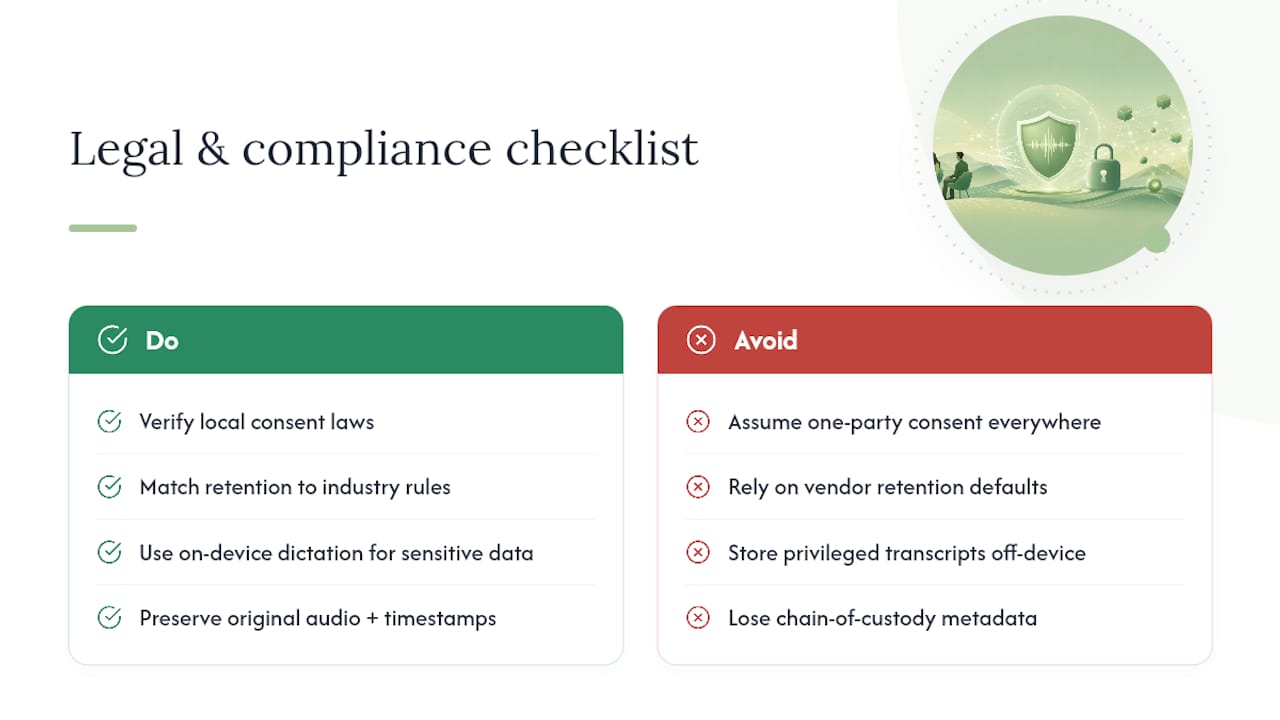
Recording a meeting and generating minutes from it isn't a purely technical decision. Consent requirements for recording conversations vary by jurisdiction, and some regions require every participant's agreement before audio capture is legal at all. Verify your local rules before recording rather than assuming a blanket "one-party consent" standard applies everywhere your attendees are located.
Once the recording exists, retention policy becomes the next legal question. Regulated industries such as healthcare, legal services, and financial advising often carry specific record-keeping obligations that dictate how long a transcript or set of minutes must be kept, and in what form. A cloud vendor's default retention window may not match what your industry actually requires, so check the vendor's stated policy against your own compliance obligations rather than assuming they align.
Attorney-client privilege and other confidentiality protections deserve particular attention. A transcript stored on a third-party server, subject to that vendor's own data practices, can complicate a privilege claim in ways a locally stored document does not. This is precisely why legal and healthcare professionals increasingly favor on-device dictation for sensitive conversations, since the workflow never introduces a third party into the data path in the first place.
Finally, if minutes are ever used as evidence in a dispute or audit, the chain of custody matters. Keeping the original audio, transcript, and final minutes together with consistent timestamps, as described earlier in the workflow section, gives you a defensible record rather than a document with no verifiable origin.
The Real Gap in How People Approach Automated Minutes
Most advice on this topic treats accuracy as a single number, some claimed percentage that's supposed to settle whether a tool is good enough. That framing misses what actually goes wrong in practice. A transcript can be 95% accurate at the word level and still produce unusable minutes if it puts a decision under the wrong speaker or invents an action item that was never actually assigned. Word accuracy and decision accuracy are not the same metric, and vendors rarely separate them.
The bigger blind spot is treating privacy as a checkbox instead of a design constraint. A cloud tool with a strong privacy policy is still a cloud tool: your audio leaves your device, full stop. For a board meeting, a legal consultation, or an HR conversation, that's not a minor trade-off buried in the terms of service.
What should come first isn't picking a tool with the highest advertised accuracy score. It's deciding, before you record anything, whether this meeting's content can tolerate leaving your hardware at all. Everything else, model choice, review process, export format, is a second-order decision that only matters once that first one is settled correctly.
— Alex
Try a Privacy-First Way to Turn Recordings Into Minutes
If keeping meeting audio confidential matters as much as getting accurate minutes, Echo Chamber processes everything on your Apple device rather than sending recordings to a remote server. That means no upload step, no cloud retention policy to scrutinize, and no third party ever holding your meeting audio.

Echo Chamber follows the same deliverable checklist covered throughout this piece: a summary, timestamped decisions, action items with owners, and a speaker-labeled transcript you can export and hand off. The difference is where the processing happens. If you want to see how the on-device approach compares to cloud alternatives before committing, the privacy verification guide walks through what to check. Otherwise, visit Obsidian Ridge Labs to try Echo Chamber on your next recording and see the minutes it produces firsthand.
Where to Verify the Technical Details
For readers who want to look under the hood, these sources cover the pipeline and privacy approaches referenced above in more depth:
- Voxbrief, a local meeting-intelligence pipeline showing schema-constrained summarization in practice.
- Whisper, Pyannote, and LLM pipeline, a reproducible open-source example of the full transcription-to-minutes chain.
- TransMeet, covering file-splitting and per-speaker channel handling for longer recordings.
- Comparisons of offline transcription apps, for evaluating on-device options against each other.
Sources
- Read AI launches an email-based digital twin to help you with schedules and answers
- bgokden/voxbrief
- dacchi-s/meeting-minutes-whisper-pyannote-chatgpt