
For Apple users who need transcription without cloud exposure, Echo Chamber by Obsidian Ridge Labs is the recommended private, on-device alternative to Otter.ai — audio and transcripts stay on your device by default, with no cloud transfer unless you explicitly opt in.
Other privacy-focused options worth considering:
- Just Press Record — iOS/macOS one-tap recorder with local transcription
- Apple Voice Memos + Live Speech — on-device speech features built into modern iOS/macOS
- MacWhisper — local Whisper-based transcription for macOS
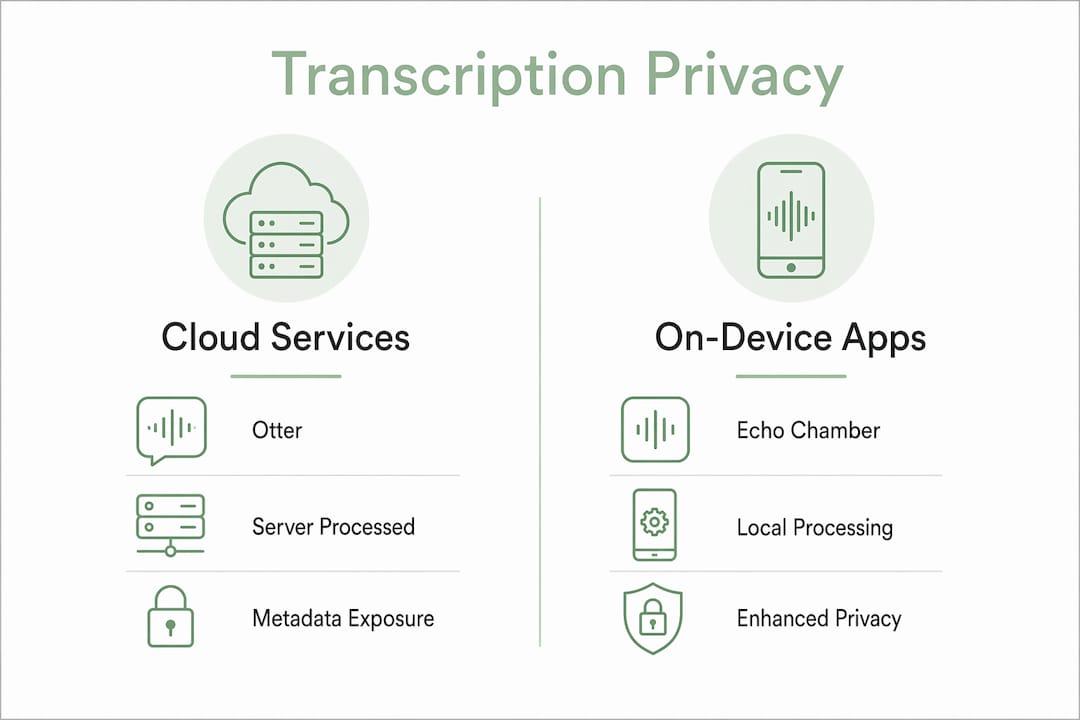
The core reason on-device processing matters: your audio and transcripts never leave your hardware unless you choose to send them. Cloud meeting bots routinely give third parties access to private meeting content — a tradeoff that is unacceptable for many professional workflows.
Table of Contents
- What are the best Otter alternatives for Apple privacy?
- How do on-device apps actually differ from Otter?
- Who should choose on-device transcription over a cloud service?
- How to choose between Otter and private on-device alternatives
- How to migrate from Otter and keep your workflow intact
- Echo Chamber by Obsidianridgelabs: private on-device transcription for Apple
- Key Takeaways
- Why the privacy gap between cloud and on-device matters more than most guides admit
- Echo Chamber is available now on Apple devices
- Further reading and sources
What are the best Otter alternatives for Apple privacy?
Each of the four tools below occupies a distinct position on the privacy spectrum for Apple users.
Echo Chamber runs all core transcription on-device, integrates with Apple Shortcuts and Files, and offers optional opt-in sync. Just Press Record is a lightweight iOS/macOS recorder that transcribes locally without a subscription. Apple Voice Memos + Live Speech requires no third-party install and processes audio through Apple's on-device speech frameworks. MacWhisper runs OpenAI's open-source Whisper model locally on a Mac, giving technically inclined users direct control over model selection.
| Dimension | On-device apps | Cloud-based services |
|---|---|---|
| Where audio is processed | Locally on iPhone/iPad/Mac | Remote servers |
| Data retention | Stays on device by default | Stored by vendor |
| Offline capability | Full | Requires internet |
| Speaker diarization | Varies by app | Usually included |
| Apple ecosystem integration | Native (Shortcuts, Files, iCloud opt-in) | Limited or none |
| Export formats | .txt, .srt, .docx (app-dependent) | .txt, .docx, .pdf |
| Pricing model | One-time or App Store subscription | Subscription or per-minute |
Privacy spectrum callouts:
- Local-only: Echo Chamber and MacWhisper process everything on-device; no data path to external servers by default.
- OS-native: Apple Voice Memos uses Apple's own speech frameworks, which are subject to Apple's privacy policy rather than a third-party vendor's.
- Lightweight local: Just Press Record transcribes on-device but has fewer export options than a dedicated transcription app.
How do on-device apps actually differ from Otter?
On-device apps keep audio and text local by default. That single architectural difference changes the entire risk profile of a recording workflow.
The primary differences across key axes:
- Processing location: On-device apps run inference on the iPhone, iPad, or Mac chip. Otter sends audio to remote servers for processing.
- Data retention and access: With local apps, no vendor holds your transcripts. With cloud services, the vendor's data retention policy governs what is kept and for how long.
- Offline capability: On-device apps work without an internet connection. Cloud services require connectivity for transcription.
- Speaker diarization: Cloud services generally handle multi-speaker labeling more reliably. On-device diarization quality depends on the model and app.
- Model provenance: Apple's speech frameworks, Whisper variants, and proprietary models each carry different accuracy profiles and update paths. Checking model provenance and local update capability is the most reliable way to predict transcription quality on iPhone and Mac.
- Multi-language support: Cloud services often support 50–150 languages. On-device language support is narrower and depends on which models are installed locally.
Pro Tip: Software-only privacy claims can still expose metadata at the OS level. For highly sensitive in-person meetings, hardware-plus-software solutions — dedicated local recorders combined with a private app — reduce risks that software alone cannot close.
One legal note for U.S. users: recording laws vary by state. Federal law and most states permit single-party consent recording, but a dozen states require all-party consent. Confirm the rules for your state before recording any conversation.
Who should choose on-device transcription over a cloud service?
Choose on-device when confidentiality, offline capture, or Apple ecosystem integration without cloud export is required. Cloud services remain reasonable for multi-language workflows or enterprise features where privacy risk is lower.
Use cases that point clearly to on-device:
- Privacy-sensitive professionals — attorneys, therapists, and financial advisors whose client conversations carry confidentiality obligations.
- Journalists — pre-publication interviews where source protection matters before a story is filed.
- Product researchers — customer discovery calls where a visible meeting bot changes participant behavior and a no-bot local capture is preferable.
- Field workers and travelers — anyone recording in locations without reliable internet.
- Personal note-takers — individuals who want private voice journals or meeting notes without a vendor holding the archive.
Quick self-check: if you answer yes to any of the following, on-device is the right path.
- Does the recording contain privileged, confidential, or pre-publication content?
- Will you record in locations without reliable internet?
- Do you need transcripts to stay inside your Apple device ecosystem only?
- Does your compliance framework restrict third-party data processors?
How to choose between Otter and private on-device alternatives
Use this checklist before switching — or before deciding to stay.
Evaluation checklist:
- Processing location: Confirm whether the app's privacy policy explicitly states that audio never leaves the device. Vague language like "we take privacy seriously" without a technical disclosure is a red flag.
- Privacy policy transparency: Look for explicit data retention periods, third-party sharing disclosures, and opt-in language for any cloud features.
- Apple ecosystem connectors: Does the app support Shortcuts automation, Files app access, Notes export, or iCloud Drive as an opt-in sync path?
- Speaker diarization: Verify whether multi-speaker labeling works offline or requires a cloud call.
- Export formats: Minimum viable set is .txt and .srt; .docx is useful for document workflows.
- Offline transcription: Test the app with airplane mode enabled before committing.
- Language support: On-device models typically cover fewer languages than cloud services. Confirm your language is supported before purchasing.
- On-device model installability: Some apps require a separate model download. Check storage requirements and whether updates are local or server-side.
Pricing shapes to expect:
| Pricing model | Typical use case | Notes |
|---|---|---|
| One-time App Store purchase | Light to moderate use | No recurring cost; model updates may be separate |
| App Store subscription (monthly/yearly) | Regular professional use | Predictable cost; check what features require subscription |
| In-app model downloads | Advanced on-device accuracy | Additional storage required |
| Cloud subscription | Enterprise, multi-language | Lower privacy; evaluation criteria include integration and support |
Red flags when evaluating any alternative: mandatory cloud opt-in with no local-only mode, no disclosure of where the transcription model runs, absence of standard export formats, and pricing that locks core features behind a subscription with no one-time option.
How to migrate from Otter and keep your workflow intact
You can export most Otter transcripts and reuse them in a local app. Follow these steps.
- Export from Otter: In Otter's web app, select conversations and export as .txt, .srt, or .docx. Prefer .srt when timestamps and speaker labels matter; .docx when you need formatted documents.
- Preserve speaker labels: Before bulk export, open one transcript and verify that speaker names are correctly assigned. Bulk exports inherit whatever labels exist at export time.
- Bulk export: Otter allows multi-select export from the web interface. Download all files to a local folder before closing your account.
- Import to local storage: Move exported files to the Files app on iPhone/iPad or Finder on Mac. From there, any app with Files integration can access them directly.
- Ingest into your new app: Echo Chamber and similar apps with Files integration can open .txt and .srt files directly. For Notes or Pages, drag and drop from Files.
- Verify and archive: Open one exported .srt file and confirm timestamps and speaker labels are intact before deleting anything from Otter.
Format compatibility:
| Export format | Best for | Import destination |
|---|---|---|
| .txt | Plain text archive | Notes, Pages, any text editor |
| .srt | Timestamps + speaker labels | Echo Chamber, video editors, subtitle tools |
| .docx | Formatted documents | Pages, Word for Mac |
Pro Tip: Before closing your Otter account, create an immutable local archive: copy all exported files to a folder in iCloud Drive (with iCloud Drive set to keep files on device) or an external drive. Verify speaker labels in at least one sample file before you delete the originals.
Echo Chamber by Obsidianridgelabs: private on-device transcription for Apple
Echo Chamber processes all transcription on-device, with no audio or transcript data sent to external servers by default. It is built exclusively for Apple platforms and integrates natively with the tools Apple users already rely on.
Feature summary:
- On-device transcription models — audio never leaves the device during processing
- Offline recording and transcription — fully functional without internet
- Speaker diarization — multi-speaker labeling available locally
- Apple Shortcuts and Files app integration
- Export in .txt, .srt, and .docx formats
- Optional opt-in cloud sync — user-controlled, not default
What "on-device" means in practice: audio is captured and processed entirely on your iPhone, iPad, or Mac. No transcript is transmitted to Obsidianridgelabs servers unless you explicitly enable an optional sync feature. That opt-in path is disclosed in the app and in the privacy documentation.
Echo Chamber differs from Otter in one fundamental way: there is no meeting bot, no cloud processing by default, and no vendor holding your transcript archive. Otter's core architecture routes audio through remote servers; Echo Chamber's core architecture does not. For a detailed technical comparison, the Echo Chamber vs Otter.ai breakdown covers accuracy, privacy design, and workflow differences side by side.
Pricing follows the App Store model: one-time purchase or subscription options, with no mandatory recurring fee for core on-device features. On-device model downloads may require additional storage.
Key Takeaways
On-device transcription apps keep audio and transcripts local by default, making them the appropriate choice for any workflow where a third-party vendor holding your recordings is not acceptable.
| Point | Details |
|---|---|
| Top recommendation | Echo Chamber by Obsidianridgelabs processes transcription on-device with no default cloud transfer. |
| When to choose on-device | Use on-device apps for confidential, offline, or Apple-ecosystem-only workflows. |
| Migration is straightforward | Export Otter transcripts as .srt or .txt, move to Files app, and import into your new app. |
| Red flag to watch | Any app that lacks explicit disclosure of where transcription processing occurs should be treated with caution. |
| U.S. legal reminder | Recording consent laws vary by state; confirm single-party vs. all-party rules before recording. |
Why the privacy gap between cloud and on-device matters more than most guides admit
The conventional framing of this decision treats accuracy as the primary variable. It is not. The more consequential variable is the data path: where audio goes, who can access it, and under what legal conditions a vendor might be compelled to produce it.
Cloud transcription services are not inherently negligent. But their architecture creates a structural exposure that no privacy policy fully eliminates. A vendor can update its retention policy, respond to a subpoena, or suffer a breach. None of those risks exist for audio that never left your device.
The shift productivity experts describe — from generic transcription to contextual intelligence integrated into sensitive workflows — is real. But the privacy dimension of that shift is underweighted in most comparisons. The question is not just "does this app transcribe accurately?" It is "who else can read this transcript, and under what circumstances?"
On-device processing answers that question cleanly. Cloud processing does not.
Echo Chamber is available now on Apple devices

Echo Chamber from Obsidianridgelabs gives you private, on-device transcription without routing audio through any external server by default. Setup takes minutes: download from the App Store, grant microphone access, optionally download additional on-device models for your language, and import a test transcript from your Files app to confirm the workflow.
Pricing is available through the App Store as a one-time purchase or subscription, with no mandatory cloud component for core features. If you want to verify the privacy design before committing, start with a single meeting or import one archived Otter transcript. The Echo Chamber product page has full feature details, model information, and setup guidance.
Further reading and sources
- Echo Chamber: Private On-Device Transcription | Obsidian Ridge Labs — product page with feature details, privacy claims, and setup instructions
- Private AI Apps for Apple | Obsidian Ridge Labs — full suite overview and privacy philosophy
- Echo Chamber vs Otter.ai: Privacy & Accuracy Compared — technical side-by-side of the two architectures
- On-Device AI on iPhone: A Privacy Verification Guide — step-by-step checks to confirm an app processes data locally
- 5 Private & Offline Transcription Apps Compared (2026) — broader roundup of offline transcription options and model tradeoffs
- 5 Best Otter AI Alternatives for AI Meeting Notes — industry writeup on the shift from generic transcription to privacy-integrated workflows
- 9 Best Otter.ai Alternatives and Competitors in 2026 — analyst notes on hardware-plus-software solutions for sensitive conversations
- Best Otter.ai Alternatives in 2026: 10 AI Meeting Tools — product-team focused roundup covering local capture and no-bot recording options
- Top Otter.ai Alternatives & Competitors 2026 | Gartner Peer Insights — enterprise evaluation criteria for replacing Otter in an organization