Use iCloud Private Relay for everyday Safari privacy on Apple devices, and use a VPN when you need device-wide encryption, country-level location spoofing, or protection outside Safari. Private Relay is not a VPN. It never encrypts your entire device's traffic, and Apple has never marketed it as one.
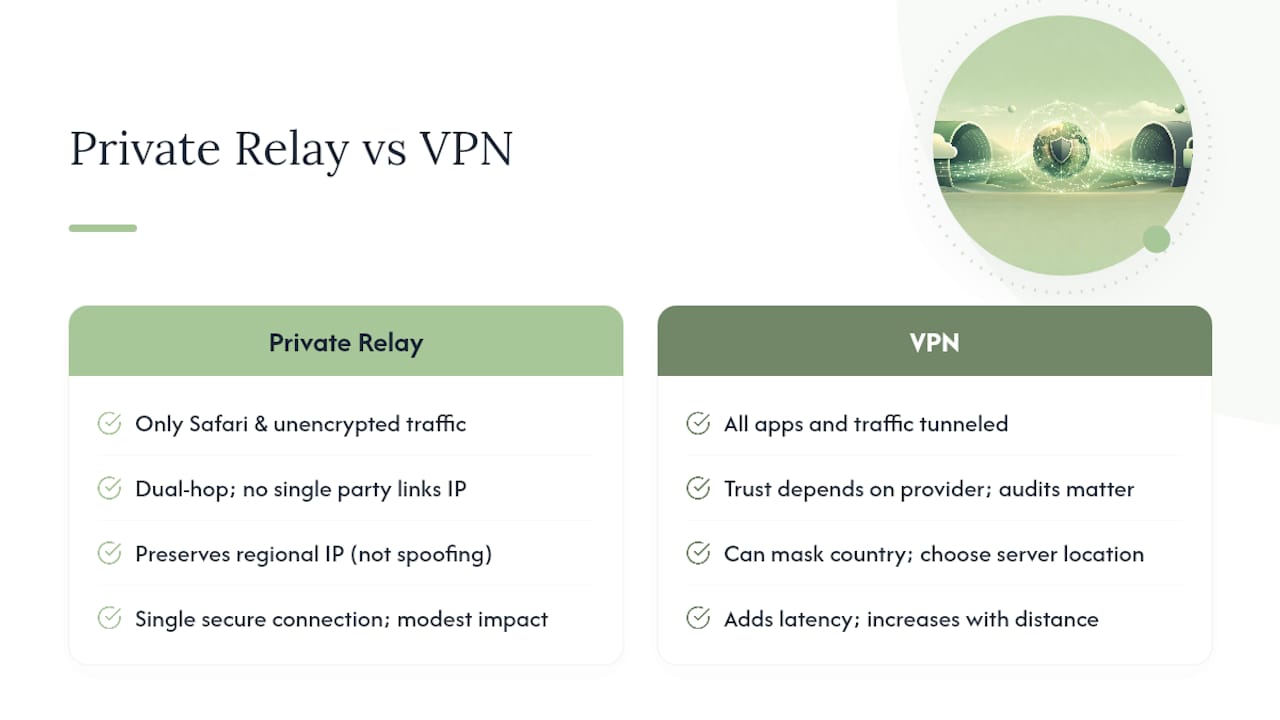
- Scope: Private Relay covers Safari and unencrypted traffic; a VPN encrypts everything leaving your device, including apps and other browsers.
- Location: Private Relay keeps you in your general region; a VPN lets you pick a country and unlock geo-restricted content.
- When to pick each: Private Relay for low-friction daily browsing on an iPhone or Mac; a VPN for public Wi-Fi, travel, or any non-Safari app that needs encryption.
Key Takeaways
Private Relay protects Safari traffic through a dual-relay split that no single party can trace, while a VPN encrypts your entire device and lets you spoof a specific country.
| Point | Details |
|---|---|
| Private Relay is not a VPN | It only covers Safari and unencrypted traffic, never your whole device. |
| Trust models differ structurally | Private Relay splits trust between two relays; a VPN concentrates trust in one provider. |
| Location masking needs a VPN | Private Relay preserves your general region; only a VPN spoofs a specific country. |
| They don't stack | An active VPN takes precedence automatically, so Private Relay steps back. |
| On-device privacy covers the gap | Obsidianridgelabs' apps keep sensitive data like transcripts and finances off the network entirely. |
Table of Contents
- Apple Relay vs VPN at a Glance
- How Does iCloud Private Relay Actually Work?
- How Does a VPN Actually Work?
- What Are the Real Differences Between Private Relay and a VPN?
- When Should You Use Each One?
- Where Does Private Relay Fall Short or Fail?
- How Do You Turn On Private Relay, and What Should You Look For in a VPN?
- When Does On-Device Privacy Beat Network Tools Entirely?
- What Should You Do Right Now?
- Why On-Device Privacy Changes the Calculation
- A Complementary Layer Beyond Private Relay and VPNs
- Frequently Asked Questions
- Sources
Apple Relay vs VPN at a Glance
The two tools solve different problems, and the table below shows exactly where they diverge.
| Dimension | iCloud Private Relay | VPN |
|---|---|---|
| Protection scope | Safari and unencrypted traffic only | System-wide, all apps and browsers |
| Architecture | Dual-relay hop separating IP from destination | Single encrypted tunnel to one server |
| Trust & logging | Split trust between Apple and a third-party relay | Full trust in one VPN provider's policy or audits |
| Location masking | Preserves general region, no country selection | Full country-level IP spoofing |
| Performance impact | Minimal in real browsing; synthetic tests can mislead | Adds latency depending on server distance |
| Cost & availability | Included with iCloud+; region-restricted | Separate subscription; broader global server access |
| Compatibility | Apple devices, Safari-focused | Cross-platform, most operating systems |
| Limitations | Blocked by enterprise profiles, some sites flag it | Some services detect and block VPN IP ranges |
| Best for | Quick, native Safari privacy | Public Wi-Fi, streaming abroad, full-device coverage |
The short version: Private Relay wins on convenience for Apple-only Safari use. A VPN wins whenever you need coverage beyond Safari or a specific country's IP address.
How Does iCloud Private Relay Actually Work?
Private Relay routes your Safari traffic through two separate relays instead of one, and that split is the entire point. Apple's own relay sees your real IP address but not the site you're visiting. A third-party relay sees your destination but never learns your IP. Neither party can link your identity to your browsing activity, because no single relay holds both pieces of information.
What does this actually cover? Not as much as people assume.
- Safari browsing traffic gets full protection through the dual-relay path.
- Unencrypted DNS queries get encrypted, closing a common tracking gap.
- Third-party browsers like Chrome or Firefox on your iPhone get none of this protection.
- Many app connections outside Safari fall outside Private Relay's reach entirely, according to Apple's own documentation.
Private Relay comes bundled with iCloud+, and it requires iOS 15, iPadOS 15, or macOS 12 at minimum. It's also not available in every country or region, which matters more than most users realize until they land somewhere it silently switches off.
Pro Tip: If a website throws repeated verification challenges or blocks you outright, try disabling Private Relay for that one site in Safari's settings. It usually fixes the access problem instantly, but remember it also exposes your real IP address to that site and network for the duration.
How Does a VPN Actually Work?
A VPN wraps your entire device's traffic in a single encrypted tunnel and routes it through one server, unlike Private Relay's two-party split. That server sees both your real IP address and every destination you connect to, which means your privacy depends entirely on that one provider's practices.
VPNs typically expose more controls than Private Relay ever will:
- Manual server selection lets you choose a country and get an IP address from that location.
- Split tunneling lets you route some apps through the VPN while others use your normal connection.
- A kill switch cuts your internet if the VPN drops, preventing accidental exposure.
- DNS leak protection stops your queries from slipping outside the encrypted tunnel.
This is where the trust question gets serious. You're relying on the provider's no-logs policy and any independent audits backing it up, not a built-in architectural split like Apple's. Providers such as NordVPN publish transparency pages detailing their logging claims, and Surfshark does the same, but you're still taking a company at its word (or at the word of whoever audited it). VPN apps also run across nearly every platform, from macOS and iOS to Windows, Android, and even routers, giving you coverage Private Relay was never designed to provide.
What Are the Real Differences Between Private Relay and a VPN?
The gap between these two tools is wider than a feature list suggests, and it shows up most clearly in five areas.
Scope of protection. Private Relay only touches Safari traffic and unencrypted connections. Everything else, other browsers, background app syncing, third-party messaging apps, passes through untouched. A VPN doesn't discriminate. It wraps every packet leaving your device, whether that's Instagram, Slack, or a game client, in the same encrypted tunnel.
Trust and logging. Private Relay's dual-hop design means no single party, not even Apple, can pair your IP address with your browsing destinations. That's a structural guarantee, not a policy promise. A VPN's guarantee is only as good as its operator. You're trusting one company's no-log claims, which is why audits matter and why reputation among providers like NordVPN and Surfshark gets scrutinized so heavily by security researchers.
Location masking. This is where the two tools genuinely diverge in purpose. Private Relay deliberately preserves an approximate regional IP so local content, currency, and language settings still work correctly. It was never built to spoof your country, and Norton's analysis confirms that's by design, not oversight. A VPN does the opposite on purpose. Pick a server in another country and the internet believes you're standing there. If your goal is watching a show unavailable in your region, only a VPN gets you there.
Performance. Apple maintains that Private Relay doesn't meaningfully slow browsing, and the confusion around this usually comes down to how speed tests work. Most speed-testing tools open multiple simultaneous connections to measure throughput, while Private Relay uses a single secure connection. That mismatch makes results look worse than real-world browsing actually feels. A standard VPN, meanwhile, adds latency that scales with distance to the server you've chosen, which is why picking a nearby server usually feels faster than picking one across an ocean.
Cost and availability. Private Relay comes at no extra charge beyond your existing iCloud+ subscription, but it's gated by region and by Apple's minimum OS requirements. VPN pricing runs on separate subscription tiers, often with monthly, yearly, or multi-year plans, and coverage extends to nearly every device you own, not just Apple hardware.
One more wrinkle worth knowing: enterprise device management profiles, proxy configurations, and active VPN connections all take precedence over Private Relay automatically. If your work laptop or managed iPhone has a corporate VPN running, Private Relay simply won't engage, no matter what your settings say.
When Should You Use Each One?
Match the tool to the situation rather than picking one permanently, since each handles a different kind of exposure.
- Everyday Safari browsing at home: Private Relay alone is enough. It's already running quietly if you have iCloud+ active.
- Public Wi-Fi at a coffee shop or airport: A VPN is the safer call, since it protects every app on your device, not just Safari.
- Traveling to stream region-locked content: Only a VPN works here. Private Relay intentionally won't hide your country.
- Working across multiple platforms (Mac, Windows PC, Android phone): A VPN travels with you across ecosystems. Private Relay stays locked to Apple hardware.
They also don't stack on the same connection. Turn on a VPN and it takes priority automatically, meaning Private Relay steps back rather than layering encryption on top of encryption. Plenty of privacy-conscious users treat this as a rotation rather than a conflict, leaning on Private Relay for casual Safari use and switching to a VPN the moment they're on an unfamiliar network or need a specific country's IP.
Where Does Private Relay Fall Short or Fail?
Private Relay isn't available everywhere, and it will disable itself automatically if your device is in a country or region where Apple can't legally or technically offer it. That can happen mid-trip with no warning banner beyond a quiet toggle in Settings.
Network conditions matter too. Enterprise mobile device management profiles can disable Private Relay outright, and any active VPN or proxy configuration takes precedence over it without exception. Some websites also flag Private Relay's traffic pattern as suspicious and throw extra verification challenges.
- Check Settings > Wi-Fi > (network name) > Private Relay to confirm it's actually active on your current connection.
- If a specific site misbehaves, toggle Private Relay off just for that site rather than disabling it device-wide.
- Custom DNS profiles can interfere with Private Relay, so remove third-party DNS settings if it won't activate.
How Do You Turn On Private Relay, and What Should You Look For in a VPN?
Enabling Private Relay takes under a minute if you already subscribe to iCloud+. Open Settings, tap your name, then iCloud, then Private Relay, and toggle it on. No separate app, no extra fee beyond your existing iCloud+ tier.
Choosing a VPN takes more homework. Run through this before subscribing:
- Confirm the app supports every platform you actually own, not just iOS.
- Look for a published no-logs policy backed by an independent audit, not just a marketing claim.
- Check server count and locations if geo-unblocking specific countries matters to you.
- Verify it includes a kill switch and DNS leak protection as standard features.
- Compare pricing across monthly, annual, and multi-year plans, since annual commitments are usually far cheaper per month.
Remember that turning on a VPN will override Private Relay automatically, so you don't need to manage a conflict between the two yourself.
When Does On-Device Privacy Beat Network Tools Entirely?
Neither Private Relay nor a VPN protects data that never needs to leave your device in the first place. That's a different layer of the privacy stack entirely, and it's often the strongest one available.
Think about a voice memo transcription, a personal budget spreadsheet, or a private journal entry. If that data is processed locally rather than sent to a cloud server, there's no network transit to intercept, no third-party server to breach, and no policy to trust. On-device AI applications built specifically for Apple hardware, Obsidian Ridge Labs' entire approach, handle tasks like transcription and journaling this way by design, keeping sensitive content local rather than routing it anywhere.
Pro Tip: Treat on-device privacy and network privacy as complementary layers rather than competitors. Use Private Relay or a VPN for general browsing exposure, and reach for on-device tools whenever the data itself, financial records, personal notes, transcripts, is sensitive enough that you'd rather it never touch a network at all.
- Sensitive personal records: prefer on-device processing over any cloud-synced app.
- General web browsing: Private Relay or a VPN, depending on the network and location.
- Data that must sync across your own devices: on-device apps with local sync avoid third-party servers entirely.
What Should You Do Right Now?
Match your next move to how you actually use your devices, not to whichever tool sounds more advanced.
- Everyday Safari user: Turn on Private Relay through iCloud+ and leave it running. It requires no ongoing management.
- Frequent traveler: Keep Private Relay on at home, but subscribe to a VPN like NordVPN or Surfshark for hotel Wi-Fi and geo-restricted streaming abroad.
- Privacy power user: Run both, understanding they won't stack simultaneously, and add on-device apps for anything sensitive enough to keep off the network altogether.
Try Private Relay alone for a week of normal browsing before deciding you need more. Most casual Safari use never requires a VPN's added complexity or cost.
Why On-Device Privacy Changes the Calculation
Most privacy comparisons stop at the network layer, weighing one relay architecture against another tunnel protocol. That framing misses something the industry doesn't talk about enough: the safest data is the data that never left your device to begin with. Private Relay and VPNs both do real work protecting traffic in transit, but they're solving for exposure that on-device processing sidesteps entirely.
The interesting tension is that network privacy tools have gotten genuinely good, and Private Relay's dual-relay split is a clever piece of engineering, while VPN encryption standards have matured for two decades. Yet the more capable these tools become, the easier it is to forget that transit protection is only half the problem. A breached VPN provider or a subpoenaed no-logs claim still puts data at risk that never should have been centralized anywhere. That's the gap on-device processing closes, not by competing with Private Relay or a VPN, but by removing entire categories of data from the conversation about network trust altogether.
A Complementary Layer Beyond Private Relay and VPNs
Private Relay and VPNs both protect data while it travels. Neither one touches the data sitting on your device right now, your voice memos, your budget spreadsheet, your journal entries. Obsidianridgelabs builds on-device AI applications for Apple hardware specifically so that transcription, finance tracking, and journaling never need to leave your device to be processed, closing the gap that network-layer privacy simply wasn't designed to cover.

If you've ever hesitated before dictating something personal into a cloud-based transcription app, that hesitation is the exact problem this solves. Obsidianridgelabs' on-device transcription app processes your voice entirely on your iPhone or Mac, with nothing transmitted to a server. Pair it with Private Relay for your general browsing and you've covered both layers of the privacy stack, not just one. Visit Obsidianridgelabs to see the full app lineup and find the one that fits how you actually use your devices.
Frequently Asked Questions
Is iCloud Private Relay a VPN? No. It's a Safari-focused privacy feature that hides your IP through two relays, but it lacks the system-wide encryption and country selection a VPN provides.
Is VPN better than Apple Private Relay? Neither is strictly better. A VPN covers more ground (your entire device and any country you choose), while Private Relay offers simpler, built-in Safari privacy at no extra cost beyond iCloud+.
Can I use Private Relay and a VPN at the same time? You can have both enabled, but an active VPN takes precedence, so your traffic runs through the VPN tunnel rather than both simultaneously.
Does Private Relay slow down my internet? Real-world browsing rarely feels slower. Apparent slowdowns usually come from speed-testing tools that measure differently than normal browsing behaves.
Why did Private Relay turn off while I was traveling? Private Relay automatically disables itself in countries or regions where Apple can't offer it, which can happen without warning during international travel.
Sources
- If your iPhone, iPad, or iPod touch doesn't support iCloud Private Relay
- iCloud Private Relay vs VPN: Which is better? | Norton