
For privacy-conscious Apple users, Echo Chamber by Obsidianridgelabs is the strongest Rev alternative available today. It processes audio entirely on your iPhone or iPad, meaning your recordings never reach a third-party server. Two facts confirm this immediately:
- On-device processing guarantee: Audio frames, feature extraction, and model inference all execute locally. No cloud upload occurs during transcription.
- App Store distribution with transparent optional connections: Echo Chamber is distributed through Apple's App Store and documents any optional network connections explicitly, so you know exactly what leaves your device.
Professionals handling confidential audio — legal depositions, medical interviews, financial consultations — should prioritize this option. Cloud-first services expose audio during transit and store it on external infrastructure, a risk that on-device tools eliminate by design.
Table of Contents
- How do the best Rev alternatives compare on privacy and features?
- Why on-device transcription matters for privacy
- How do you choose a privacy-first Rev alternative for Apple devices?
- Echo Chamber by Obsidianridgelabs: the on-device alternative in depth
- How to set up Echo Chamber for private transcription on your iPhone
- Other local-first approaches and when to pick each
- What are the real tradeoffs of on-device transcription?
- How do you verify an app actually processes audio locally?
- What does on-device transcription cost compared to cloud services?
- Key Takeaways
- The privacy gap most transcription guides ignore
- Echo Chamber is the private transcription alternative you have been looking for
- Useful sources and further reading
How do the best Rev alternatives compare on privacy and features?
The table below covers the key decision dimensions across three on-device approaches.
| Dimension | Echo Chamber (Obsidianridgelabs) | Apple built-in speech (iOS Speech API) | Local model workflow (user-run pipeline) |
|---|---|---|---|
| Privacy model | On-device, no cloud upload | On-device (with optional server fallback) | Fully local, user-controlled |
| Accuracy / model quality | Dedicated on-device model, optimized for Apple silicon | General-purpose, adequate for dictation | Varies by model chosen |
| Languages supported | Select languages; see product page | — | Depends on model |
| Offline capability | Full offline mode available | Partial (server fallback by default) | Full offline |
| Cost shape | One-time purchase or subscription | Free (bundled with iOS) | Free to low-cost; setup effort required |
| Realtime vs. batch | Both modes | Realtime only | Batch primary |
| Export formats | Text, copy/paste, local file export | Text via system clipboard | Varies by pipeline |
| Minimum iOS | Listed on App Store product page | iOS for on-device mode | Depends on toolchain |
When to pick each approach:
- Echo Chamber: Best for professionals who need a polished app experience, reliable accuracy, and documented privacy guarantees without configuring a technical pipeline.
- Apple built-in speech: Adequate for casual dictation or quick notes; confirm server fallback is disabled if privacy is critical.
- Local model workflow: Best for technically confident users who want maximum control and are comfortable managing model files and dependencies.
Pro Tip: When evaluating model quality against privacy, ask one question: does the app document exactly which processing steps stay on-device? A vague "AI-powered" label is not the same as a published on-device processing guarantee. High-stakes audio deserves the explicit claim.
Why on-device transcription matters for privacy
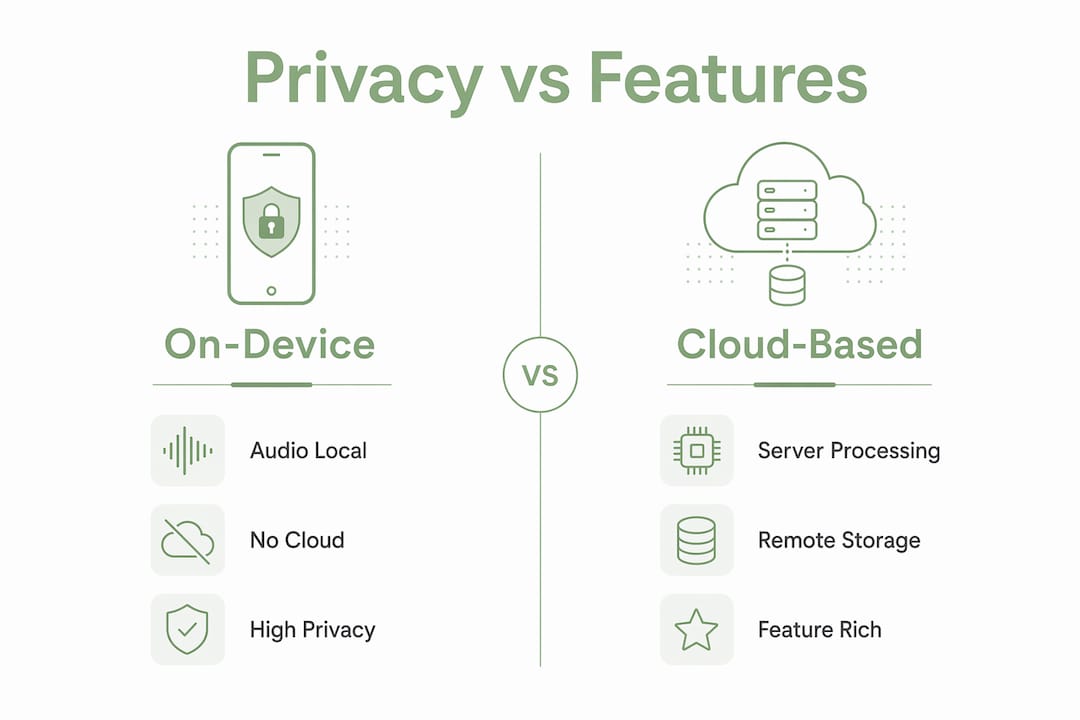
On-device transcription keeps audio and all derived text on your device, removing cloud transfer risk entirely. That distinction matters most when the content is sensitive.
Cloud-based services expose audio at multiple points: during transit to the server, in third-party storage while the file awaits processing, and potentially during model updates or support access. Industry guidance is clear that many popular tools default to cloud architectures even when marketed as "AI-driven," and users must actively filter for local-first processing. True local processing means audio never leaves the device, a standard that analysts recommend specifically for legal, medical, and financial audio where data sovereignty is required.
For professionals in regulated fields, cloud uploads are often a non-starter. A legal deposition or a therapy session recording carries confidentiality obligations that a cloud vendor's terms of service cannot fully satisfy.
How do you choose a privacy-first Rev alternative for Apple devices?
Start with two non-negotiable criteria: an explicit on-device processing guarantee and transparent documentation of any optional connections. Everything else is secondary.
Checklist for evaluating any on-device transcription app:
- Processing model proof: Does the vendor explicitly state that audio never leaves the device? "AI-powered" is not sufficient.
- App Store distribution: Confirms the app has passed Apple's review process and carries a privacy nutrition label.
- Privacy policy clarity: The policy should name what data, if any, is collected and under what conditions.
- Offline mode: Can the app transcribe with no network connection active?
- Device and iOS compatibility: Check the minimum iOS version and whether the app is optimized for your specific hardware.
- Model accuracy and language support: Test on a representative audio sample before committing.
- Export formats: Confirm the app can output files in formats your workflow requires (plain text, formatted documents, etc.).
- Local file management: Transcripts should be stored on-device and exportable without a cloud sync requirement.
- Human-review options: If near-100% accuracy is required, understand whether human review is available and what privacy tradeoffs it introduces.
Pro Tip: Open the App Store listing and scroll to the Privacy section. Look for "Data Not Collected" or a minimal data label. Then check the listed permissions: a transcription app that requests contacts or location access warrants scrutiny. For a step-by-step walkthrough, the privacy verification guide covers exactly what to look for.
Echo Chamber by Obsidianridgelabs: the on-device alternative in depth
Echo Chamber delivers private, on-device transcription for Apple devices with explicit documentation of optional connections, distributed through the App Store.
Core feature profile:
- Privacy guarantee: All core transcription processing runs on-device. Audio does not transit to external servers during normal operation.
- iOS compatibility: Listed on the App Store product page; optimized for Apple silicon.
- Accuracy and languages: Uses a dedicated on-device model tuned for Apple hardware; language support details are available on the product page.
- Realtime and batch modes: Supports both live transcription and batch processing of pre-recorded audio files.
- Export formats: Plain text, copy/paste, and local file export; no mandatory cloud sync.
- Pricing: Available as a one-time purchase or subscription via the App Store.
Professional use cases where Echo Chamber fits better than cloud-first services:
- Attorneys transcribing client interviews where privilege applies
- Healthcare providers documenting patient encounters under HIPAA considerations
- Financial advisors recording client calls with confidentiality obligations
- Journalists protecting source audio from third-party access
- Researchers handling IRB-protected interview data
Pro Tip: For best on-device accuracy, record in a quiet environment and position the iPhone microphone 6–12 inches from the speaker. If the app supports downloadable language packs, install the relevant pack before going offline so the full model is available locally.
How to set up Echo Chamber for private transcription on your iPhone
Install Echo Chamber from the App Store, grant local microphone access only, and enable offline mode before your first session.
Setup steps:
- Search "Echo Chamber" in the App Store and install the Obsidianridgelabs app.
- On first launch, grant microphone access when prompted. Deny any permission requests that are not required for transcription.
- Navigate to settings and confirm offline mode or local model download is enabled.
- Download any language packs you need while connected to Wi-Fi, so they are available without a network connection later.
- Set your preferred audio quality and recording format in the app settings.
- Run a short test recording and verify the transcript appears without any network activity.
Usage tips:
- For realtime transcription, open a new session and speak directly; the transcript builds as you record.
- For batch processing, import an existing audio file and let the on-device model process it; larger files take longer depending on device compute.
- Export transcripts via the share sheet to Files, Notes, or any local app. Avoid cloud-sync destinations if privacy is the priority.
- Back up transcripts using encrypted local export or AirDrop to a trusted device rather than iCloud if you want to keep the data path fully local.
Pro Tip: After setup, put your iPhone in Airplane Mode and run a full transcription session. If the transcript completes normally, the app is genuinely processing locally. This one test confirms more than any privacy policy statement.
Other local-first approaches and when to pick each
Most aggregator lists of transcription service alternatives mix cloud-first and local-capable tools without separating them clearly. For privacy-conscious users, the relevant categories are narrower.
- Native iOS Speech API (Apple Speech): Built into iOS, free, and capable for short dictation tasks. By default it may use server-side processing; enabling on-device mode requires a developer setting that most consumer apps do not expose. Best for quick notes, not sensitive audio.
- Packaged on-device apps with proprietary models (e.g., Echo Chamber): The most practical option for most users. The vendor handles model management, updates, and UX. Privacy guarantees are documented and verifiable through the App Store privacy label.
- Local model workflows (user-run pipelines): Power users can run open-source speech recognition models directly on a Mac or via iPhone-side compute. Full control, no vendor dependency, but requires technical setup and ongoing maintenance. Best when institutional policy prohibits any third-party app.
- Hybrid offline-first apps with optional cloud features disabled: Some apps offer an offline mode that disables cloud sync. Verify the privacy label carefully; "offline mode" does not always mean the core model runs locally.
What are the real tradeoffs of on-device transcription?
On-device transcription improves privacy but involves real tradeoffs in collaboration, language breadth, and processing time for large files.
Common tradeoffs to expect:
- Fewer real-time collaboration features; cloud-native platforms offer shared dashboards and live editing that on-device apps do not replicate.
- Language pack availability is narrower than major cloud services, which can draw on server-side model libraries.
- Local storage usage increases as audio files and model weights are kept on-device.
- Battery and compute load are higher during intensive batch processing on older devices.
- Model updates arrive less frequently; cloud services can push new model versions server-side without an app update.
| Dimension | On-device | Cloud-first |
|---|---|---|
| Privacy | Audio stays on device | Audio transits to and is stored on external servers |
| Collaboration | Local export only | Shared dashboards, live editing |
| Language coverage | Limited to downloaded packs | Broad, server-side library |
| Model update frequency | Tied to app release cycle | Continuous server-side updates |
How do you verify an app actually processes audio locally?
Use the App Store privacy label, permissions inspection, network monitoring, and vendor documentation together. No single check is sufficient on its own.
Verification steps:
- Open the App Store listing and read the Privacy section. Look for "Data Not Collected" and the absence of audio or usage data categories.
- Review the listed optional connections in the app's own settings or documentation. Echo Chamber documents these explicitly.
- Check permission requests on first launch. A transcription app needs microphone access; it should not request network access as a required permission.
- Enable Airplane Mode and run a complete transcription session. A successful result confirms local inference.
- On a paired Mac, use a network monitor (such as Little Snitch or the built-in Network Utility) while the app transcribes a sample. No outbound audio traffic should appear.
- Consult any published technical notes or audit reports the vendor provides.
Pro Tip: The Airplane Mode test is the fastest single check. If transcription fails in Airplane Mode, the app requires a network connection for core processing, regardless of what the marketing copy says. For a deeper technical walkthrough, the offline AI apps guide covers network behavior patterns to watch for.
What does on-device transcription cost compared to cloud services?
On-device solutions typically use a one-time purchase or subscription model for the app, eliminating per-minute cloud fees entirely.
Typical pricing shapes across the market:
- Free tier with limited minutes: Some apps offer a capped free tier before requiring a subscription.
- One-time purchase: Pay once, use indefinitely; common for on-device apps including those in the Obsidianridgelabs suite.
- Monthly or annual subscription: Recurring access, often including model updates and new features.
- Paid language or model packs: Premium languages or higher-accuracy models available as add-ons.
Cloud-first services often charge per minute of audio, which adds up quickly for professionals with high volume. Pricing models vary widely across the market, and human-review add-ons push costs higher while also requiring audio uploads to external systems.
For professionals who need near-human accuracy on critical recordings, occasional human review may still be necessary. That step involves a cloud upload by definition, so the privacy tradeoff should be weighed deliberately and limited to non-sensitive material where possible.
Key Takeaways
For privacy-conscious Apple users, Echo Chamber by Obsidianridgelabs is the most practical on-device Rev alternative because it combines a documented local processing guarantee, App Store distribution, and transparent optional connections disclosures.
| Point | Details |
|---|---|
| Recommended pick | Echo Chamber (Obsidianridgelabs) offers on-device transcription with explicit privacy guarantees for Apple devices. |
| Top verification steps | Check the App Store privacy label, inspect permissions, and run a transcription in Airplane Mode to confirm local processing. |
| When to use a local model workflow | Choose a user-run pipeline only when institutional policy prohibits any third-party app and you have technical capacity to maintain it. |
| Main tradeoff to accept | On-device apps sacrifice real-time collaboration features and broad language libraries in exchange for keeping audio off external servers. |
| Obsidianridgelabs | Echo Chamber is available via the App Store as a one-time purchase or subscription, with all core processing on-device. |
The privacy gap most transcription guides ignore
Most transcription app roundups sort by accuracy, price, and integrations. Privacy model rarely appears as a column, and when it does, "AI-powered" is treated as equivalent to "private." It is not.
The distinction between a service that runs inference on your device and one that streams your audio to a cloud endpoint is not a minor technical footnote. For anyone working with legally privileged, medically sensitive, or commercially confidential audio, that distinction is the entire decision. Cloud vendors can update their infrastructure, change their data retention policies, or experience a breach. None of those events affect audio that never left your iPhone.
What the conventional wisdom also underestimates is how far on-device models have come. The assumption that local processing means meaningfully worse accuracy no longer holds for most common transcription tasks. The gap that remains is at the edges: rare languages, heavy accents, and very long files where cloud services can throw more compute at the problem. For the majority of professional use cases, the accuracy tradeoff is smaller than the privacy benefit.
The practical implication: if you are evaluating transcription tools and privacy is a real requirement rather than a preference, filter for on-device processing first and treat everything else as secondary criteria. The private AI apps Obsidianridgelabs builds are designed around exactly that priority.
Echo Chamber is the private transcription alternative you have been looking for
If you need transcription that keeps your audio off third-party servers, Echo Chamber by Obsidianridgelabs delivers exactly that. Every recording stays on your Apple device, processed locally with no mandatory cloud upload.

Key reasons professionals choose Echo Chamber over cloud-first services:
- On-device processing guarantee: Audio never transits to external infrastructure during normal operation.
- App Store distribution: Verified by Apple's review process, with a published privacy nutrition label.
- Transparent optional connections: Documented clearly so you know exactly what, if anything, leaves your device.
- Flexible pricing: Available as a one-time purchase or subscription, with no per-minute cloud fees.
Visit the Echo Chamber product page to review the full feature list and privacy documentation, or browse the complete private AI app suite to see how the same local-first approach applies across transcription, finance, journaling, and more.
Useful sources and further reading
External references:
- The Best Transcription Services (PCMag) — Broad market review covering accuracy, pricing, and feature comparisons across cloud and hybrid services.
- Best Transcription Software (Zapier) — Practical roundup with notes on cloud vs. local processing distinctions.
- The 3 Best Transcription Services (Wirecutter/NYT) — Independent testing methodology and accuracy benchmarks for leading services.
Obsidianridgelabs resources:
- Echo Chamber: Private On-Device Transcription — Full product page with feature list, pricing, and privacy documentation.
- Why We Build Private On-Device AI — Company philosophy and transparency commitments around optional connections.
- 5 Private & Offline Transcription Apps Compared — Deeper comparison of local-first transcription options for Apple devices.
- On-Device AI on iPhone: A Privacy Verification Guide — Step-by-step guide to verifying on-device processing via App Store labels and permissions.