
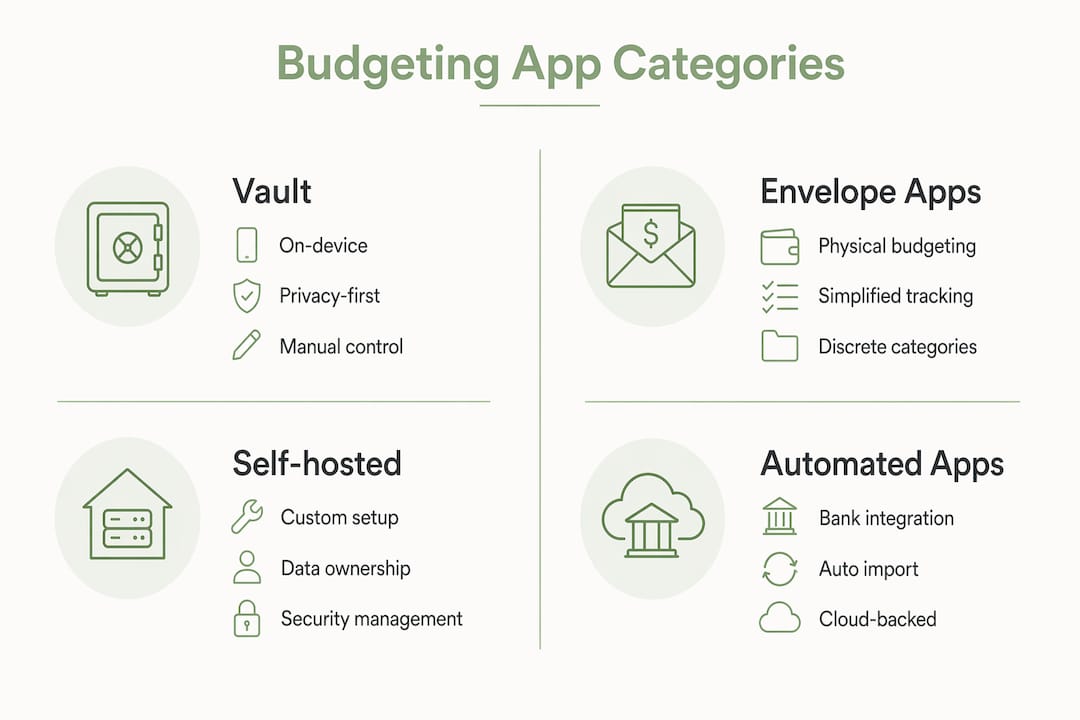
For Apple users who want YNAB-style zero-based budgeting without handing financial data to cloud intermediaries, Vault by Obsidianridgelabs is the recommended starting point: it runs entirely on-device, carries a clean App Store privacy label, and requires no persistent bank-credential sharing. Other approaches worth considering include self-hosted or local-first options for users who want open-source control, envelope/manual-entry apps for those who prefer a paper-like workflow, and automated oversight tools for passive, high-level tracking.
- On-device/local-first: No transaction data leaves your device; no third-party aggregator tokens.
- Self-hosted open-source: Full data ownership, free or low-cost, but requires technical setup.
- Envelope/manual-entry apps: Minimal cloud exposure; bank credentials optional or unused.
- Automated oversight apps: Convenient but rely on bank-sync intermediaries that may store tokens.
The core privacy check before installing any budgeting app: review its App Store privacy label under "Data Linked to You" and confirm whether bank tokens are held by a third-party aggregator or stay on your device.
Table of Contents
- How do Vault, self-hosted tools, envelope apps, and automated apps compare?
- How do you choose the right YNAB alternative for your workflow?
- How do you switch from YNAB without losing your data?
- When should you choose on-device vs. cloud-backed budgeting?
- How we evaluated these alternatives
- Do any of these apps integrate with Apple Wallet or Apple Health?
- What security certifications apply to on-device budgeting apps on Apple?
- What support and community resources exist for Apple users?
- How reliable are these apps on Apple platforms long-term?
- Troubleshooting common switching pain points on Apple
- Key Takeaways
- Why on-device finance apps reflect how we build at Obsidianridgelabs
- Vault is the on-device YNAB alternative built for Apple privacy
- Sources and further reading
How do Vault, self-hosted tools, envelope apps, and automated apps compare?
| Dimension | Vault (on-device) | Self-hosted / local-first | Envelope / manual-entry | Automated oversight |
|---|---|---|---|---|
| Privacy model | On-device only | Local server or private cloud | Manual entry; minimal cloud | Cloud-hosted; bank sync required |
| Bank sync | None by default | Optional CSV import | Optional or none | Required (aggregator) |
| Automation level | AI-assisted, local | Low; manual or scripted | Manual | High |
| Cost model | One-time or subscription | Free to low-cost | Free or low subscription | Subscription |
| Apple platforms | iPhone, iPad | Mac/web (varies) | iPhone, iPad, web | iPhone, iPad, web |
| Best for | Privacy maximalist, active planner | DIY/technical user | Envelope planner | Passive overseer |
| Data export | Local CSV/backup | Full ownership | CSV | CSV (cloud-dependent) |
Who each category suits:
- Vault: Privacy-conscious Apple users who want YNAB-style control, local AI assistance, and zero cloud exposure.
- Self-hosted/local-first tools: Technical users comfortable with setup who want full data ownership and no subscription fees.
- Envelope/manual-entry apps: Users who prefer deliberate, hands-on tracking with minimal credential sharing.
- Automated oversight apps: Users who prioritize convenience and high-level financial visibility over strict data sovereignty.
Pro Tip: Before installing any budgeting app, open its App Store listing, tap "App Privacy," and check "Data Linked to You." Then read the privacy policy for any mention of third-party bank aggregators. If the app stores persistent bank tokens with an intermediary, that data path exists outside your control regardless of the app's marketing.
How do you choose the right YNAB alternative for your workflow?
The single most useful filter: match the tool category to your workflow style (active/manual planner vs. passive/automated overseer) and your privacy model (on-device vs. optional cloud). A mismatch between tool and workflow is the most common reason budgeters abandon an app within weeks; using mobile laundry POS and management software as an analogy, efficient workflow design is key to long-term satisfaction.
Criteria checklist:
- Privacy model. Does the app process data on-device, on a local server, or in the cloud? Confirm via App Store privacy label.
- Bank-credential policy. Does the app require persistent bank-sync, or does it support manual entry and CSV import as first-class options?
- Automation balance. How much manual input does the app expect? Manual-entry-first apps reduce cloud touchpoints; auto-sync-first apps introduce aggregator risk.
- Export and backup. Can you export a full CSV of your transaction history at any time, without a subscription?
- Apple-native UX. Does the app have a native iOS/iPadOS app, or is it a web wrapper? Native apps tend to respect Apple's privacy framework more consistently.
- Cost shape. One-time purchase, annual subscription, or free with limitations?
- Community and support. Is there active documentation, a support channel, or a community forum?
Red flags that should disqualify a candidate:
- Mandatory persistent bank-credential storage with a third-party aggregator
- No CSV or local export option
- Opaque or vague privacy policy with no mention of data retention
- No native iOS app (web-only on mobile)
How do you switch from YNAB without losing your data?
You can migrate from YNAB without losing spend history or your budgeting method. The core stages are: export, choose your import path, map categories, reconcile, and verify backups. The most frequent migration friction is category mapping and reconciliation, not the export itself.
- Export your YNAB data. In YNAB, go to Settings > Export Data. Download the CSV file. On iPhone or iPad, use the Files app to save it to a local folder (not iCloud Drive if you want to avoid cloud exposure) or to your Mac via AirDrop.
- Choose your import path. For Vault, follow the in-app CSV import flow. For self-hosted tools, consult the tool's documentation for its specific import format. For envelope apps, manual re-entry of opening balances is often faster than CSV mapping.
- Map your categories. Create a side-by-side list of your YNAB categories and the new app's category structure. Rename or merge as needed before importing.
- Run a two-week parallel ledger. Enter transactions in both YNAB and the new app simultaneously. This surfaces mapping errors and reconciliation gaps before you decommission YNAB.
- Reconcile your first full month. Compare closing balances in both systems. Investigate any discrepancy above a few dollars before proceeding.
- Verify your backup. Export a CSV from the new app and confirm it opens correctly in Numbers or Excel on your Mac. Store a copy in a local folder, not solely in a cloud service.
Realistic timeline:
- Basic migration to an on-device or envelope app: one weekend.
- Self-hosted or complex automation setup: two to four weeks.
Migration checklist: export file saved locally, category map documented, test import completed, parallel ledger run, backup verified.
When should you choose on-device vs. cloud-backed budgeting?
The right category depends on your privacy tolerance and how actively you want to engage with your budget.
- Privacy maximalist: Use Vault or a self-hosted local-first tool. Avoid any app that requires persistent bank sync. Use CSV import for transaction data.
- DIY spreadsheet user: Self-hosted or spreadsheet-based tools give full data ownership at low or no cost. Aspire Budgeting (Google Sheets) is a widely cited free option for zero-based budgeting without a subscription.
- Envelope/manual planner: Choose a manual-entry-first app. The deliberate friction of manual entry reinforces spending awareness without cloud exposure.
- Automation-first overseer: A cloud-backed automated app suits users who want high-level visibility and accept the bank-sync tradeoff. Separate this tool from your daily budgeting app.
- Collaborative household: Consider whether the app supports shared access without requiring all members to share bank credentials with a third party.
For hybrid approaches, decoupling daily budgeting from investment tracking often improves long-term use. Use a private on-device app for daily spending control and a separate service for aggregated wealth or investment tracking.
How we evaluated these alternatives

Evaluation covered six axes: privacy architecture (on-device vs. cloud), bank-token handling, export and data ownership, Apple-native UX, automation model, and cost.
Hands-on checks performed:
- App Store privacy label review for each category representative
- CSV import and export test on iPhone 15 Pro and iPad Pro (M2)
- Documentation review for self-hosting or open-source code availability
- Short UX sessions on iPhone, iPad, and Mac for native app candidates
Caveats: Third-party bank connectors change their data-retention policies without notice. App Store privacy labels are self-reported by developers. Self-hosted tool security depends on the user's own server configuration. For the most current disclosures, always check the App Store listing and the app's privacy policy directly. The [bank-data privacy comparison](https://obsidianridgelabs.com/blog/finance app red flags) published by Obsidianridgelabs covers these checks in more detail.
Do any of these apps integrate with Apple Wallet or Apple Health?
None of the four categories covered here integrate directly with Apple Health, which stores biometric and fitness data rather than financial records. Apple Wallet integration is limited: some apps can read Apple Card transaction exports as CSV files, but no budgeting app in this comparison has a live, bidirectional Apple Wallet data feed. Vault, as an on-device app, can accept manual transaction entries and CSV imports from Apple Card's monthly statements, which you can export from the Wallet app on iPhone.
What security certifications apply to on-device budgeting apps on Apple?
Apple's App Store review process requires apps to comply with App Store Review Guidelines, which include data-handling requirements. Apps that process data entirely on-device benefit from Apple's Secure Enclave and sandboxing architecture by default. No independent SOC 2 or ISO 27001 certification is publicly listed for the app categories covered here. For on-device apps like Vault, the relevant assurance comes from Apple's platform-level security, the app's own privacy label, and the absence of outbound network calls for financial data. Readers who want to verify network behavior can use tools like Little Snitch on macOS to monitor outbound connections during a budgeting session.
What support and community resources exist for Apple users?
Obsidianridgelabs provides documentation and support through its website for Vault users. The self-hosted budgeting community is active on Reddit (r/personalfinance and r/selfhosted) with threads covering CSV import workflows and local backup strategies. Envelope-method communities maintain guides on manual migration from YNAB. For Apple-specific troubleshooting, Apple's own support forums cover Files app behavior, iCloud Drive sync conflicts, and Shortcuts automations that some users build to automate CSV imports.
How reliable are these apps on Apple platforms long-term?
Vault is maintained by Obsidianridgelabs, which publishes updates through the Apple App Store and has a stated commitment to on-device processing across its product suite. Self-hosted open-source tools depend on community or individual maintainer activity; update frequency varies. Envelope and manual-entry apps with small development teams carry some risk of abandonment, as seen when Mint shut down in 2024. Automated oversight apps backed by venture-funded companies tend to have more frequent updates but also more frequent pricing changes. When evaluating long-term reliability, check the app's App Store release history and the developer's public roadmap or changelog.
Troubleshooting common switching pain points on Apple
CSV won't import on iPhone. Save the YNAB export to the Files app's "On My iPhone" location, not iCloud Drive. Some budgeting apps cannot read files directly from iCloud during import.
Categories don't map correctly. Export your YNAB category list first and build a mapping document in Notes before starting the import. Rename categories in the new app to match before importing transactions.
Balances don't reconcile after import. Check whether the CSV includes starting balances or only transactions. You may need to enter opening balances manually.
App loses data after iOS update. For on-device apps, verify that local backups are enabled and stored in a location you control. Export a CSV immediately after any major iOS update as a precaution.
iCloud sync conflicts. If the app uses iCloud for backup, conflicts can occur when switching between iPhone and iPad. Check the app's sync settings and resolve conflicts from the Files app before editing on a second device.
Key Takeaways
For privacy-conscious Apple users, the right budgeting alternative to YNAB is the one that matches your workflow style and keeps your financial data on your device, not on a third-party server.
| Point | Details |
|---|---|
| Match tool to workflow | Active planners need manual-first apps; passive overseers can accept cloud sync if they accept the tradeoff. |
| On-device is the privacy floor | Only apps that process data locally guarantee no third-party aggregator access to your bank credentials. |
| Export is non-negotiable | Any app without a full CSV export option locks your data in; verify this before committing. |
| Migration takes one weekend | Basic YNAB-to-on-device migration is achievable in a weekend; self-hosted setups take two to four weeks. |
| Vault is the recommended start | Vault by Obsidianridgelabs is the Apple-native, on-device pick for users who want YNAB-style budgeting without cloud exposure. |
Why on-device finance apps reflect how we build at Obsidianridgelabs
The decision to build Vault entirely on-device was not a feature choice. It was a position on where financial data belongs: with the person it describes, not on a server owned by a company the user never chose to trust. Every budgeting app that routes transactions through a bank-sync aggregator creates a data path that the user cannot audit, revoke, or fully understand. On-device processing eliminates that path by design.
Obsidianridgelabs publishes its privacy philosophy for readers who want to verify the architecture before installing. The same on-device principle applies across the full product suite, from transcription to journaling to budgeting. For users who have spent time evaluating YNAB alternatives and keep returning to the question of where their data actually goes, that transparency is the point.
Vault is the on-device YNAB alternative built for Apple privacy

Vault by Obsidianridgelabs gives you zero-based budgeting on iPhone and iPad with all processing on your device. No persistent bank-token intermediaries. No transaction data uploaded to a cloud server. Local backups you control. A clean App Store privacy label you can verify before you install.
- Local AI processing: budget analysis runs on your device, not a remote server.
- Bank sync is optional: manual entry and CSV import are first-class features.
- Exportable local backups: your data leaves only when you choose to export it.
- Available on the Apple App Store for iPhone and iPad.
Visit Obsidianridgelabs to review the full product suite and privacy documentation, then install Vault directly from the App Store.
Sources and further reading
- NerdWallet: Best Budget Apps for 2026 — independent overview of YNAB pricing and feature set.
- The CFO Club: 18 YNAB Alternatives — covers privacy architecture and bank-token handling across a broad field.
- Aspire Budgeting: Free Zero-Based Budgeting Alternatives — details on self-hosted and spreadsheet-based local-first options.
- Envelope Budgeting: 7 Best YNAB Alternatives — manual vs. auto-sync spectrum and privacy implications.
- Rob Berger: YNAB Alternatives — case for decoupling daily budgeting from investment tracking.
- [Obsidianridgelabs: Bank-Data Privacy Comparison](https://obsidianridgelabs.com/blog/finance app red flags) — hands-on privacy checks for budgeting apps, including App Store label review.
- Obsidianridgelabs: Vault vs. YNAB, Monarch, Copilot & Actual Budget — detailed privacy architecture comparison and migration notes.
- Obsidianridgelabs: Privacy Philosophy — architecture documentation for verifying on-device processing claims.
To verify App Store privacy labels yourself: open the App Store on your iPhone, tap any app listing, scroll to "App Privacy," and review "Data Linked to You" and "Data Used to Track You." Cross-reference with the app's published privacy policy for bank-connector and token-retention details.