
The best Apple Notes alternatives in 2026 are Cove (on-device AI journaling with no cloud retention), Obsidian (local Markdown files with full ownership), and Microsoft OneNote (free cross-platform access across iOS, Android, Windows, and web). Which one fits depends on a single question: what pushed you off Apple Notes in the first place?
Apple Notes is genuinely good for quick capture on Apple hardware. It's fast, free, and syncs across iPhone, iPad, and Mac without configuration. The problem is Apple Notes has no native Android or Windows client, which creates real friction for anyone working across mixed devices. Beyond platform limits, users who keep journals, financial records, or health notes often find Apple Notes' cloud-sync model gives them less control over where their data lives than they'd like.
Top picks at a glance:
- Cove (Obsidianridgelabs) — Best for private journaling and on-device AI on iPhone; tradeoff: Apple-only
- Obsidian — Best for local file ownership and Markdown portability; tradeoff: steeper setup
- Microsoft OneNote — Best free cross-platform option; tradeoff: cloud-dependent, Microsoft account required
- Notion — Best for structured workspace and team collaboration; tradeoff: cloud-only, complex for simple notes
- Bear — Best for clean writing on Apple devices with tag-based organization; tradeoff: Apple-only, paid sync
- Craft — Best for document-style notes with strong Apple design; tradeoff: limited Windows/Android support
- Joplin — Best open-source, self-hosted option with E2EE; tradeoff: no-frills interface
- Evernote — Best for heavy web clipping and OCR; tradeoff: expensive paid tier, past privacy concerns
- Notability — Best for handwriting and PDF annotation; tradeoff: not a general-purpose note app
- Atlas — Best for AI-powered search across a personal knowledge base; tradeoff: newer, smaller ecosystem
When to stay with Apple Notes: You work exclusively on Apple devices, you don't need advanced linking or AI search, and you're comfortable with iCloud sync. It's hard to beat for speed and simplicity in that context.
When to move: You use Windows or Android regularly, you want local file ownership, you need end-to-end encryption for sensitive content, or you want AI features that process data without sending it to a cloud server.
Table of Contents
- What do the best Apple Notes alternatives look like side by side?
- How we evaluated these apps
- How do you choose the right Apple Notes replacement?
- Detailed reviews: which app fits your situation?
- How do App Store Privacy Nutrition Labels help you choose?
- How do you migrate from Apple Notes without losing data?
- Key Takeaways
- The case for on-device processing is stronger than most comparisons admit
- Cove by Obsidianridgelabs keeps your most personal notes off the cloud
- Useful sources for further verification
What do the best Apple Notes alternatives look like side by side?
Comparative testing consistently points to five decision axes: cross-platform access, file ownership, capture speed, export quality, and privacy posture. The table below maps each shortlisted app against those axes.
| App | Best for | Platforms | Pricing | Offline/local storage | Export from Apple Notes | Organization | Handwriting/OCR | Collaboration | Search/AI |
|---|---|---|---|---|---|---|---|---|---|
| Cove | Private on-device journaling | iOS, macOS | Paid (subscription/one-time) | On-device, local | Manual import | Tags, folders | No | No | On-device AI |
| Obsidian | Local file ownership | iOS, macOS, Windows, Android, Linux | Free core; paid sync/publish | Local Markdown files | Export to Markdown | Folders, tags, backlinks | No | Limited | Local/plugin AI |
| Microsoft OneNote | Free cross-platform | iOS, macOS, Windows, Android, Web | Free (Microsoft account) | Offline notebooks | PDF/RTF import | Notebooks, sections, pages | Yes (stylus) | Yes | Microsoft Copilot (cloud) |
| Notion | Structured workspace | iOS, macOS, Windows, Android, Web | Free tier; paid from $10/mo | Limited offline | PDF/Markdown import | Databases, pages, blocks | No | Yes | Notion AI (cloud) |
| Bear | Clean writing, Apple-first | iOS, macOS | Free; Bear Pro ~$2.99/mo | Local + iCloud | Markdown/PDF export | Tags, nested tags | No | No | No |
| Craft | Document-style notes | iOS, macOS, Web (limited Windows) | Free tier; paid from $5/mo | Local + iCloud/cloud | PDF/Markdown export | Spaces, pages, blocks | No | Yes | Craft AI (cloud) |
| Joplin | Open-source, self-hosted E2EE | iOS, macOS, Windows, Android, Linux | Free; cloud sync optional | Local files | Markdown import | Notebooks, tags | No | No | No |
| Evernote | Web clipping, OCR | iOS, macOS, Windows, Android, Web | Free (limited); paid from $14.99/mo | Offline notebooks (paid) | HTML/ENEX import | Notebooks, tags | Yes (OCR) | Yes | Basic AI (cloud) |
| Notability | Handwriting, PDF annotation | iOS, macOS | One-time or subscription | Local + iCloud | PDF import | Subjects, dividers | Yes (full) | Limited | No |
| Atlas | AI-cited knowledge base | iOS, macOS, Web | Paid subscription | Cloud | Markdown/text import | AI-organized | No | No | AI-cited answers |
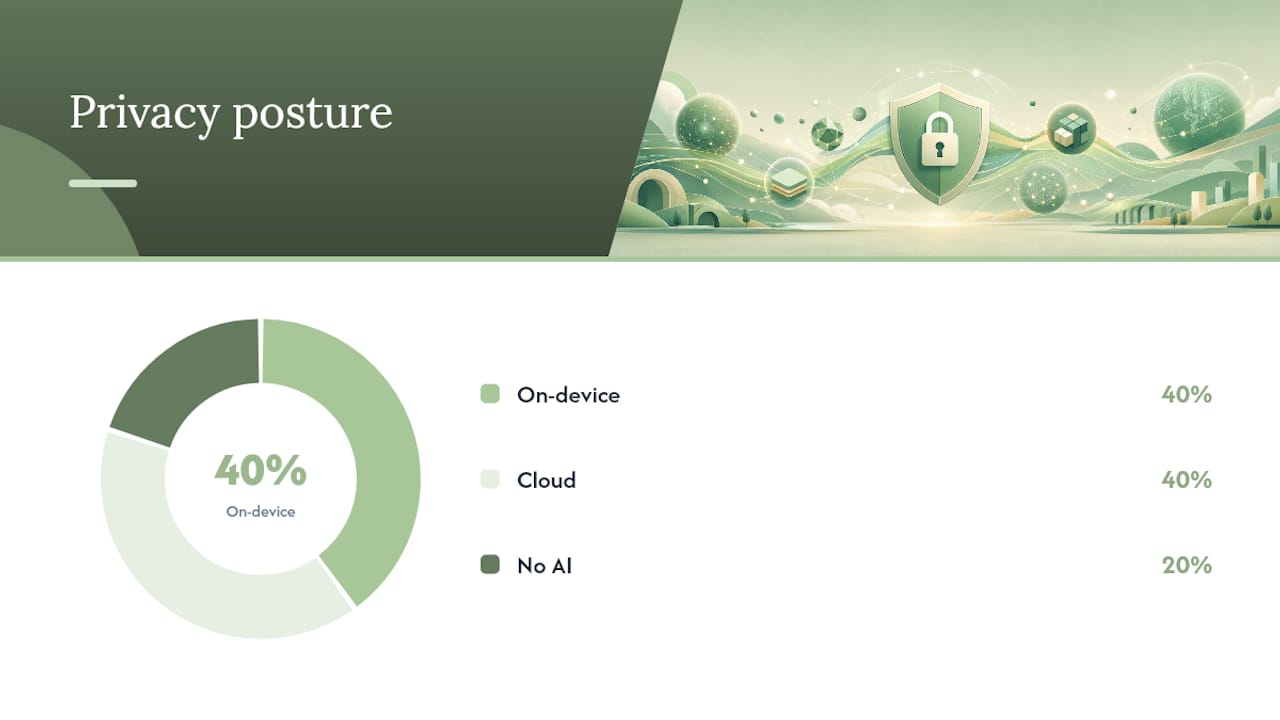
Reading the privacy column: "On-device" means core processing happens locally with no cloud transmission required. "Cloud" means the app's AI or sync features send data to external servers. For sensitive content like journals or financial notes, this distinction matters more than any feature list. Apple's App Store Privacy Nutrition Labels show exactly what each app declares about its data practices, and checking them before committing takes under two minutes.
How we evaluated these apps
The evaluation focused on five criteria that matter most to Apple Notes users considering a switch: cross-platform reliability, data ownership and export quality, capture speed, privacy posture (including App Store nutrition label review), and AI or search capabilities.
Each app was tested with a real capture workflow: creating a note on iPhone, syncing to a second device (macOS and, where supported, a Windows browser or Android), then exporting that note and verifying the output format. Export tests used both plain text and notes with embedded images to check attachment handling. Privacy labels were pulled directly from each app's App Store product page and cross-referenced against the developer's stated data practices.
Red flags that surfaced during testing:
- No export option or export locked behind a paid tier
- Offline access unavailable without a subscription
- Privacy label showing "data linked to identity" for content categories (notes text, usage data) with no clear on-device processing disclosure
- AI features that require sending note content to a cloud API with no opt-out
- Sync that silently fails without an error state on the secondary device
Any app with more than one of these issues was noted as a conditional recommendation rather than a primary pick.
How do you choose the right Apple Notes replacement?
Pick based on the single constraint that pushed you off Apple Notes. Everything else is secondary.
Platform mix is the first filter. If you regularly use Windows or Android, Apple Notes is a workaround, not a solution. Cross-platform access is the most common reason mixed-device users seek alternatives, and it narrows the list quickly: OneNote, Notion, Joplin, and Obsidian all run natively on Windows and Android. Bear and Craft do not.
File ownership is the second. If you want your notes to exist as files you control, not records in a vendor's database, look for apps that store notes as local Markdown or plaintext files. Local-file apps like Obsidian and Joplin reduce lock-in risk because the files stay on your device and open in any text editor. Cloud-native apps (Notion, Evernote) give you convenience but require trusting the vendor's export quality if you ever want to leave.
Privacy posture is the third, and it's often skipped. Before installing any app that will hold journals, financial notes, or health records, check its App Store Privacy Nutrition Label. Look specifically at whether the app declares "data linked to identity" for content categories, and whether AI features are processed on-device or transmitted off-device. The developer guidance Apple publishes clarifies that any data transmitted off-device counts as "collected" and must be declared in the label.
Red flags to verify without installing:
- No export option listed in the app's feature page or support docs
- Privacy label shows "data linked to identity" for notes content with no on-device processing disclosure
- "Offline access" listed only under a paid tier
- Required account creation before any local data is stored
For readers who want a deeper framework on validating on-device AI claims on Apple devices, the verification steps there apply directly to note apps as well.
Detailed reviews: which app fits your situation?
Cove (Obsidianridgelabs): best for private on-device journaling
Cove is built specifically for users who want AI-assisted journaling without sending personal content to a cloud server. All core processing runs on-device, which means your journal entries, reflections, and voice notes stay local to your iPhone or Mac. It's the clearest choice when the content is sensitive, whether that's personal health notes, financial records, or private writing.
The tradeoff is platform scope: Cove is Apple-only. If you need the same notes on a Windows machine or Android phone, Cove is not the right fit. For users who live in the Apple ecosystem and prioritize data path transparency, that's a reasonable constraint.
Pros: On-device AI processing, no cloud retention by default, strong privacy posture, purpose-built for journaling
Tradeoffs: Apple-only, not a general-purpose note app
Platforms: iOS, macOS
Migration tip: Apple Notes doesn't export to a Cove-native format directly. Export your notes as PDFs or text files first, then import or manually transfer the content you want to keep.
Obsidian: best for local file ownership and knowledge linking
Obsidian stores every note as a plain Markdown file on your device. There's no proprietary format, no vendor database, and no mandatory cloud account. If you ever want to leave, your files open in any text editor. That portability is the core reason hands-on comparisons consistently recommend it for users who care about long-term archive ownership.
The learning curve is real. Obsidian's power comes from its plugin ecosystem and backlink graph, neither of which you need on day one, but both of which reward investment. Sync across devices requires either iCloud or Obsidian Sync (paid).
Pros: Full local file ownership, Markdown portability, strong plugin ecosystem, cross-platform
Tradeoffs: Setup complexity, paid sync for mobile
Platforms: iOS, macOS, Windows, Android, Linux
Migration tip: Export Apple Notes as text or PDF, then convert to Markdown using a tool like Pandoc. Folder structure from Apple Notes maps reasonably well to Obsidian vaults.
Microsoft OneNote: best free cross-platform option
OneNote covers every major platform at no cost, which makes it the default recommendation for mixed-device users who don't want to pay. The notebook/section/page hierarchy is familiar, and the stylus support on Windows is genuinely useful for handwritten notes. Microsoft Copilot integration adds AI features, though those run in the cloud.
The privacy tradeoff is straightforward: OneNote syncs to Microsoft's cloud, and AI features send content to Microsoft's servers. For general productivity notes, that's an acceptable tradeoff for most users. For sensitive personal content, it isn't.
Pros: Truly free, full cross-platform, good handwriting support, familiar structure
Tradeoffs: Cloud-dependent, Microsoft account required, AI is cloud-based
Platforms: iOS, macOS, Windows, Android, Web
Migration tip: Apple Notes exports to PDF or text; OneNote accepts both. Shared notes in Apple Notes don't migrate automatically, so document collaborators before switching.
Notion: best for structured workspace and collaboration
Notion is less a note app and more a flexible workspace. Its database and block system lets you build structured content that Apple Notes can't match: linked tables, kanban boards, filtered views. Teams that need shared documentation alongside personal notes find it genuinely useful.
The complexity is also its main liability for simple note-taking. Broad roundups note that Notion's free tier is capable for individuals, but heavy users benefit from paid tiers for features like unlimited file uploads and advanced permissions. Everything syncs to Notion's cloud; there's no local-first option.
Pros: Flexible structure, strong collaboration, wide platform support, generous free tier
Tradeoffs: Cloud-only, overkill for quick capture, AI is cloud-based
Platforms: iOS, macOS, Windows, Android, Web
Migration tip: Export Apple Notes as PDFs, then import into Notion pages. Embedded images require manual re-upload in most cases.
Bear: best for clean writing on Apple devices
Bear's tag-based organization and clean editor make it the most Apple-native alternative for writers who want more than Apple Notes offers without the complexity of Obsidian or Notion. Nested tags work well for organizing large note libraries. Export to Markdown, PDF, HTML, and DOCX is straightforward.
Bear Pro (required for sync across devices) costs roughly $2.99/month. The app is Apple-only, so it doesn't solve the cross-platform problem. For Apple-ecosystem users who want a better writing experience and don't need Windows or Android access, it's a strong choice.
Pros: Clean editor, strong Markdown export, nested tags, good Apple integration
Tradeoffs: Apple-only, sync requires paid tier
Platforms: iOS, macOS
Migration tip: Bear imports Markdown files directly. Export Apple Notes as text, clean up formatting, and drag files into Bear.
Craft: best for document-style notes with Apple design
Craft produces notes that look like polished documents, which makes it useful for meeting notes, project briefs, or any content you'd share externally. Its block-based editor is more structured than Apple Notes but less database-heavy than Notion. The Apple design quality is high.
Cross-platform support is limited: iOS and macOS are strong, web access works for viewing, but Windows support is partial. For users who need full Windows functionality, Craft is not the right fit.
Pros: Strong document design, good sharing, solid Apple integration
Tradeoffs: Limited Windows/Android support, AI is cloud-based
Platforms: iOS, macOS, Web (limited Windows)
Migration tip: Export Apple Notes as PDFs or text and import into Craft pages. Block structure requires some manual reorganization.
Joplin: best open-source option with end-to-end encryption
Joplin is the privacy-focused choice for users who want cross-platform access, local file storage, and end-to-end encryption without paying for a proprietary app. It's open-source, stores notes as Markdown, and supports self-hosted sync via Nextcloud or Joplin Cloud. The interface is functional rather than polished.
For users who want to understand exactly where their data goes, Joplin's open-source codebase is auditable. That transparency is rare among note apps.
Pros: Open-source, E2EE, local Markdown files, cross-platform, self-hosted sync option
Tradeoffs: No-frills interface, setup required for sync
Platforms: iOS, macOS, Windows, Android, Linux
Migration tip: Apple Notes exports to text or PDF; Joplin imports Markdown directly. Use a conversion script to batch-convert exported notes.
Evernote: best for web clipping and OCR
Evernote's web clipper and OCR capabilities remain among the strongest in the category. It can search text inside images and PDFs, which is useful for scanned documents and receipts. The paid tier is expensive at $14.99/month, and the free tier is now significantly limited.
Pros: Strong OCR, best-in-class web clipper, cross-platform
Tradeoffs: Expensive paid tier, cloud-dependent, past privacy concerns
Platforms: iOS, macOS, Windows, Android, Web
Migration tip: Apple Notes exports to PDF or text; Evernote imports both. The ENEX format is Evernote-native and not easily portable out later.
Notability: best for handwriting and PDF annotation
Notability is purpose-built for handwritten notes and PDF markup, not general-purpose text notes. If your workflow involves annotating lecture slides, signing documents, or sketching diagrams, it's the strongest option on Apple hardware. For typed notes, it's not the right tool.
Pros: Best handwriting experience on iPad, strong PDF annotation, audio sync
Tradeoffs: Not a general note app, Apple-only, limited export formats
Platforms: iOS, macOS
Migration tip: Apple Notes doesn't export handwriting. Typed notes export as PDF and import into Notability subjects.
Atlas: best for AI-cited answers from your knowledge base
Atlas takes a different approach: rather than organizing notes manually, it uses AI to surface cited answers from your personal archive. For researchers and writers who accumulate large note libraries and need to retrieve specific claims with source attribution, that's a genuinely different capability than what Apple Notes or most alternatives offer.
Pros: AI-cited retrieval, good for large archives, knowledge-graph approach
Tradeoffs: Newer app, smaller ecosystem, cloud-dependent AI
Platforms: iOS, macOS, Web
Migration tip: Import Markdown or text exports from Apple Notes. Atlas organizes content automatically after import.
Pro Tip: Before committing to any app, run a 10-note sample import with your most complex notes, including ones with embedded images and shared links. Export quality and attachment handling are where most migrations break down, and discovering that on 10 notes is far better than discovering it on 1,000.
How do App Store Privacy Nutrition Labels help you choose?
Apple's Privacy Nutrition Labels are the single most useful quick check for privacy-conscious users evaluating a note app. Every app on the App Store is required to declare its data practices in a standardized format, covering three categories: data used to track you, data linked to your identity, and data not linked to your identity.
For note apps specifically, the categories that matter most are content (your actual note text), identifiers, and usage data. An app that lists "content" under "data linked to identity" is telling you that your note text is associated with your account or device profile on their servers. An app that processes notes on-device and declares no content collection is making a materially different privacy commitment.
The developer guidance Apple publishes is explicit: any data transmitted off-device counts as "collected" and must be declared. That means an app's AI feature that sends your note text to a cloud API must declare that transmission in its label, even if the app markets itself as private. The WWDC guidance on building accurate nutrition labels further clarifies that third-party SDKs embedded in an app (analytics, crash reporting, advertising) must also be declared, which is why two apps with similar feature sets can have very different labels.
For journals, financial notes, or health records, the practical rule is: if the label shows "data linked to identity" for content or health/fitness categories, treat that as a signal to read the privacy policy carefully before storing sensitive material.
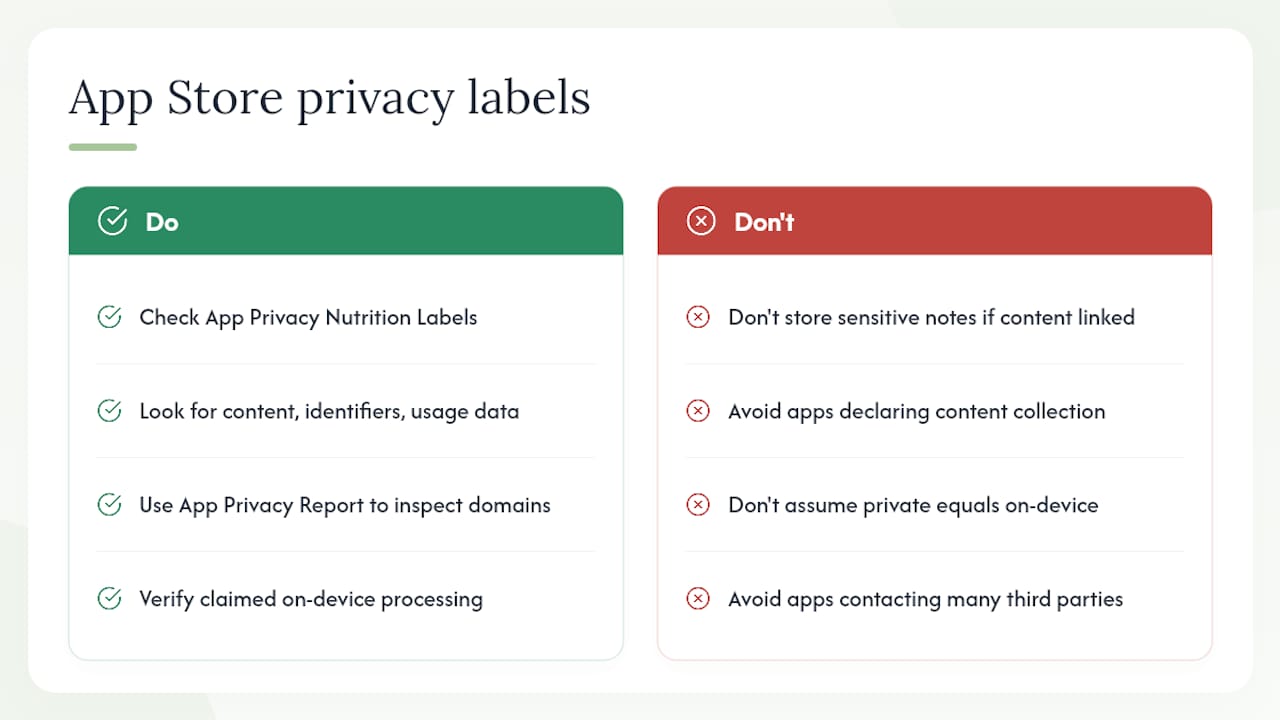
Pro Tip: Use Apple's App Privacy Report (Settings > Privacy & Security > App Privacy Report on iOS) to see which domains a note app contacts after you've used it. An app that claims on-device processing but contacts multiple third-party domains during a note-creation session warrants closer scrutiny. Pair this with the privacy verification steps for Apple devices to get a complete picture of the data path.
For readers who want to apply the same privacy-first evaluation framework to other app categories, the approach to validating on-device processing for privacy-first Apple apps follows the same logic.
Key stat: Apple's privacy labels page shows that Apple's own apps, including Notes, declare iCloud sync data under "data linked to identity" for account identifiers, which is a useful baseline when comparing third-party apps' disclosures.
How do you migrate from Apple Notes without losing data?
Migration from Apple Notes is straightforward for most users, but a few specific steps prevent the most common data-loss issues.
Step-by-step migration process:
- Export from Apple Notes — On macOS, select the notes or folders you want to export, then go to File > Export as PDF (for formatted output) or copy/paste to a text editor for plain text. For bulk export, third-party tools can batch-export Apple Notes to Markdown or HTML.
- Choose your target format — If your destination app supports Markdown (Obsidian, Joplin, Bear), convert exported text to .md files. If it accepts PDF or HTML (Notion, OneNote, Evernote), use those formats directly.
Common pitfalls and fixes:
For users whose note workflows include audio recordings or transcriptions, the private offline transcription options available on Apple devices integrate well with on-device note apps.
Key Takeaways
The best Apple Notes alternative depends on one primary constraint: platform mix, file ownership, or privacy posture. Identify that constraint first, then use the comparison table and privacy label check to narrow the shortlist.
| Point | Details |
|---|---|
| Platform mix drives the first cut | OneNote, Obsidian, and Joplin support Windows and Android natively; Bear and Craft do not. |
| Local files reduce lock-in | Obsidian and Joplin store notes as Markdown files you own; cloud-native apps require trusting vendor export quality. |
| Privacy labels are verifiable | Check the App Store label for "data linked to identity" under content before storing journals or financial notes in any app. |
| Migration requires a sample test | Import 10–15 notes with images first; attachment handling and formatting loss are where most migrations fail. |
| Cove fits privacy-first Apple users | Obsidianridgelabs' Cove processes journaling and AI features on-device with no cloud retention by default. |
The case for on-device processing is stronger than most comparisons admit
Most note-app comparisons treat privacy as a checkbox: does the app have a password lock? Does it offer two-factor authentication? Those are table-stakes features, not privacy signals. The more meaningful question is where the processing happens, specifically whether your note content leaves your device at all.
Cloud AI features in note apps are genuinely useful. Summarization, smart search, and auto-tagging save real time. But they work by sending your note text to a server, running a model, and returning a result. For general productivity notes, that's a reasonable tradeoff. For journals, financial records, health observations, or anything you'd be uncomfortable having indexed on a third party's infrastructure, it's a different calculation entirely.
The conventional wisdom in note-app comparisons is that on-device processing is a niche concern for privacy enthusiasts. That framing undersells the risk. The apps most likely to hold your most sensitive writing, personal journals, financial summaries, health notes, are exactly the ones where the data path matters most. An app that processes those notes on your device and declares no content collection in its App Store label is making a fundamentally different commitment than one that sends the same content to a cloud API, regardless of how the marketing describes it.
The practical implication: treat the privacy label and the on-device/cloud processing distinction as primary filters, not afterthoughts. Run the App Privacy Report check described earlier. Read the privacy policy for third-party SDK disclosures. Those steps take ten minutes and tell you more than any feature comparison.
Cove by Obsidianridgelabs keeps your most personal notes off the cloud
If the privacy criteria in this article matter to you, specifically local processing, no cloud retention by default, and a clean App Store privacy label, Cove by Obsidianridgelabs is built around exactly those constraints. It's a private, on-device AI journal for iPhone and Mac that handles personal writing, voice notes, and AI-assisted reflection without sending your content to an external server.

Where most note apps add AI by routing your content through a cloud API, Cove runs its AI features locally. That means your journal entries, financial observations, and personal reflections stay on your device. The App Store privacy label reflects that architecture. For users who've worked through the checklist in this article and concluded that on-device processing is non-negotiable, Cove is the direct answer.
It's not a general-purpose note app or a cross-platform workspace. It's purpose-built for private, AI-assisted personal writing on Apple hardware. If that's the gap Apple Notes left, explore Cove's full feature set and review the privacy label directly on the App Store product page before deciding.
For readers also evaluating local AI models and their privacy tradeoffs, the same on-device processing principles that apply to Cove apply across Obsidianridgelabs' full app suite.
Useful sources for further verification
The sources below back the claims in this article and give you the tools to run the same checks independently.
- Privacy - Control - Apple
- App Privacy Details - App Store - Apple Developer
- Create your Privacy Nutrition Label - WWDC22 - Videos - Apple Developer
- Apple Notes Alternatives (2026): 8 Best Note Apps Compared
- The 7 best note taking apps in 2026
- How to use Apple Notes on Windows or Android - How-To Geek
- Best alternatives to Apple Notes - Pocket-lint
- App privacy labels - Apple