
For privacy-conscious Apple users, Vault by Obsidianridgelabs is the strongest Monarch Money alternative because all processing stays on your device,, your financial data never touches a third-party server, and the app is built exclusively for iPhone, iPad, and Mac. Two other options worth evaluating alongside it:
- Vault (Obsidianridgelabs): Best for on-device AI budgeting with full local data residency — no cloud sync required.
- Empower: Best for free net-worth tracking and investment dashboards when you're comfortable with a cloud-based model.
- YNAB: Best for behavior-change budgeting if zero-based methodology matters more than investment visibility.
The comparison table below maps each option across privacy model, bank integration, and platform support so you can verify those claims directly.
Table of Contents
- Which Monarch Money alternatives should you actually consider?
- What each app actually does: pros, cons, and who it fits
- How do you pick the right alternative as a privacy-conscious Apple user?
- Why on-device AI and local data residency actually protect you
- How to migrate from Monarch Money to a new app
- What's the right pick for your situation?
- Key Takeaways
- The privacy gap most budgeting app reviews ignore
- Vault keeps your financial data where it belongs: on your device
- Useful sources
Which Monarch Money alternatives should you actually consider?
| App | Privacy model | Bank integration | Platform | Core strengths | Price | Best for |
|---|---|---|---|---|---|---|
| Vault | On-device | Optional / read-only | iPhone, iPad, Mac | AI budgeting, local data | Subscription / one-time | Privacy purists, Apple-only |
| Empower | Cloud / server-side | Plaid | iOS, web | Net worth, investments | Free (advisory upsell) | Free investment tracking |
| YNAB | Cloud / server-side | Plaid | iOS, Android, web | Zero-based budgeting | $99/year | Behavior change |
| Copilot | Cloud / server-side | Plaid | iPhone, iPad, Mac | Apple-native design | Subscription | Apple-first design fans |
| Actual Budget | Local-first (self-hosted) | Manual import | iOS, Mac, web | Envelope budgeting | Free / one-time | Privacy + spreadsheet control |
| Mint | Shut down March 2024 | N/A | N/A | N/A | N/A | No longer available |
Legend: "On-device" means core AI and data processing runs locally on your Apple hardware with no routine cloud transfer. "Cloud / server-side" means your financial data is processed and stored on the provider's servers. "Plaid" is a third-party bank aggregation service that relays your credentials or tokens to a separate company.
- On-device processing
- Free tier available for Empower
- Apple-first design for Vault and Copilot
What each app actually does: pros, cons, and who it fits
Vault (Obsidianridgelabs)
Vault runs its AI budgeting engine entirely on your Apple device. Your transaction data, spending patterns, and budget categories never leave your hardware during normal operation. Obsidianridgelabs publishes its on-device processing approach and documents optional connection tradeoffs transparently. The primary limitation is the absence of a web client and reduced feature breadth compared with cloud-powered tools. Best for: privacy purists who want Apple-native AI without cloud exposure.
- Pros: Full local data residency; Apple platform integration (Face ID, system privacy controls)
- Con: No web client; optional bank connections require explicit user consent
Empower
Empower (formerly Personal Capital) is the go-to free net-worth tracker when investment dashboards and retirement planning matter more than day-to-day envelope budgeting. The core dashboard carries no fee. The tradeoff: Empower's business model includes advisory service upsells, and your data lives on its servers. Day-to-day budgeting tools are secondary to the investment view.
- Pros: Free portfolio analysis; strong retirement planning tools
- Con: Cloud-based; advisory lead generation is part of the revenue model
YNAB
YNAB's zero-based budgeting assigns every dollar a job before you spend it, which makes it genuinely effective for changing spending behavior. It costs $99/year and has a steeper learning curve than most apps on this list. Investment tracking is not a focus. Best for: users who left Monarch because passive dashboards never changed their habits.
- Pros: Proven behavior-change methodology; strong educational resources
- Con: No investment tracking; subscription cost similar to Monarch
Copilot
Copilot is Apple-native by design, with a polished iOS and macOS interface that feels at home on Apple hardware. It uses Plaid for bank connections, so your data does pass through a third-party aggregator. There is no Android or web client, which is a real constraint for households with mixed devices. Best for: Apple-only users who prioritize interface quality and can accept cloud-based data handling.
Actual Budget
Actual Budget takes a self-hosted, local-first approach. You import transactions manually or via limited sync, and the data stays on your machine. It is free or available as a one-time purchase, and it uses envelope budgeting similar to YNAB. The setup requires more technical comfort than a typical consumer app. Best for: privacy-minded users who want spreadsheet-level control without a subscription.

How do you pick the right alternative as a privacy-conscious Apple user?
The single most important criterion is where your data is processed and stored. For Apple users with a strict privacy posture, that means on-device processing or, at minimum, client-side encryption before any cloud sync.
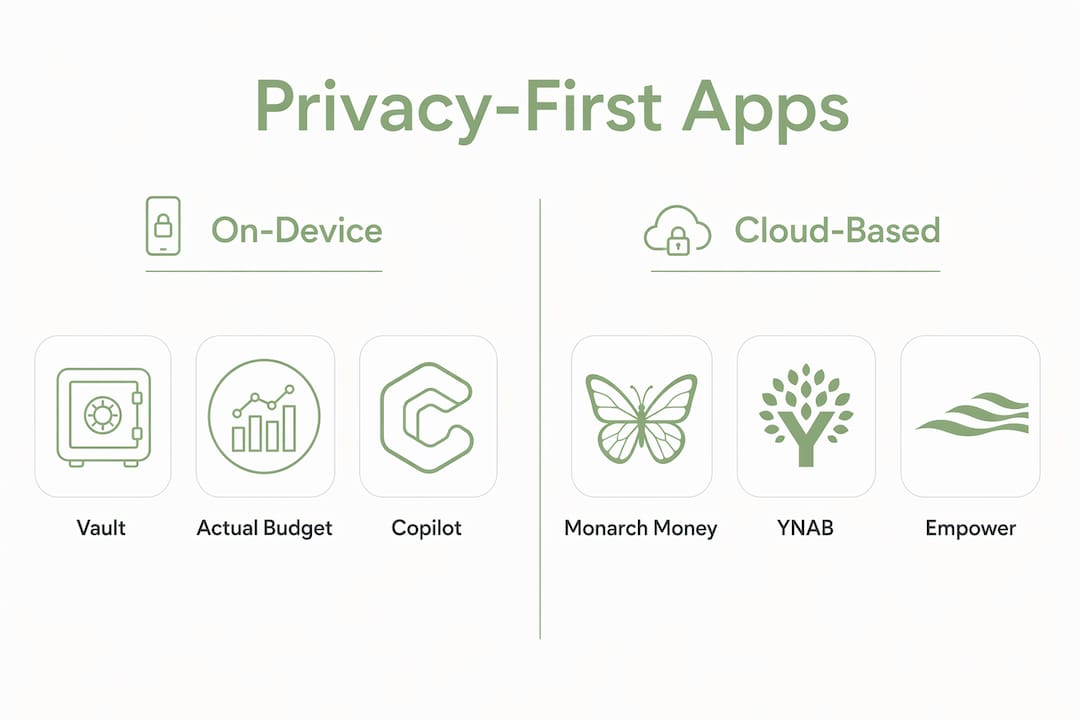
Privacy model is the first filter. Ask whether the app processes data locally on your device or sends it to a server. "End-to-end encrypted sync" is not the same as on-device processing; it protects data in transit but the provider may still decrypt it server-side.
Bank-connection transparency is the second. Plaid is the most common aggregator, and it introduces a third party into your data path. Some apps support read-only OAuth connections directly with your bank, which reduces exposure. A few, like Actual Budget, require manual import entirely. Knowing which method an app uses before you connect your accounts is non-negotiable.
Apple platform support matters practically. If you work across iPhone, iPad, and Mac, confirm the app has native builds for all three, not just a responsive web wrapper. Apple-native apps can leverage Face ID, Shortcuts, and system-level privacy controls that web apps cannot.
Budgeting methodology shapes daily use. Zero-based budgeting (YNAB, Actual Budget) requires active engagement. Dashboard-style tracking (Empower, Monarch) is more passive. On-device AI (Vault) can surface insights without sending your patterns to a remote model.
Cost model is worth mapping before you commit. Prices range from free to roughly $99/year for subscription tools; self-hosted and one-time options exist. Free tools often monetize anonymized spending data for advertisers or financial partners, which is a direct conflict with privacy goals.
Questions to ask before signing up: Does the app publish a clear privacy policy that names every third party receiving your data? Does it offer a bank-connection method that does not require sharing credentials? Can you use the app fully offline or with manual import if you choose? Is there a paid tier that removes data monetization entirely?
Watch for these red flags: vague privacy policy language that references "trusted partners" without naming them; mandatory advertising data-sharing buried in terms of service; opaque bank aggregation where the app does not disclose which aggregator it uses or what data that aggregator retains.
Why on-device AI and local data residency actually protect you
On-device processing limits data exfiltration by keeping your financial patterns on hardware you physically control. When a budgeting app processes transactions locally, there is no server-side database to breach, no API endpoint to intercept, and no third-party model provider receiving your spending history.
The mechanisms behind this protection are model isolation (the AI runs inside the app's sandbox on your device), local indexing (transaction categorization happens without a network call), and client-side storage (your data is written to local encrypted storage, not a cloud database).
| Dimension | On-device | Cloud / server-side |
|---|---|---|
| Attacker surface | Your device only | Provider servers + transit |
| Feature breadth | Limited by device compute | Large models, complex analysis |
| Update cadence | App updates required | Server-side updates, instant |
| Battery / CPU cost | Higher on-device | Offloaded to server |
The tradeoff is real: cloud-based apps can run larger models, sync across devices instantly, and offer features that exceed what current iPhone hardware can handle locally. On-device processing is not the right choice for every user. It is the right choice when your threat model includes third-party data breaches, advertising profiling, or regulatory exposure.
Obsidianridgelabs builds exclusively for on-device execution, documenting local model execution and optional connection tradeoffs for each app in its suite, including Vault. That level of transparency is uncommon among consumer finance apps.
Pro Tip: Before trusting any app's "privacy-first" claim, check whether it publishes a technical note or whitepaper describing where model inference runs. If the privacy page only says "we take your privacy seriously" without naming the data path, treat it as a cloud-based product until proven otherwise. Also check whether the app's bank-data privacy practices are documented for each connection type.
How to migrate from Monarch Money to a new app
Expect 1–3 hours to export, reconnect accounts, and re-create budgets; investment accounts and custom tags add time. Mint shut down in March 2024, pushing many users to Monarch, so this migration path is well-traveled.
- Export your Monarch data. Go to Settings > Data > Export in Monarch and download your transaction CSV and account history.
- Back up locally. Move the export to an encrypted folder on your Mac or an offline drive before proceeding.
- Choose your bank-connection method. Decide whether you want Plaid, direct OAuth, or manual import in the new app before connecting anything.
- Reconnect accounts with read-only access where supported. Avoid sharing full credentials; prefer OAuth tokens that can be revoked independently.
- Re-create budgets, categories, and tags. Map your Monarch categories to the new app's structure; this step takes the most time for complex setups.
- Validate balances. Cross-check opening balances against your bank statements before treating the new app as your source of truth.
- Post-migration privacy cleanup. Revoke Monarch's bank tokens via your bank's connected-apps settings, delete any cloud backups of the export file, and confirm the new app's privacy settings match your preferences.
If you choose a privacy-first app without investment tracking, pair it with Empower's free dashboard for net-worth visibility. Keep the two apps intentionally separate so your daily transaction data stays local while investment aggregation happens in a contained, clearly understood cloud context.
What's the right pick for your situation?
For privacy-conscious Apple users, Vault by Obsidianridgelabs is the primary recommendation. It is the only option on this list that combines on-device AI, local data residency, and a native Apple experience across iPhone, iPad, and Mac.
Three archetypes map cleanly to specific choices:
- Privacy purist: Vault is the answer. On-device processing, no routine cloud transfer, transparent optional connections.
- Apple-only user who prioritizes design: Copilot fits if you accept Plaid-based bank connections and cloud data handling.
- User who needs free net-worth tracking: Empower covers investments at no cost; pair it with Vault or Actual Budget for daily budgeting if privacy matters for transaction data.
The full Vault vs. alternatives comparison covers feature-level tradeoffs in more depth if you want to verify the specifics before switching.
Key Takeaways
For privacy-conscious Apple users, Vault by Obsidianridgelabs is the strongest Monarch Money alternative because on-device processing keeps financial data off third-party servers entirely.
| Point | Details |
|---|---|
| Top privacy pick | Vault (Obsidianridgelabs) processes all data on-device with no routine cloud transfer. |
| Privacy red flag | Free apps often monetize anonymized spending data; verify the business model before connecting accounts. |
| Bank-connection preference | Prefer read-only OAuth or manual import over Plaid to minimize third-party data exposure. |
| Migration time | Expect 1–3 hours to export, reconnect, and re-create budgets from Monarch. |
| Cost range | Options range from free (Empower) to $99/year (YNAB, Monarch); one-time purchases exist. |
The privacy gap most budgeting app reviews ignore
Most comparison articles treat privacy as a checkbox: does the app have a privacy policy? Does it use HTTPS? Those questions miss the more consequential issue, which is where your financial data is processed and who can access it at rest.
Cloud-based budgeting apps are not inherently irresponsible. But when your spending patterns live on a provider's server, you are trusting that provider's security posture, their legal team's response to government data requests, and their business model's alignment with your interests. For most users, that trust is reasonable. For users with elevated privacy needs — professionals, high-net-worth individuals, anyone subject to financial surveillance risk — it is not a safe default.
The apps that take on-device processing seriously tend to also be more transparent about optional connections, data paths, and what happens when you revoke access. That correlation is not accidental. Building locally forces architectural honesty: you cannot hide a server-side data pipeline when there is no server.
Vault keeps your financial data where it belongs: on your device
Most budgeting apps ask you to trust their servers with your most sensitive financial data. Vault by Obsidianridgelabs takes the opposite position: your transactions, spending patterns, and AI-generated insights stay on your iPhone, iPad, or Mac, processed locally with no routine cloud transfer.

Vault is built exclusively for Apple devices, which means it integrates with Face ID, respects system-level privacy controls, and runs its budgeting AI within your device's own compute environment. Optional bank connections are documented transparently, and you control whether and how external data flows into the app. The tradeoffs are real: no web client, and on-device compute limits some of the large-model features you'd find in cloud-based tools. For users who have decided that data residency matters more than feature breadth, those are acceptable constraints.
See Vault and the full suite of private AI apps at Obsidianridgelabs, or go directly to the Vault app page to review pricing and platform requirements.
Useful sources
The claims in this article draw from the following sources. Each link is provided so you can verify the underlying data directly.
- Best Monarch Money Alternatives: Beat the $99 Fee — FinCompareLab: Covers pricing comparisons, free-tool business model tradeoffs, and YNAB methodology notes.
- Best Budget Apps for 2026 — NerdWallet: Background on Monarch Money's feature set, Mint's shutdown timeline, and PocketGuard's daily-spending model.
- Best Monarch Money Alternatives in 2026 — X1Wealth: Covers Copilot's Apple-only positioning, pricing bands, and cross-platform tradeoffs.
- 10 Best Alternatives to Monarch Money — Get Money Saving: Beginner-focused reviews including Goodbudget's manual-entry envelope method.
- Best Budgeting Apps of 2026 — Forbes Advisor: Scored comparison of major budgeting apps including Monarch Money, YNAB, and PocketGuard.
- Private AI Apps for Apple — Obsidianridgelabs: Company landing page describing on-device processing architecture and the full app suite.
- Why We Build Private On-Device AI — Obsidianridgelabs: Technical and philosophical rationale for local model execution and optional-connection transparency.