Most Apple Intelligence tasks process directly on your iPhone, iPad, or Mac, and never reach a server. When a request exceeds what the device can handle, Apple sends only the data that task needs to Private Cloud Compute, a system Apple says does not store that data or make it accessible to Apple employees. The mechanisms behind that promise, on-device models, the Secure Enclave, server attestation, and public transparency logs, are real and independently checkable. They are also not a guarantee against every form of exposure.
TL;DR:
- Apple processes most AI tasks entirely on the device with hardware like Neural Engines on iPhone 15 Pro or newer chips, limiting data transfer needs.
- Tasks that require broader context, such as detailed document rewriting or large image generation, trigger Private Cloud Compute and send minimal data to Apple servers.
- When data leaves the device for cloud processing, Apple commits to not storing or sharing that data, and technical attestation verifies server software integrity.
- Users can review requests routed to Private Cloud Compute through the Apple Intelligence Report and audit server activity, but metadata may still reveal usage patterns.
- External extensions and third-party apps can bypass Apple privacy guarantees, so scrutiny of third-party integrations remains essential for privacy.
Table of Contents
- Apple Intelligence Privacy Starts With On-Device Processing
- Private Cloud Compute: What Happens When Data Leaves the Device
- How To Check Apple Intelligence With the Transparency Report and Settings
- Where Apple's Privacy Model Still Has Gaps
- Can You Actually Verify Apple's Privacy Claims?
- A Practical Checklist To Reduce What Apple Intelligence Sees
- What Obsidian Ridge Labs Has Learned Building Private AI Apps
- GDPR, CCPA, and Where Apple Intelligence Fits Legally
- How Apple Intelligence Privacy Protections Have Evolved
- Why Privacy-First AI Design Matters More Than the Marketing Term
- Build Your Privacy Habits Around Apps That Never Leave Your Device
- Sources
Apple Intelligence Privacy Starts With On-Device Processing
Every Apple Intelligence request begins with the same question: can the device handle this alone? Apple built the system so the answer is yes as often as possible, and Apple Support describes on-device processing as the architectural starting point for the entire feature set, not an afterthought bolted onto a cloud service.
That check happens fast and locally. The operating system evaluates the size and complexity of the request against what the on-device models can realistically do, using the Neural Engine built into Apple silicon. If the model can produce a reliable result without help, the request never leaves the device.
Several everyday tasks fall into this category:
- Summarizing an email thread or a long group of notifications
- Generating notification previews and smart replies in Messages
- Suggesting text in the keyboard, including tone adjustments through Writing Tools
- Running Photos analysis, like identifying a person, pet, or object for search
- Handling most Siri requests that don't require pulling in fresh external information
Hardware matters here more than most people realize. Apple Intelligence requires an iPhone 15 Pro or later, or a Mac or iPad with an M1 chip or newer, specifically because the Neural Engine on those chips has enough throughput to run compact language and vision models without draining the battery in minutes. Older devices simply lack the silicon to keep this work local, which is part of why Apple Intelligence isn't available on them at all rather than offered in a degraded, more cloud-dependent form.
The limits show up with generative tasks that need broader context or more parameters than an on-device model can hold. Rewriting a long document in a different style, generating detailed images, or handling a Siri request that requires reasoning across a wide range of personal data can outrun what fits on a phone, however powerful the chip. That's the threshold where the second half of Apple's system, Private Cloud Compute, takes over. Obsidianridgelabs's own breakdown of on-device AI privacy walks through this decision point in more technical detail for readers who want to see exactly where that line sits on their own devices.
Private Cloud Compute: What Happens When Data Leaves the Device
Private Cloud Compute exists for exactly one reason: some Apple Intelligence tasks are too demanding for on-device hardware, but Apple still wanted server-side processing to carry privacy guarantees closer to on-device processing than to a typical cloud AI service. Apple's privacy documentation states that when a task is routed to Private Cloud Compute, only the data required for that specific request is sent, and that data is not stored or made accessible to Apple, including to Apple staff.
That's a stronger claim than most cloud AI providers make, and Apple backs it with specific technical commitments rather than a general privacy policy statement:
- Requests run on Apple silicon servers, not third-party cloud infrastructure
- Each server cluster uses a Secure Enclave, the same hardware security component that protects Face ID data and payment credentials on your iPhone
- Servers undergo cryptographic attestation before a device will send them any data, confirming the software running matches what Apple has published
- Apple states it does not retain user data after the request completes, even temporarily on disk
By the numbers: Apple Intelligence requires an iPhone 15 Pro or later, or Apple silicon Macs and iPads, because Private Cloud Compute's device-side attestation and on-device fallback models both depend on Neural Engine capacity that only appeared starting with those chips.
What Apple does collect, according to that same documentation, is limited operational telemetry: which feature triggered the request, roughly how large the payload was, and timing information needed to route and process it. Apple's stated position is that the content of the request itself, the actual text, photo, or voice data, is never logged or retained. That distinction between operational metadata and content is the crux of the entire Private Cloud Compute pitch, and it's worth remembering as a separate category from the content-level privacy guarantee when you evaluate the claim.
How To Check Apple Intelligence With the Transparency Report and Settings
Apple doesn't ask you to simply trust that Private Cloud Compute behaves as described. It gives you a log.
- Open Settings, tap Apple Intelligence & Siri, then look for Apple Intelligence Report to see a record of requests that were routed to Private Cloud Compute rather than handled on-device.
- Export that report if you want a persistent copy, useful if you're auditing behavior over time rather than checking a single session.
- Go to Settings > Privacy & Security > Analytics & Improvements to review whether Share iPhone Analytics is enabled, which governs a separate stream of aggregate usage data.
- Check Settings > Privacy & Security > App Privacy Report to see which apps, including Apple Intelligence features, have accessed sensitive data like your microphone, camera, or location recently.
- Review Siri & Dictation permissions and individual app integrations with Writing Tools to confirm which apps can invoke Apple Intelligence features at all.
The analytics sharing toggle deserves a closer look than most people give it. When enabled, Apple's privacy documentation explains that Apple uses differential privacy techniques, injecting statistical noise into data before it's aggregated, so Apple can spot trends across millions of devices without being able to trace any single data point back to your device. It's a real technique with academic grounding, not a marketing label, but it only protects you if you understand what you're opting into.
Pro Tip: Export your Apple Intelligence Report right after a week of heavy Siri or Writing Tools use, then compare it against your memory of what you asked. Requests you don't recognize as needing outside help are worth investigating first.
Where Apple's Privacy Model Still Has Gaps
The architecture reduces exposure. It doesn't eliminate it, and pretending otherwise does readers a disservice.
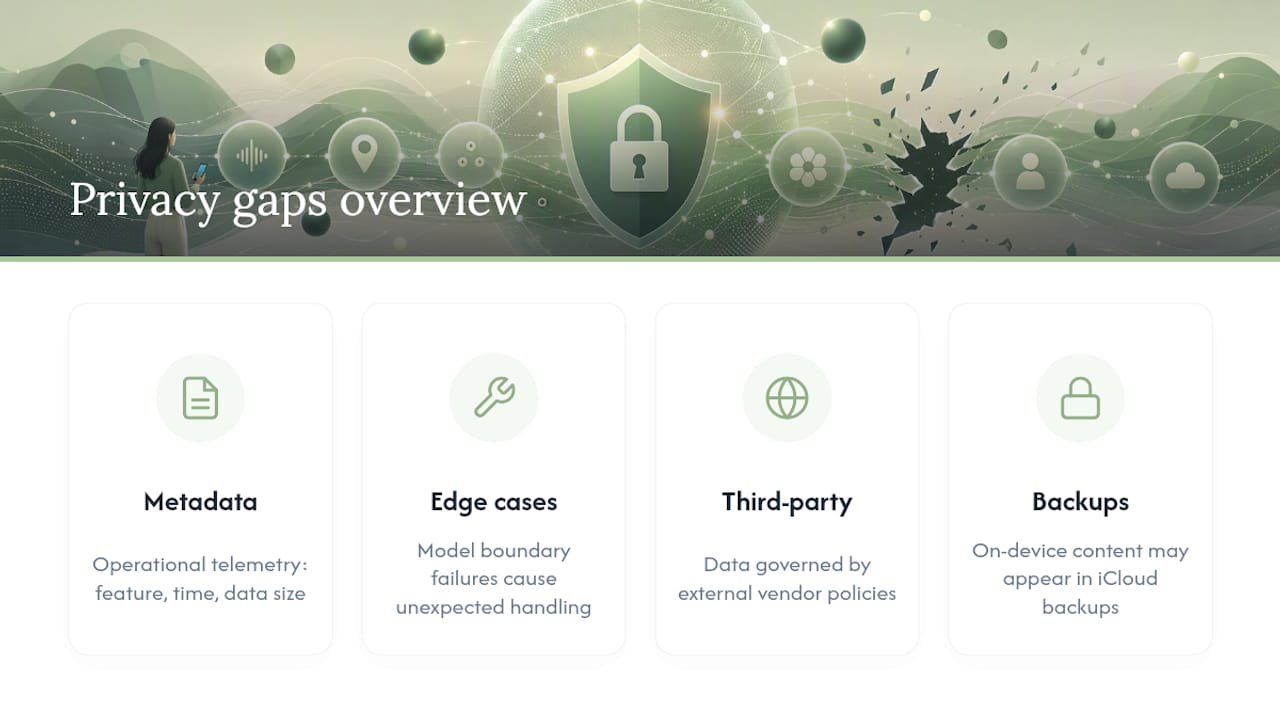
Start with metadata. Even when content never leaves the device or is never stored on Apple's servers, Private Cloud Compute still generates operational telemetry, which feature was used, when, and roughly how much data moved. That's a smaller attack surface than a service that logs full content, but metadata alone can be revealing. A pattern of large, frequent requests at 2 a.m. tells a story even without the content behind it.
By the numbers: Technical analysis of hybrid on-device and cloud-assisted generative systems, documented in machine learning failure-mode research, identifies edge cases where model behavior at the boundary between local and remote processing can produce unexpected data handling, not because a company misrepresents its architecture, but because the systems themselves are complex enough to have blind spots even their designers didn't anticipate.
Third-party extensions change the calculation entirely. Apple's own Private Cloud Compute guarantees apply to Apple's infrastructure, not to external services you explicitly connect, such as a ChatGPT integration inside Siri. The moment you opt into a plugin like that, your data is governed by that third party's privacy policy, not Apple's, and the privacy characteristics of the whole interaction shift with it. This is a class of risk, not a single vendor problem: any external extension you enable deserves the same scrutiny you'd apply to a new app.
Backups and sync add another layer worth watching. Content that stayed strictly on-device during processing can still end up in an iCloud backup, synced across your other devices, or exposed if a device is lost unlocked. App permissions compound this: an app with broad access to Photos or Contacts can expose the same data Apple Intelligence is careful with, through a completely different door.
Can You Actually Verify Apple's Privacy Claims?
Attestation is the technical backbone of the entire Private Cloud Compute promise, and it's worth understanding what it actually proves. Before your device sends any data to a Private Cloud Compute server, it checks a cryptographic signature confirming that server is running the exact software build Apple has published and logged. If the signature doesn't match, the device refuses to send the request. That's a real, verifiable handshake, not a policy statement.
Apple pairs that with public logging that goes further than most companies attempt:
- Apple publishes the software images running on Private Cloud Compute servers so outside parties can inspect them
- Independent security researchers can request access to verify that the published code matches what's actually deployed
- This process is designed to let researchers, not just Apple, confirm the attestation claims hold up in practice
Policy researchers have argued this kind of external verification is exactly what builds durable public trust in AI systems, rather than asking users to take a company's word alone. The OECD's work on AI risk and incident transparency frames independent verification as a baseline expectation for any system handling sensitive personal data, and Apple's approach to Private Cloud Compute maps onto that framework more closely than most consumer AI products do.
Still, verification has real limits. Researchers can inspect published server software, but they can't inspect the physical hardware inside a data center themselves, and they're relying on Apple to have published the complete, accurate image in the first place. Sealed hardware and proprietary on-device models mean external checks corroborate specific claims; they don't amount to a full, independent audit of everything Apple builds.
A Practical Checklist To Reduce What Apple Intelligence Sees
Getting specific about your own settings does more for your privacy than any general policy debate. Work through this in order:
- Open Settings > Apple Intelligence & Siri > Apple Intelligence Report and review recent Private Cloud Compute requests before changing anything else.
- Go to Settings > Privacy & Security > Analytics & Improvements and turn off Share iPhone Analytics if you'd rather not contribute to Apple's aggregate telemetry.
- Check Settings > Privacy & Security > App Privacy Report and revoke camera, microphone, or location access for any app that doesn't clearly need it.
- Review iCloud sync settings for Notes, Photos, and Messages, and turn off sync for any folder holding sensitive content you'd rather keep local only.
- Remove any third-party chat or writing extensions integrated with Siri or Writing Tools that you're not actively using.
- Decide whether specific Apple Intelligence features, like Writing Tools in a specific app, are worth keeping active given what they access.
If you decide the tradeoffs aren't worth it, Apple Intelligence can be turned off entirely under Settings > Apple Intelligence & Siri. You'll lose the summarization, generative writing, and enhanced Siri features, but Siri's basic voice commands and dictation continue working on the older, non-generative system.
Pro Tip: Treat the App Privacy Report as a monthly habit rather than a one-time check. Permissions creep quietly, especially after app updates that quietly request broader access.
For a deeper settings walkthrough beyond Apple Intelligence specifically, Obsidianridgelabs's guide to iPhone privacy settings worth auditing covers adjacent controls, like location services and ad tracking, that interact with how much data any AI feature can ultimately draw on.
What Obsidian Ridge Labs Has Learned Building Private AI Apps
Some developers build transcription, finance, and journaling apps that process entirely on-device, and that engineering choice comes with real costs Apple's hybrid model is designed to avoid. A model small enough to run entirely on an iPhone's Neural Engine will generally be less capable than one running on a data center GPU cluster, and offline accuracy on complex tasks, like transcribing overlapping speakers or parsing messy handwriting, often lags what a cloud-augmented system can do.
That tradeoff is exactly why Apple built Private Cloud Compute instead of staying purely on-device for everything. There's no universally correct answer, only a set of choices with different exposure profiles.
If you're evaluating any app claiming to be "private," ask three concrete questions: does it run inference locally by default, does it have a network fallback and does it disclose when that triggers, and does it give you a log or report you can inspect yourself. An app that can't answer those clearly is asking you to trust a claim it hasn't made verifiable, the same standard Apple's own transparency logging is built to meet.
GDPR, CCPA, and Where Apple Intelligence Fits Legally
Apple Intelligence's architecture wasn't designed in a legal vacuum. Minimizing what data leaves the device, and guaranteeing that what does leave isn't stored, aligns closely with data minimization principles at the core of the EU's General Data Protection Regulation, which requires companies to collect and retain no more personal data than a task genuinely requires.
In the United States, the California Consumer Privacy Act and its expansion under the California Privacy Rights Act give California residents specific rights to know what data a company collects and to request its deletion. Apple's Private Cloud Compute design, where content isn't retained after a request completes, sidesteps much of the friction other companies face when responding to deletion requests, since there's little to delete in the first place if the claim holds.
Regulatory compliance and privacy protection aren't identical, though it's tempting to treat them that way. A system can satisfy the letter of GDPR or CCPA while still leaving room for the metadata exposure and third-party extension risks discussed earlier. Regulation sets a floor, not a ceiling, and Apple's on-device-first architecture appears designed to clear that floor by a wide margin rather than to merely meet it. Readers outside the US and EU should check their own jurisdiction's rules directly, since data protection law varies significantly by country and Apple's global privacy commitments don't always map one-to-one onto every local legal requirement.
How Apple Intelligence Privacy Protections Have Evolved
Apple Intelligence launched with on-device processing and Private Cloud Compute as a paired system from the start, rather than adding server-side privacy protections after the fact in response to criticism. That sequencing matters: the attestation and transparency logging discussed earlier were part of the initial architecture, not a patch.
Since launch, Apple has continued expanding what the Apple Intelligence Report surfaces and which languages and regions have access to specific features, with server-side capacity and language support scaling gradually rather than arriving all at once. Each hardware generation with a more capable Neural Engine also shifts a slightly larger share of tasks from Private Cloud Compute back to on-device processing, since more work becomes possible locally as the chips improve.
The practical lesson for privacy-conscious readers is to treat Apple Intelligence Report review as an ongoing habit rather than a one-time check, since which tasks route to Private Cloud Compute on your specific device can shift with each iOS update. What required a server round-trip on last year's iPhone might run entirely on-device after this year's chip update, and the report is the only reliable way to see that shift happening on your own hardware.
Why Privacy-First AI Design Matters More Than the Marketing Term
Apple's Private Cloud Compute architecture is more rigorous than most of the industry gives it credit for, and more limited than most of Apple's own marketing implies. Both things are true at once, and treating this as a binary, either fully private or fully exposed, misses what actually matters for your decisions.
The evaluation questions I'd ask of any AI feature, Apple's or otherwise, are the same three that matter for Obsidianridgelabs's own apps: does it default to local processing, does it disclose when it falls back to a server, and does it give you a way to check its own claims rather than asking you to take them on faith. Apple clears that bar better than nearly any competitor building generative AI into a consumer operating system. It still doesn't clear it perfectly, and no company running any hybrid on-device and cloud system currently does.
What privacy-conscious users get wrong most often is assuming "on-device" and "private" are the same word. On-device processing reduces exposure to a third party seeing your content, but a phone that syncs everything to iCloud, runs a dozen apps with broad permissions, and connects a chat extension with no privacy review of its own can still leak plenty, regardless of how carefully Apple built the AI layer itself. The architecture is only as private as the settings sitting on top of it.
— Alex
Build Your Privacy Habits Around Apps That Never Leave Your Device
Some developers design transcription, finance, and journaling apps to keep processing on iPhone by default, with no server round-trip required for the core functionality Apple's own hybrid model sometimes needs. That means no Private Cloud Compute decision to audit, because there's no cloud step in the path at all for the tasks these apps handle.

Where Apple's transparency logging lets you review what left your device after the fact, Obsidianridgelabs's approach is built so there's less to review in the first place. If you want to see exactly how that verification-first thinking applies across the Apple ecosystem beyond a single app, the privacy verification guide walks through the same attestation and on-device concepts covered here, applied to a broader set of tools. Readers comparing dedicated transcription apps specifically can start with the offline transcription app comparison to see how local-only processing holds up against hybrid alternatives on accuracy and speed. If you're building your own on-device tools rather than buying one, Devwiz's guide to on-device AI app development covers the implementation side of the same tradeoffs discussed above. Visit Obsidian Ridge Labs to see the current app lineup and decide which one fits the data you're most protective of.
Sources
- Legal - Apple Intelligence & Privacy - Apple
- Apple Intelligence and privacy on iPhone - Apple Support
- OECD — AI risks and incidents
- arXiv paper on ML/AI failure modes