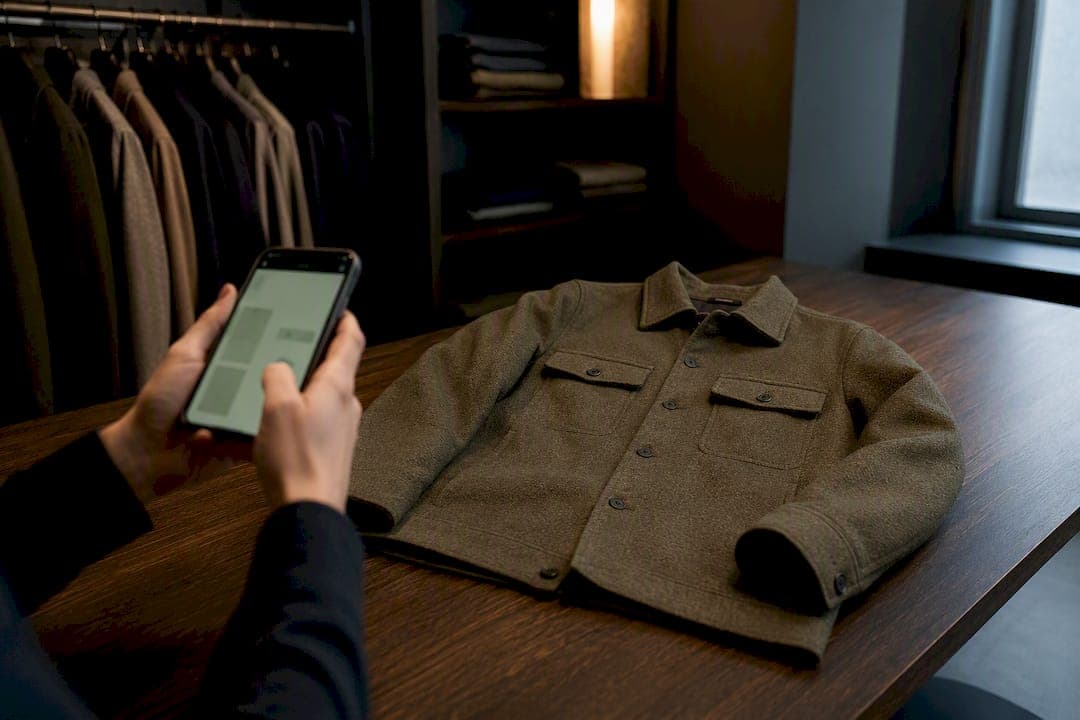
Most outfit planner apps are not private by default: many transmit wardrobe photos to cloud AI services for background removal, categorization, or virtual try-on rendering. The immediate cue is the upload screen itself. If the app asks permission before sending an image off-device and names where it's going, that's a good sign. If it just uploads silently, treat every photo as shared with a third party.
TL;DR:
- Most outfit planner apps send photos to cloud AI services by default, often without clear notification or explicit consent from users.
- Photos can contain background details, metadata, or reflections that reveal sensitive information beyond the clothing items uploaded.
- Cloud processing can involve indefinite storage and potential use of images for model training, analytics, or data resale unless explicitly stated otherwise.
- Using apps with on-device processing ensures wardrobe images stay on your phone, minimizing exposure and reducing privacy risks.
- Regularly review app permissions, disable unnecessary features, and choose services that provide clear privacy policies with specific retention and security commitments.
Table of Contents
- What Do Outfit Planner Apps Actually Collect?
- Feature Use Versus Hidden Risk: How Apps Use Your Wardrobe Data
- Where Are Your Photos Actually Processed: On-Device or Cloud?
- AI Training, Model Reuse, and Third-Party Sharing
- How to Lock Down Your Wardrobe Data in Four Steps
- What Security and Deletion Promises Should Look Like
- Why On-Device Architecture Changes the Privacy Equation
- Convenience Has a Price Most People Never See
- A Wardrobe App That Keeps Your Photos on Your Phone
- Sources
- FAQ
What Do Outfit Planner Apps Actually Collect?
Wardrobe apps gather far more than the item photos you intentionally upload. Understanding the full inventory matters because each data class carries a different risk profile, and most privacy policies bundle them together in vague language.
The core categories look like this:
- Wardrobe images, including individual item photos and full-body "outfit of the day" shots.
- Profile and measurement inputs, such as height, size, body shape, and style preferences used to personalize suggestions.
- Device and usage metadata, covering session length, tap patterns, and which features get used most often.
- Calendar and schedule data, when an app syncs outfit planning to upcoming events or weather forecasts tied to your location.
- Payment information, collected through the App Store or, in some cases, a separate billing processor.
The riskier data often hides inside the photo itself. A full-body outfit shot can capture a face, a reflection, a room layout, or a street sign in the background. Photo files also frequently carry EXIF metadata, embedded location coordinates, and timestamps that reveal exactly where and when a picture was taken. Vision models can analyze these images to infer body measurements, daily routines, and other sensitive attributes that you never explicitly typed into a form. Privacy advocates put it plainly: visibility does not mean permission.
Before uploading anything, run a quick check. Look for a setting that strips EXIF data automatically, a face-blur or crop tool built into the camera flow, and a toggle for local-only storage that keeps images on your device rather than syncing them to a server. Apps that skip all three options are asking you to trust them blind.
Feature Use Versus Hidden Risk: How Apps Use Your Wardrobe Data
There's a real difference between an app using your photos to build the feature you asked for and an app using them for something you never agreed to. Categorization, outfit suggestions, virtual try-on rendering, and search all require some analysis of your images. That's expected and reasonable.
The trouble starts with derived inferences that go beyond the stated feature. A wardrobe planner tracking what you wear each day can quietly build a profile of your daily routine, your body shape over time, your spending habits, and even your social patterns based on outfit changes tied to calendar events. None of that requires malicious intent. It's simply what happens when photo and usage data accumulate without a hard limit on purpose.
Secondary uses push further into risk territory:
- Analytics platforms that receive usage data alongside images for "product improvement."
- Ad-targeting systems that use style preferences to build advertising profiles.
- Dataset resale or licensing, where anonymized or aggregated wardrobe data gets sold to fashion retailers or research firms.
- Cross-service profiling, where data shared with one vendor gets matched against data from another app you use.
The tell is in the language. A privacy policy that says it uses your data "to improve our services and provide relevant content" is functionally unlimited. A policy that says it uses images "solely to render virtual try-on previews, deleted within 24 hours of processing" is a limited-purpose statement you can actually verify.
Pro Tip: Search the privacy policy for the word "solely" or "only." Its presence, or absence, next to a stated purpose tells you more than the length of the document ever will.
Where Are Your Photos Actually Processed: On-Device or Cloud?
This is the single most consequential technical distinction in outfit planner privacy, and most apps do not make it obvious. On-device processing means the analysis, categorization, background removal, style matching, happens using your phone's own hardware. The image never leaves your device. Cloud inference means the app uploads your photo to a remote server, runs it through a model hosted somewhere else, and sends the result back.
Cloud processing isn't automatically dangerous, but it introduces a data path that did not exist before. Some apps describe this as "transient inference": the image is uploaded, processed, and deleted within a short window, sometimes minutes. Technical documentation from wardrobe-adjacent AI services shows this distinction can be explicit, with stated retention periods and a clear line between inference and storage. Other apps store uploaded images persistently on cloud object storage, sometimes indefinitely, often without a clearly stated deletion timeline.
Typical cloud architecture behind an outfit planner includes an object store for the images themselves, a separate AI inference vendor (often a third-party computer vision or generative model provider), and sometimes a fourth-party analytics layer. Each hop is a place your photo can sit longer than you expect.
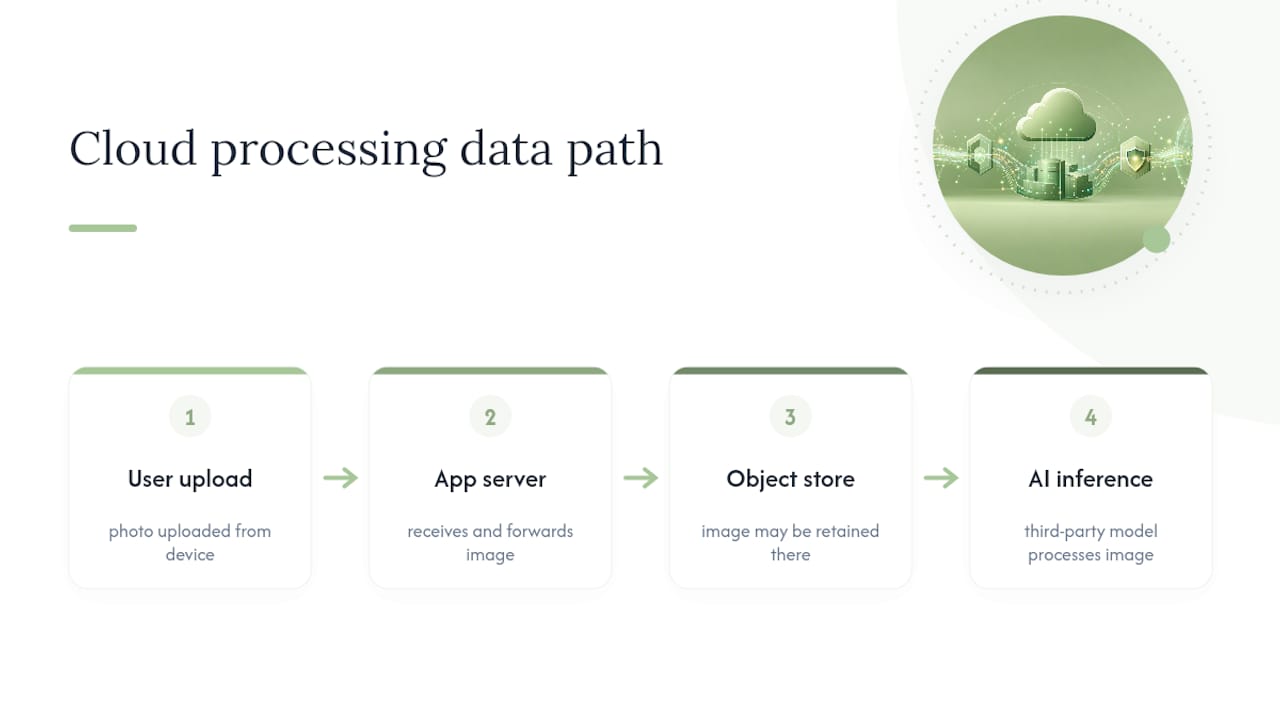
To verify what's actually happening, check three things: the privacy policy for retention language ("processed and deleted within," "stored until account deletion"), any in-app disclosure that appears immediately before your first photo upload, and whether the policy names its vendors directly. A policy that names its inference provider and storage vendor is telling you more than one that simply says "trusted partners."
AI Training, Model Reuse, and Third-Party Sharing
Processing your photo to generate a result is not the same as using your photo to train a model. This distinction rarely gets explained clearly, and it's the one that determines whether your wardrobe images could resurface in ways you never intended, embedded in a model's learned patterns rather than deleted after use.
Ephemeral inference treats your image as a one-time input: upload, process, discard. Training retention keeps a copy, or a derivative of it, to improve the underlying model over time. The second scenario means your photo, or patterns extracted from it, could influence outputs for other users indefinitely. Data processing agreements between an app and its AI vendors typically specify which scenario applies, and a policy that includes an explicit "not used for training" clause is giving you a real, checkable commitment rather than a vague reassurance.
Watch for these categories of vendor and the risks each carries:
- GPU inference providers, which run the model computation and may retain logs longer than the app itself discloses.
- Vision and language model services, some of which reserve rights to use submitted data for model improvement unless a business-tier contract excludes it.
- Analytics and crash-reporting tools, which sometimes receive image metadata bundled with diagnostic data.
Red flags include consent flows that bundle image upload with broad "service improvement" language, privacy policies that never name a single vendor, and settings pages with no separate toggle for AI processing versus basic app analytics. If a policy can't tell you whether your photo trains a model, assume it might.
How to Lock Down Your Wardrobe Data in Four Steps
Reducing exposure doesn't require abandoning outfit planning apps altogether. It requires a short audit and a few settings changes.
- Check for per-feature consent. Before using virtual try-on or AI styling, the app should ask specifically, not bundle it into a general terms acceptance.
- Turn off cloud sync and location access. Most outfit planners work fine with wardrobe data stored locally; deny calendar and location permissions unless a feature genuinely requires them.
- Disable analytics and session replay. These settings usually live under a "privacy" or "data sharing" menu, separate from account settings.
- Minimize what you digitize. Crop photos to the clothing item only, blur faces in full-body shots, and skip digitizing pieces you rarely style.
Digitizing a small, deliberate set of items, rather than your entire closet at once, keeps the exposure proportional to the value you're getting from the app.
Pro Tip: Keep a local backup of your digitized wardrobe outside the app itself. If a service shuts down or changes its data policy overnight, you won't lose your catalog along with your trust in the platform.
What Security and Deletion Promises Should Look Like
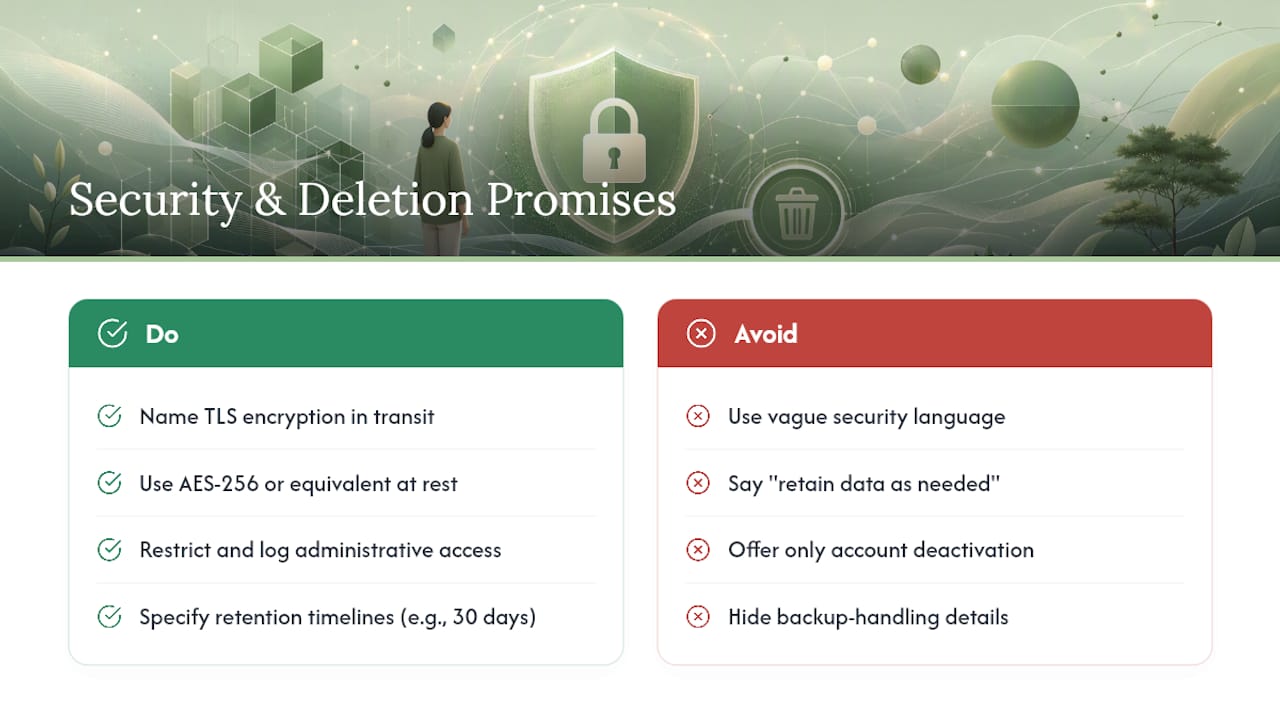
A credible outfit planner names its security measures instead of gesturing at them. Look for TLS encryption in transit, AES-256 or an equivalent standard for data at rest, and language confirming that administrative access to stored images is restricted and logged.
Retention timelines should be specific. "We delete uploaded images within 30 days of account closure" is verifiable. "We retain data as needed" is not. A trustworthy app also offers a real export and delete flow, not just an account deactivation button, and explains how backups are handled once you delete an image from the main app.
Your rights as a user typically include access to what's stored about you, portability (getting your data in a usable format), correction of inaccurate profile details, and deletion on request. A privacy policy worth trusting tells you exactly where to send that request, usually a dedicated privacy email or an in-app form, not a generic support inbox. If a company can produce a data processing agreement excerpt or a documented retention schedule on request, that's a stronger signal than any marketing language about "bank-level security."
Why On-Device Architecture Changes the Privacy Equation
On-device processing on an iPhone means wardrobe analysis runs on the device's own chip, using local model files rather than a round trip to a server. No account is required to make the core feature work, and no image leaves the phone unless you explicitly choose a connected feature. Obsidian Ridge Labs builds its apps around this principle, pairing local processing with clear opt-in dialogs for any optional network connection.
To validate an on-device claim yourself, check the app listing for explicit local-processing language, confirm the app functions with your device offline, and look for a settings toggle that shows exactly which features, if any, require a network connection.
Convenience Has a Price Most People Never See
Cloud features earn their trade-off when they do something local processing genuinely can't, like matching your wardrobe against a live weather feed or a shared family calendar. Everything else, categorization, basic styling suggestions, outfit history, works fine locally, and there's no good reason to accept the added exposure for it.
The habit that actually protects you long term isn't a one-time settings sweep. It's a quarterly audit: review what's connected, delete images you no longer need digitized, and revoke permissions for features you stopped using months ago.
— Alex
A Wardrobe App That Keeps Your Photos on Your Phone
Every risk covered here, cloud uploads, ambiguous training language, third-party vendor sharing, comes from the same root design choice: sending your images somewhere else to get an answer back. Some app developers build digital wardrobe tools that run the core AI processing on your iPhone itself, so there's no mandatory upload and no server holding your outfit photos while you decide whether to trust it.

Optional connections exist where they add real value, and each one requires an explicit opt-in rather than a buried default. There are no advertising profiles built from your style history and no account requirement standing between you and the app's core features. If you've read this far because you wanted a wardrobe planner that doesn't quietly become a data pipeline, Echo Chamber Pro is available starting at $2.99 per month, with yearly and one-time purchase options listed on the app page where you can compare plans and get started today.
Sources
- How to Disappear: The Rise of Anti-Surveillance Fashion - Mozilla Foundation
- Fashn.ai docs - data retention and privacy
FAQ
What Is the 3-3-3 Rule for Clothes?
The 3-3-3 rule is a wardrobe minimalism method where you build outfits from just 3 tops, 3 bottoms, and 3 pairs of shoes for a set period, often a month. It's unrelated to app privacy directly, but a smaller digitized wardrobe also means fewer photos exposed if an app suffers a data breach.
What Is the Best App for Cataloging Outfits With Privacy in Mind?
The best choice depends on whether your priority is on-device processing or advanced cloud-based styling features. Apps that process images locally and require explicit opt-in for any network feature, like the approach Obsidian Ridge Labs takes with its digital wardrobe tools, minimize the amount of wardrobe data that ever leaves your phone.
Are Outfit Planner Apps Safe to Use With Real Photos?
They're as safe as their storage and processing model allows. An app that keeps photos on-device and strips EXIF metadata carries far less risk than one that uploads full-resolution images to cloud storage with vague retention language.
Do Outfit Planner Apps Use My Photos to Train AI Models?
It depends entirely on the vendor and the data processing agreement behind the app. Some services explicitly state images are not used for training and are deleted after processing, while others reserve broader rights, so checking for a "not for training" clause in the privacy policy is worth the two minutes it takes.
How Do I Know if an App's Privacy Claims Are Legitimate?
Check whether the app names its actual vendors (storage provider, AI inference service), states specific retention timelines instead of vague language, and requires per-feature consent before your first photo upload rather than bundling it into general terms acceptance.