
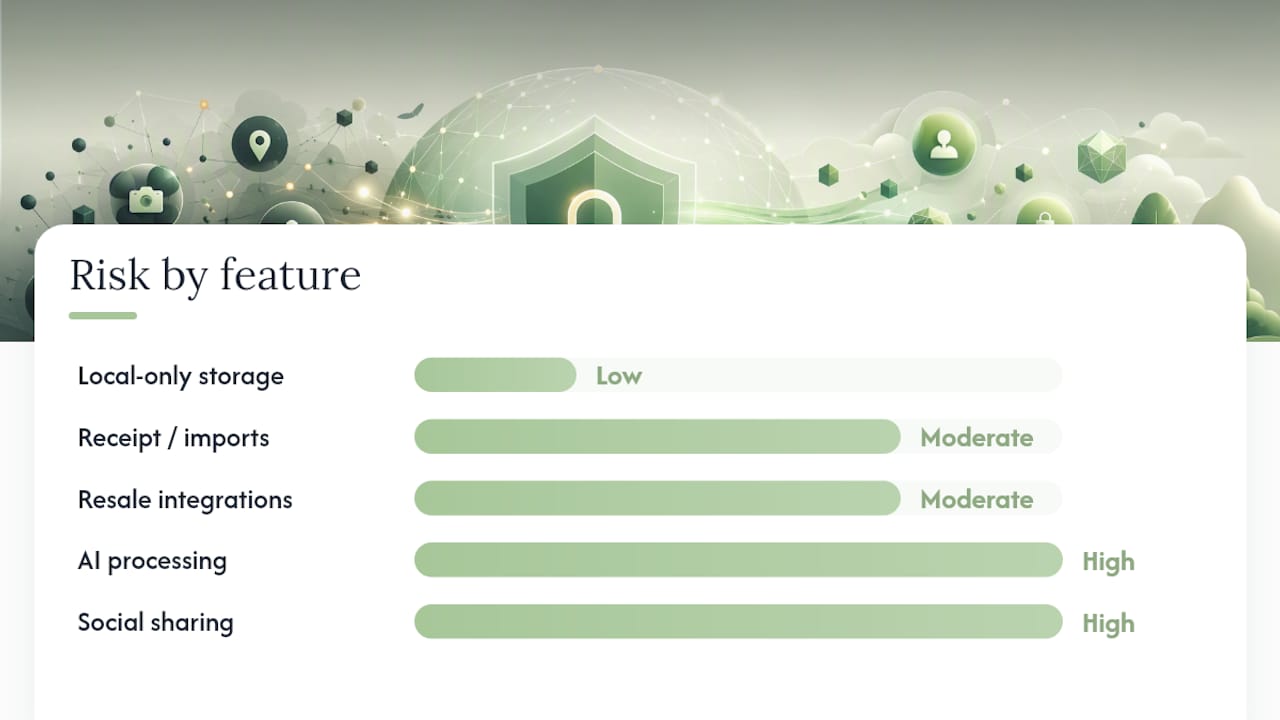
Whether a closet app is safe to use depends entirely on which features you turn on. Local-only wardrobe storage carries low risk. Anything involving AI processing, receipt imports, resale integrations, or social sharing raises the stakes considerably, because each of those routes your data somewhere new.
Before you upload a single photo or flip on an AI feature, check three things: the app's App Store or Google Play Data safety label, its current privacy policy, and any point-of-use consent prompt that appears the moment you enable a feature. Together, these three sources catch what any one of them misses on its own, since store labels summarize categories but skip retention and point-of-use detail.
Look for three signals as you compare apps:
- Private-by-default language, meaning features start off until you turn them on.
- A specific claim about on-device processing, not vague reassurance.
- Clear deletion and export controls you can test yourself.
Quick check: if a wardrobe app can't tell you, in plain language, where your photos go the moment you tap "scan item," that's a signal worth taking seriously before you upload anything else.
Key Takeaways
Closet app safety depends on feature-level choices, not a single trust decision, and verifying claims across the store label, policy, and consent prompts is the most reliable defense.
| Point | Details |
|---|---|
| Risk scales with features | Local-only storage is low risk; AI, imports, resale, and sharing each add exposure separately. |
| Check three sources | Store privacy label, current privacy policy, and in-app consent prompts together cover what one alone misses. |
| Test deletion yourself | Delete one photo before uploading your whole closet to confirm the flow actually works. |
| Ask five direct questions | Processing location, retention period, export format, sharing defaults, and training-data use. |
| Obsidianridgelabs sets a benchmark | Wove processes wardrobe photos on-device by default, with trade-offs disclosed around cloud-only conveniences. |
Primary Sources and Guides to Verify Privacy Claims
Check the app's own Data safety page and privacy policy first, then compare against independent privacy checklists and Obsidianridgelabs' wardrobe app comparisons.
Table of Contents
- What Data Do Closet Apps Typically Collect?
- How Do Image and AI Features Change Where Your Data Goes?
- How to Read App Store and Play Store Privacy Labels Quickly
- Feature-By-Feature Checklist Before You Upload Anything
- Retention, Deletion, and the Red Flags Worth Watching
- Why On-Device Processing Changes the Privacy Equation
- Sources
What Data Do Closet Apps Typically Collect?
Wardrobe photos are the obvious category, but they're rarely the whole picture. Most closet apps also store item metadata (brand, color, category tags), saved outfit combinations, and wear history that tracks how often you actually put something on.
Account-level data comes next: your login identifiers, subscription status, and payment state, usually handled by Apple or a billing processor like RevenueCat rather than the app developer directly. Behind that sits device telemetry, crash logs, and product-analytics events that measure how you use the app, which most developers collect regardless of what you upload.
The real expansion happens through imports. Features that pull in purchase receipts, scan your email for order confirmations, parse shopping-page HTML, or sync calendar entries all add transaction data and metadata far beyond a photo of a sweater. Closet apps often collect more than clothing images, and resale or social integrations compound that further:
- Friend links and shared-outfit connections tied to your identity.
- Public share URLs for outfit posts, which may or may not be unguessable.
- Resale-marketplace metadata if you list items directly from the app.
Each import or share feature is a separate decision, not a footnote to the last one.
How Do Image and AI Features Change Where Your Data Goes?
This is where privacy stops being theoretical. On-device processing means your wardrobe photos never leave your phone. The app analyzes the image locally, using the device's own hardware, and nothing gets transmitted for that task. Verify this claim by checking the minimum OS version required (on-device AI models tend to need recent iOS or Android releases) and looking for explicit wording like "processed on your device" rather than generic privacy assurances.
Cloud or API processing works differently. The app sends your image to a third-party AI provider, which returns a result, background removed or an item categorized, but that provider now holds a copy, at least temporarily. Privacy policies commonly name these vendors and should state whether your data is used to train their models.
Common AI flows to watch for: background removal, automatic clothing recognition, chat-based styling assistants, and virtual try-on tools. Each may use a different processing path.
Pro Tip: Check the consent prompt that appears the first time you use an AI feature, not just the privacy policy. If the app asks permission before the feature runs and names where the data goes, that's a stronger signal than a policy buried in settings.
How to Read App Store and Play Store Privacy Labels Quickly
Store privacy labels give you a fast summary of what data an app says it collects, but they were never designed to cover retention periods or exactly when a feature triggers a data transfer. Treat them as a starting point.
- Open the app's store listing and review the "Data Safety" (Android) or "App Privacy" (iOS) section before installing anything.
- Cross-check the runtime permissions the app actually requests: Photos, Camera, Contacts, Calendar, Location, and Microphone matter most for wardrobe apps, and each should map to a specific feature you understand.
- After installing, use iOS Privacy Report or Android's permission manager to audit which permissions the app has actually used, not just what it requested.
A closet app has no obvious reason to request microphone or location access unless it offers voice search or local shopping recommendations. If it does, that's worth a direct question to support before you grant it.
Feature-By-Feature Checklist Before You Upload Anything
Treat every feature as its own privacy decision rather than trusting a blanket policy statement. Privacy-focused guides recommend checking permissions, photo handling, sync controls, and deletion options one at a time, rather than accepting an app's overall reputation as proof any single feature is safe.
Before turning on a feature, work through this:
- Does it require a network call, and if so, which provider receives the data?
- Is there a point-of-use consent screen naming specific data categories and how long they're retained?
- Can you actually delete an uploaded image and confirm it's gone, not just hidden from your view?
- Can you export your data in a format you could open elsewhere?
- Are social and resale features off by default, requiring you to opt in rather than opt out?
Resale and sharing features deserve extra caution because they often generate public or semi-public links tied to your wardrobe. Leave them off until you've confirmed how links get revoked and who else can see them.
Pro Tip: Test the delete function on one photo before you upload your entire closet. If deletion is slow, hidden three menus deep, or doesn't actually remove the item from the server, you've learned something important in under a minute.
Apps built private-by-default, where features stay off until you explicitly enable them, tend to put less pressure on you to get every setting right on day one.
Retention, Deletion, and the Red Flags Worth Watching
Good privacy practice looks specific. A policy that names an explicit retention window (say, 30 days after account deletion), offers a machine-readable export, and processes deletion requests immediately is doing what it should.
Vague language is the opposite signal. Phrases like "as long as necessary for business purposes," a missing export option, or no disclosure of how long third-party vendors retain your data are all reasons to slow down. Poorly documented deletion flows are a meaningful limitation for anyone who takes their data seriously, not a minor inconvenience.
Deleting data from your local app and deleting it from a company's servers are two different actions, and only one of them is guaranteed to happen automatically. If you're covered under a framework like the CCPA or GDPR, you generally have a formal right to request deletion and export, and a company's response process should be documented, not something you have to hunt for in a support forum.
Questions to Ask a Developer Before Trusting a Sensitive Feature
Five questions cut through most marketing language fast:
- Is image processing done on-device, or sent to a third party, and if so, which one?
- Do you store images or analysis results on your servers, and for how long?
- Can I export my data in a machine-readable format that includes both images and metadata?
- Is sharing off by default, and how are public share links revoked?
- How do you prevent my data from being used to train third-party models?
A support team that answers these directly, without redirecting you to a generic policy page, is telling you something about how the company operates.
Why On-Device Processing Changes the Privacy Equation
Obsidianridgelabs builds its apps, including its wardrobe app, Wove, around on-device AI processing on Apple hardware. That design choice means wardrobe photos are analyzed locally by default, with no routine transfer to third-party cloud services for core features.
The strongest practical safeguard isn't a policy promise. It's architecture that makes a data transfer impossible rather than merely unlikely, because processing never leaves the device in the first place.
Staying local does involve trade-offs. Some cloud-only conveniences, like instant cross-device sync or certain large-model features that need more compute than a phone provides, may work differently or be unavailable. That's a reasonable exchange for many privacy-conscious users, but it's worth knowing upfront. You can validate on-device claims yourself: check OS compatibility requirements, test the app in airplane mode to see what still works, and compare it against the checklist above whenever you evaluate a new wardrobe app.
A Note on Taking This Slow
Adopt features one at a time rather than accepting every default on day one. Turn on AI scanning, test it, check what the consent prompt actually said, and only then decide whether resale or sharing features are worth the added exposure.. If you want to verify any of the on-device claims discussed here yourself, Obsidianridgelabs' privacy resources walk through the practical steps.
A Privacy-First Alternative Worth Comparing
If the checklist above left you wanting an app that starts from private-by-default rather than asking you to lock down settings after the fact, Wove processes wardrobe photos on your Apple device, not on a third-party server, which means there's no routine upload to audit in the first place. That's a meaningfully different starting point than apps where privacy is a setting you have to find and enable.

To be clear about trade-offs: staying fully on-device means some cloud-dependent conveniences, like certain cross-device sync features, work differently than they would with a cloud-first app. For most privacy-conscious users, that's a fair exchange for not having wardrobe photos sitting on a third-party server. You can see how the approach works in practice on the Obsidianridgelabs site, and if you want to verify on-device claims for any app, including ones you're already using, the Apple-ecosystem privacy verification guide walks through exactly what to check.
Sources
- Closet App Privacy: What Data Is It Collecting?
- Private Digital Closet App: A Practical Privacy Checklist (2026)
- YouCloset privacy policy (example)