Most iPhone users should choose a privacy-first, on-device digital wardrobe app rather than a cloud-based one, unless they specifically need cross-platform web access or a shared stylist account. On-device processing keeps your clothing photos and outfit data on your phone instead of a company's server, while still delivering fast AI tagging and outfit suggestions on modern iPhones. The practical next step: install an app with a free tier, then digitize 10 to 20 items to see how it handles your closet before committing further.
TL;DR:
- Most privacy-focused wardrobe apps process photos and data on the iPhone itself, with cloud features being optional rather than mandatory, reducing data exposure.
- Digitizing your closet with automated background removal and batch tagging can take 30 to 90 minutes for 50 items, and photographing your most-worn pieces first boosts immediate usability.
- When testing an app, verify whether it states "processed on device" versus "processed in the cloud" and conduct a quick upload test of a few items to confirm data handling practices.
- On-device AI on recent iPhones enables smart features like tags and outfit suggestions without sacrificing privacy, making local processing increasingly viable.
- Free tiers of digital wardrobe apps generally cover basic inventory, but advanced features such as wear analytics or AI suggestions require a subscription or paid upgrade.
Table of Contents
- What Does a Digital Wardrobe App on iPhone Actually Do?
- How Do You Choose the Best iPhone Digital Wardrobe App?
- Why On-Device Processing Matters for Your Wardrobe Data
- How Do You Digitize Your Closet Without Losing a Weekend?
- Why I Think Privacy-First Wardrobe Apps Are the Right Call Now
- Try Wove for a Private Digital Wardrobe on Your iPhone
- Sources and Further Reading
- FAQ
What Does a Digital Wardrobe App on iPhone Actually Do?
A digital wardrobe app photographs, catalogs, and organizes your clothing so you can plan outfits, track what you actually wear, and stop buying duplicates you forgot you owned. The category sits at the intersection of a virtual closet app and a fashion planning tool, and the feature set varies more than most people expect before they start comparing options.
Digitization is the first hurdle. Some apps require you to snap a photo of each item against a plain background; others use AI background removal to cut the item out automatically, turning a messy phone photo into a clean product shot. A few apps let you import directly from retailer order histories or forward a receipt by email, which saves time if you buy most of your clothes online. Automated import tools are consistently described as the biggest time-saver for initial cataloging, since manual photography for a full closet can take hours.
Organization comes next, and this is where a wardrobe app either earns its keep or becomes clutter. Look for:
- Custom tags and categories (by season, occasion, color, or brand)
- Collections or capsule groupings for travel or minimalist wardrobes
- Packing list generation tied to a trip or event
- Search and filter tools that actually work with dozens or hundreds of items
Planning tools turn the catalog into something useful day to day. An outfit editor lets you drag and drop pieces into combinations, an outfit calendar tracks what you wore and when, and weather-aware suggestions pull local forecast data to recommend appropriate layers. Not every app does all three well, so check which ones matter to you before assuming a feature exists.
Analytics is the feature that separates a simple inventory from a genuine sustainability tool. Cost-per-wear divides what you paid by how many times you have worn something, which reframes a purchase decision quickly once you see the number. Wear-rate tracking flags items sitting untouched for months. Industry commentary on apps like Indyx frames this as a tool to "shop your own closet," using the data you already own instead of buying more.
AI outfit generation and virtual try-on get the most marketing attention, but expect real limitations. AI-generated outfit suggestions work best as a starting point, not a final answer, and apps that combine automated suggestions with a manual inspiration library tend to keep users happier over time, since style control matters as much as convenience. Virtual try-on, where you see clothing rendered on a photo of yourself, remains a newer feature and often requires sending images to a server for processing, which raises the privacy question covered in the next section.
How Do You Choose the Best iPhone Digital Wardrobe App?
Choosing the right wardrobe app comes down to matching a handful of decision criteria to your actual habits, not picking whatever ranks highest in an app store search. Here's the framework worth working through before you download anything:
- Privacy posture. Does the app process photos and data on your iPhone, or does it upload everything to a cloud server? This affects both your exposure to data breaches and how fast the app feels, since local processing skips the round trip to a server.
- Digitization speed versus manual control. Faster automated cataloging usually means less precision in tagging and categorization. If you want a tightly organized closet, manual tagging pays off even though it takes longer upfront.
- Analytics depth. If cost-per-wear and wear-rate tracking matter to you, confirm the app actually surfaces those numbers rather than just storing photos.
- Multi-device sync. Some users need their wardrobe app on an iPad or a web browser too. Local-first apps sometimes limit sync to reduce cloud exposure, which is a real trade-off worth understanding upfront.
- Stylist or sharing access. If you want a professional stylist or a friend to weigh in on outfits, that typically requires some form of account sharing or cloud access.
Match these criteria to your actual goal. A minimal-setup user wants fast AI import and low manual tagging. A capsule-builder wants strong collection tools and packing list generation, something covered in more depth in guides on building a capsule wardrobe. A sustainability tracker cares most about cost-per-wear and wear-rate data. A stylist collaborator needs sharing features that most privacy-first apps intentionally limit.
Pricing in this category generally falls into three models: one-time app purchases, ongoing subscriptions (monthly, yearly, or lifetime), and freemium tiers that give you basic cataloging free but charge for AI credits or advanced analytics. A resource like apppricer tracks how these subscription models shift over time across app categories, which is worth a look if pricing structure matters to your decision.
Before installing anything, run through a short pre-install checklist: confirm iOS compatibility with your specific iPhone model, check whether the app requires account creation just to use basic features, verify you can export your data if you switch apps later, and look for family or shared-plan options if multiple people in your household want to use it.
Pro Tip: Check an app's privacy policy for the phrase "processed on device" versus "processed in the cloud" before you download. That single distinction tells you more about your actual data exposure than any marketing copy on the app store listing.
Watch for red flags: apps that require account sign-up before you can even browse the interface, permission requests for contacts or location that have nothing to do with cataloging clothes, and vague privacy policies that never specify where AI processing actually happens.
Why On-Device Processing Matters for Your Wardrobe Data
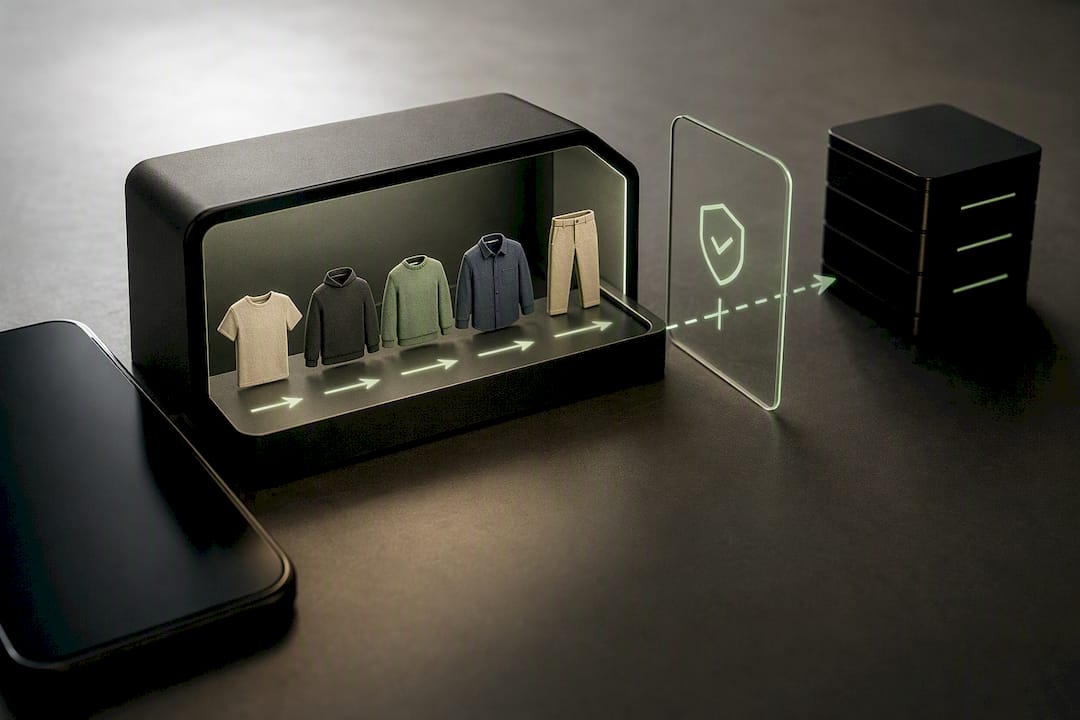
Local-first architecture means your wardrobe photos, tags, and usage history stay stored on your iPhone rather than a remote server. Some apps in this category, including Threadlist, market a no-account, local-storage approach specifically because it removes the need to trust a third party with hundreds of photos of your personal belongings and daily habits. That matters more than it sounds. A wardrobe app knows what you wear, when you wear it, and by extension a fair amount about your routines and finances.
On-device AI reduces exposure to third-party tracking, since your data never leaves the phone to be processed on someone else's infrastructure, according to Obsidian Ridge Labs' privacy verification guide. That guide frames on-device processing as a practical middle ground: you still get AI-powered tagging and suggestions, but without the data transfer that comes with cloud-based equivalents.
Verifying an app's privacy claims takes a few minutes and is worth doing before you commit to digitizing a full closet:
- Confirm the app states clearly whether photos are stored locally or synced to a cloud account.
- Check whether cloud features are opt-in rather than mandatory, and what specifically triggers a data upload.
- Look for encryption details if any data does leave the device, especially for backup or sync features.
- Note whether basic cataloging works without creating an account at all.
There is a real trade-off here. Cloud-based features, like accessing your wardrobe from a web browser or sharing it with a stylist service, generally require some data to leave your device. That is not automatically a problem, but it should be a decision you make deliberately rather than one buried in a terms-of-service document you never read. Local-first apps commonly gate advanced AI features behind a paid tier while keeping your base wardrobe data on-device, so it is worth checking exactly where the AI processing runs before you assume "local" means everything, all the time.
Wove, Obsidian Ridge Labs' own wardrobe app, is built around this exact principle: on-device processing for cataloging and outfit planning, with cloud connections treated as optional rather than required. The company's broader journal covers the specifics of how that verification process works across its apps, which is a useful reference regardless of which wardrobe app you ultimately choose.
If privacy is a top priority, the concrete next step is simple: before digitizing your whole closet in any app, upload five items and check exactly what happens to those photos. Does the app ask for cloud permission? Does it work offline? That small test tells you more than any privacy policy summary.
How Do You Digitize Your Closet Without Losing a Weekend?
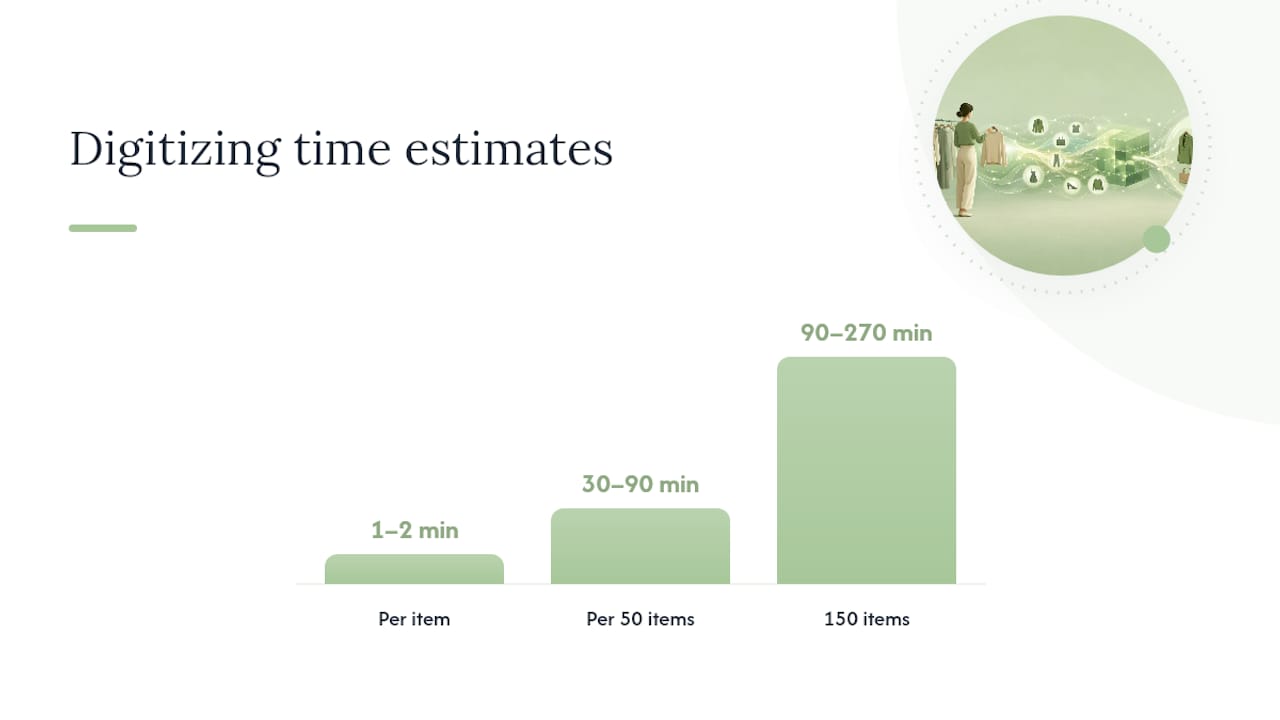
Digitizing a full wardrobe sounds like a weekend-long chore, but the right workflow cuts that down significantly. Expect roughly one to two minutes per item with good lighting and an AI background-removal tool doing the cropping work for you, according to app-level guidance from Stylebook. Bulk import from retailer accounts can move faster, though it often needs manual correction afterward since automated matching isn't perfect.
Here's a workflow that keeps the process manageable:
- Batch by category first. Photograph all your tops in one session, then bottoms, then outerwear. Switching categories mid-session slows you down because lighting and framing needs shift.
- Use consistent lighting. Natural daylight near a window beats indoor lighting for color accuracy, and it reduces the correction work AI background removal has to do.
- Lay flat or hang, don't wear. Most apps process flat-lay or hanger shots more cleanly than photos of items worn on a body.
- Bulk edit tags after import. Rather than tagging each item individually as you go, catalog everything first, then batch-tag by category. It's faster and you'll catch categorization patterns you would have missed one item at a time.
- Set a realistic goal. Plan for 30 to 90 minutes per 50 items depending on how much of the process is automated versus manual. A closet of 150 items is a genuine afternoon project, not a five-minute task.
Pro Tip: Photograph your most-worn items first, not your entire closet in category order. That way you get immediate outfit-planning value from the app within the first 15 minutes, which makes the rest of the digitization feel worth finishing.
Once your closet is cataloged, maintenance is what keeps the app useful rather than an abandoned project. Add new purchases the same week you buy them, before the "I'll do it later" pile grows. Sync your outfit calendar with your iPhone's built-in Calendar app if the wardrobe app supports it, so outfit planning happens alongside your actual schedule rather than in a separate silo. And revisit packing lists a few days before travel. Most digital closet organization tools let you build a capsule collection for a trip in minutes once the base catalog exists, turning what used to be a suitcase-packing scramble into a five-minute task.
Why I Think Privacy-First Wardrobe Apps Are the Right Call Now
Two trends are converging in a way that makes this a good moment to rethink how you organize your closet. On-device AI has gotten genuinely capable on recent iPhones, which means you no longer have to trade privacy for smart features like automated tagging or outfit suggestions. At the same time, sustainability pressure around clothing consumption keeps growing, and a wear-rate number is a more honest nudge toward buying less than any amount of good intentions.
What gets underappreciated in most coverage of this category is how much personalization these apps can offer without surveillance. An outfit suggestion based on what's actually in your closet and what you've actually worn is more useful than a generic style feed, and it doesn't require a company to build a profile of your habits to deliver that value. That's the bet Obsidian Ridge Labs is making across its apps, wardrobe included: that private, on-device AI can match cloud-based convenience without the data trade-off.
If you've been putting off digitizing your closet because every option felt like handing over a catalog of your life to another app, that's a reasonable hesitation. It's also one worth testing against an app built specifically to avoid that trade.
— Alex
Try Wove for a Private Digital Wardrobe on Your iPhone
Wove is a digital wardrobe app designed around the privacy trade-off most wardrobe apps ask you to accept. Cataloging, tagging, and outfit planning run on your iPhone rather than a remote server, and any cloud connection is an opt-in choice, not a requirement to use the app.

It fits the decision criteria covered earlier: on-device AI for digitization and outfit suggestions, cost-per-wear and wear-rate analytics built in, and a data export option so you're never locked in if you change your mind later. It's the strongest fit for privacy-conscious iPhone users who want smart features without a cloud account attached to their closet, more than for someone who specifically needs a web dashboard or a shared stylist login.
During a trial, check three things: whether basic cataloging works before you grant any permissions, whether there's a clear local-only mode, and whether you can export your data on request. Start with the Obsidian Ridge Labs landing page to see the full lineup of private, on-device apps for Apple devices, or go straight to the privacy verification guide to see exactly what to check before you commit your closet to any app.
Sources and Further Reading
For a deeper feature comparison across the category, see 5 Best Digital Wardrobe Apps Compared and Wove vs. Stylebook, Whering, Indyx & Acloset. For the privacy checklist referenced throughout this guide, read Are Closet Apps Safe? The Privacy Verdict Explained.
FAQ
Is There a Free Digital Wardrobe App for iPhone?
Yes, most digital wardrobe apps offer a free tier that covers basic cataloging and organization, with paid tiers unlocking advanced AI features, unlimited items, or deeper analytics. Wove and similar apps let you test digitization and outfit planning before deciding whether a subscription is worth it.
What Is the 3-3-3 Rule for Clothes?
The 3-3-3 rule is a minimalist wardrobe method where you choose three tops, three bottoms, and three pairs of shoes to build a rotating set of outfits over a set period, usually a season. Digital wardrobe apps with capsule collection tools make it easier to build and track a 3-3-3 rotation without manually remembering what you've assigned to it.
Is There an App That Lets You Try On Clothes Virtually?
Some wardrobe apps offer virtual try-on features that render clothing on a photo of yourself, though this typically requires cloud processing rather than on-device AI. If privacy is a priority, check whether the specific try-on feature processes images locally or sends them to a server before relying on it.
What Is the Best Clothing Design App for iPhone?
For organizing and planning an existing wardrobe rather than designing new garments, a privacy-first digital wardrobe app like Wove combines digitization, outfit planning, and wear analytics in one place. If you specifically need garment design or sketching tools, that's a different category from wardrobe organization apps and worth searching separately.