
Most third-party iPhone apps that claim on-device AI are doing exactly what the label implies: transcription, journaling, and finance analysis running entirely on your device's processor, never touching a server. On modern iPhones and iPads, many of these tasks work with the phone in airplane mode. The rest of this guide shows how that works, where the exceptions hide, and how to confirm an app is telling the truth before you trust it with sensitive data.
TL;DR:
- Many third-party iPhone apps with claimed on-device AI run their models entirely locally, often functioning in airplane mode for common tasks like transcription and note summarization.
- Apps utilizing Apple’s Core ML or Foundation Models keep inference on the device, but some may route complex requests through private cloud compute, which should be transparently disclosed.
- Verifying local processing involves testing features offline in airplane mode and reviewing privacy claims, documentation, and network activity for hidden server communication.
- On-device AI tasks excel at short audio transcriptions, local data searches, and basic image edits, but still rely on cloud for web knowledge and large models.
- Choosing a privacy-focused app requires clear "on-device" language, transparency guides, and offline demonstrations before commitment.
Table of Contents
- What Does On-Device AI Processing Mean for Third-Party iOS Apps?
- Why Local Inference Protects Your Privacy, and Where It Doesn't
- How Can You Verify an App Actually Processes Data Locally?
- Which Tasks Actually Run Offline, and Which Need the Cloud?
- How to Choose and Set Up a Private On-Device AI App
- A Privacy-First Developer's Take on Local-First Design
- Try Private, On-Device AI for Yourself
- Sources
- FAQ
What Does On-Device AI Processing Mean for Third-Party iOS Apps?
"Siri offline processing" gets searched a lot, but for privacy-conscious Apple users, the more useful question isn't about Apple's own assistant. It's about whether the third-party apps on your phone, the transcription tool, the budgeting app, the journal, run their AI features locally or ship your data to a server first. That's the on-device AI question, and Apple has spent the last few product cycles building the plumbing to make it possible.
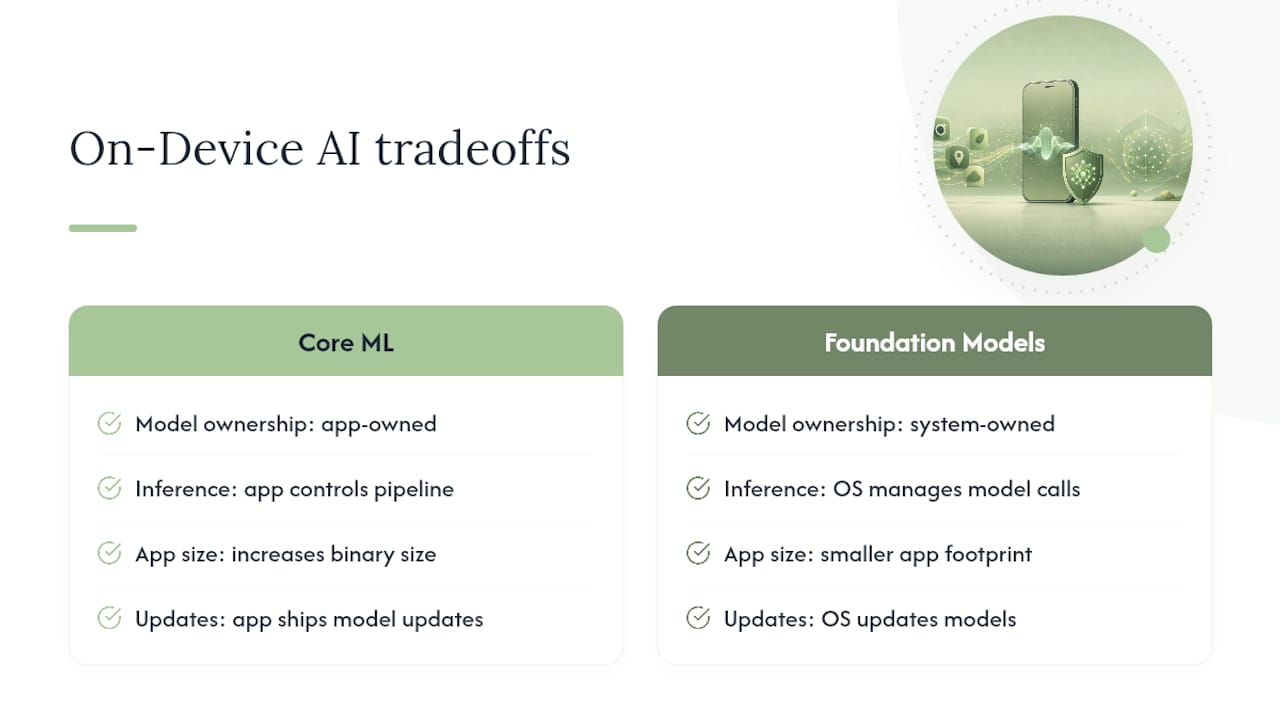
The foundation is Core ML, Apple's framework for bundling machine learning models directly inside an app so inference happens on the device's own silicon. Developers train or license a model, convert it to Core ML format, and ship it inside the app binary or download it after install. No round trip to a server is required for the model to produce an answer.
Apple also offers system-level Foundation Models, on-device language models the operating system itself manages, which developers can call through an API instead of bundling their own. That's a meaningful distinction: an app using Apple's Foundation Models framework leans on Apple's on-device model, while an app with its own bundled Core ML model controls its own inference pipeline entirely. Either path keeps computation local, but they represent different tradeoffs in size, control, and update cadence.
App Intents and Writing Tools are the integration layer. They let a third-party app expose specific on-device AI capabilities, summarize this note, extract this receipt, to the rest of the system without routing anything through the cloud.
None of this works without hardware to back it. The Apple Neural Engine, paired with unified memory that lets the CPU, GPU, and Neural Engine share data without duplicating it, is what makes running a language model on a phone feasible instead of theoretical. Apple's own research on its Foundation Models describes an on-device model in the range of roughly three billion parameters, kept efficient through quantization, low-bit palettization, and lightweight LoRA adapters that fine-tune behavior without retraining the whole model. Those optimizations are why a phone can run tasks that would have needed a data center a few years ago.
Why Local Inference Protects Your Privacy, and Where It Doesn't
Keeping inference on the device shrinks your exposure in a very literal sense: data that never leaves your phone can't be intercepted in transit, retained on a server you don't control, or swept up in a breach somewhere else. That's the entire argument for on-device AI, and it holds up. Fewer network calls means fewer places for something to go wrong.
It's not absolute, though. Apple's own system, Apple Intelligence, runs many requests entirely on-device but routes some to Private Cloud Compute when a task needs more processing power than the device can supply. Apple designed Private Cloud Compute to avoid retaining data after the request completes, but it's still a server hop, and third-party apps can build the same kind of fallback into their own AI features.
That's the detail worth watching. Nothing about that is inherently deceptive, but it needs to be disclosed.
- Check whether the app distinguishes "on-device by default" from "on-device with optional cloud sync."
- Look for explicit language about backups, analytics, or cloud-based feature upgrades.
- Treat vague privacy language ("we care about your data") as a yellow flag, not reassurance.
Security researchers covering Apple's Private Cloud Compute architecture have made the same point: local inference is a strong privacy defense only when developers are transparent about the exceptions.
Pro Tip: Enable Apple Intelligence's transparency reporting in Settings. It logs when a request was processed off-device, which gives you a real audit trail instead of relying on marketing copy.
How Can You Verify an App Actually Processes Data Locally?
Trusting an app's privacy claims without checking them defeats the purpose of choosing on-device AI in the first place. A short verification pass takes a few minutes and tells you more than any privacy policy summary.
- Read the App Store privacy labels and the app's own privacy page. Look for specific mentions of "on-device processing" or "Core ML," not just generic promises about data protection.
- Turn on airplane mode and try the core feature. If transcription, journaling, or expense categorization still works with zero connectivity, that's strong evidence of genuine local inference.
- Look for transparency logging or exported reports. Some developers publish documentation describing exactly how their models run locally, similar to Apple's own approach with Apple Intelligence transparency data.
- Check developer documentation for architecture details. A team confident in their local-first design usually explains it, rather than hiding behind vague language.
- Monitor network activity and audit optional cloud features separately. iOS's per-app network usage stats under Settings can reveal a "local" app quietly phoning home.
Pro Tip: If an app's support team can't clearly explain what happens when you're offline, that's usually a sign the architecture wasn't built local-first to begin with.
Which Tasks Actually Run Offline, and Which Need the Cloud?
Realistic expectations matter here. On-device AI is genuinely capable, but it isn't a replacement for every cloud-based feature you've used elsewhere.
Tasks that run well entirely offline:
- Short-to-medium audio transcription processed in real time
- Local summarization of notes, journal entries, or meeting recordings
- Semantic search across your own personal notes and documents
- On-device keyboard suggestions and autocomplete
- Basic image edits that only need information already on the device
Tasks that usually still lean on the cloud:
- Anything requiring broad, current web knowledge
- Summarizing extremely long documents that exceed on-device context limits
- Heavy multi-step reasoning tasks
- Features built on multi-gigabyte models too large to bundle in an app
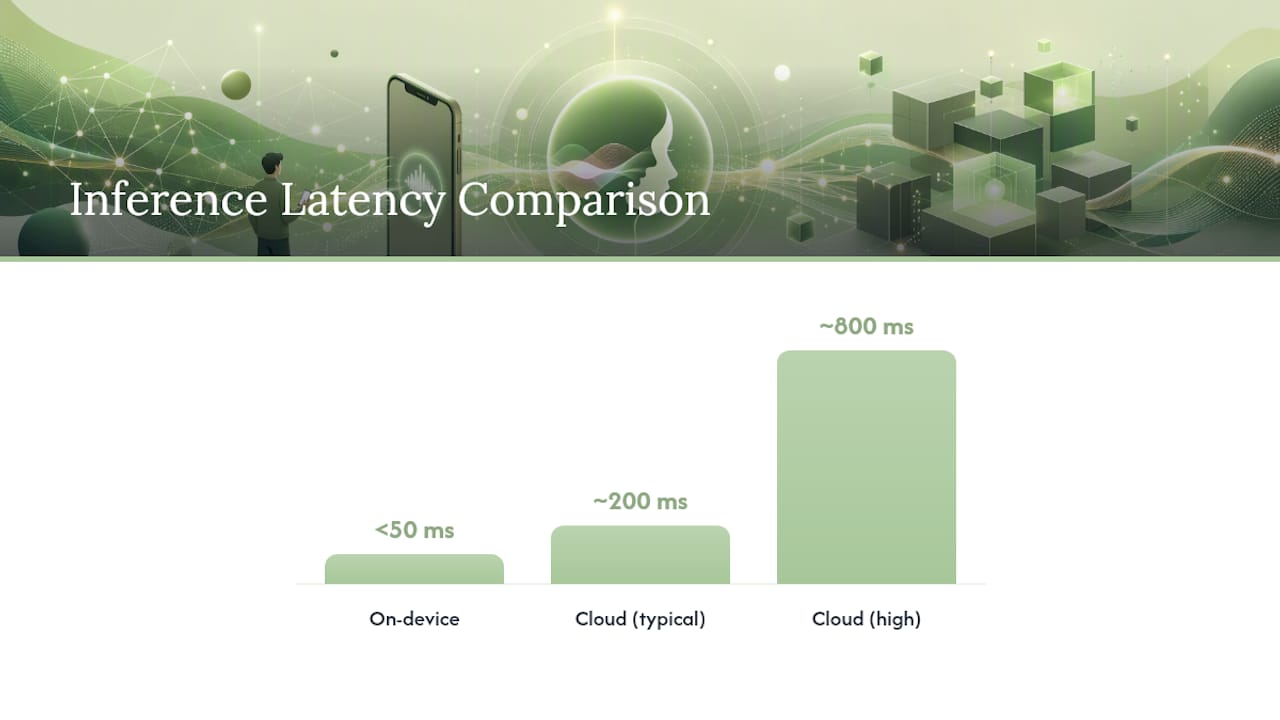
Developer comparisons of on-device versus cloud inference put the latency gap in concrete terms: on-device responses often land under 50 milliseconds, while cloud calls run 200 to 800 milliseconds once network round trips are factored in. That speed comes at a cost, though. Bigger on-device models eat more storage, drain battery faster, and update less frequently than a cloud model a company can improve overnight.
How to Choose and Set Up a Private On-Device AI App
Picking an app that actually stays local takes a bit more scrutiny than reading the App Store description. A short checklist before you buy saves you from discovering the tradeoffs after your data is already in someone else's system.
- Look for explicit "on-device" language, not just "private" or "secure," which are vaguer and easier to misuse.
- Check for a published transparency or verification guide. Developers serious about local-first design tend to document it, similar to the approach described in Obsidian Ridge Labs' privacy verification guide.
- Ask about model size and update frequency before buying. A tiny bundled model behaves differently than a multi-gigabyte one downloaded after install.
- Try the offline demo or trial in airplane mode before committing to a subscription.
- After installing, disable optional cloud sync or backup features, enable any local-only mode offered, and review the permissions screen line by line.
A Privacy-First Developer's Take on Local-First Design
One privacy-focused developer builds transcription, finance helpers, and journaling apps around one architectural rule: core processing stays on the device unless you explicitly opt into something else. That's not a marketing angle. It's a constraint that shapes which models get bundled, how large they can be, and what features get cut if they can't run locally.
The harder discipline is transparency about the exceptions. Any optional cloud feature gets a clear opt-in, and published verification guidance explains exactly how to confirm the claim yourself. Try an offline demo, run the checklist above, and see what actually survives airplane mode.
— Alex
Try Private, On-Device AI for Yourself
The tasks covered here, transcription, journaling, finance tracking, are exactly what Obsidian Ridge Labs builds, with processing that stays on your iPhone or iPad by default rather than routing through a server you can't inspect. Where other privacy-focused apps make broad claims, Obsidian Ridge Labs backs its own with a published privacy verification guide so you can confirm local processing yourself instead of taking a company's word for it. That transparency is a key product difference: users are offered ways to check privacy claims rather than only trusting a privacy policy.
If you've been burned by an app that quietly synced more than it advertised, start with the verification guide, run the airplane-mode test on whatever you're currently using, then compare it against what Obsidian Ridge Labs' apps do out of the box.
Sources
- Apple Intelligence: Privacy and data processing (legal/intelligence-engine)
- Introducing Apple foundation models
- On-Device AI vs Cloud AI - DataSapien
- Wired: reporting on Apple Private Cloud Compute and privacy
FAQ
Does Siri Offline Processing Apply to Third-Party Apps Too?
The underlying on-device technology, Core ML and Apple's Neural Engine, is available to any developer, so many third-party apps run AI tasks locally using the same hardware foundation, independent of Apple's own assistant.
Can I Use AI Features Without an Internet Connection?
Yes, for many tasks. Transcription, note summarization, and local search often work fully offline; test this directly by switching to airplane mode and trying the feature.
Why Would an App Send Data to the Cloud If It's "On-Device"?
Some tasks exceed what a phone's processor can handle efficiently, so apps may route heavier requests to a server, similar to how Apple's own Private Cloud Compute handles overflow, but this should always be disclosed and ideally optional.
How Do I Know an App Isn't Secretly Uploading My Data?
Check the app's network activity in Settings, test core features in airplane mode, and look for a published transparency or verification guide, like the one Obsidian Ridge Labs provides for its own apps.
Are On-Device AI Apps Less Capable Than Cloud-Based Ones?
They're more limited for tasks requiring broad web knowledge or very long documents, but for personal tasks like journaling, transcription, and expense tracking, on-device performance is often fast enough that the tradeoff favors privacy.