Podcast transcription is not private by default. Most cloud transcription services can retain your audio or use it to train their models unless you opt out, and encryption doesn't change that. If you're recording anything sensitive, don't upload it to a consumer transcription tool. Process it on-device instead, or require a signed BAA or DPA before sending it anywhere. Obsidian Ridge Labs builds toward the first option.
TL;DR:
- Cloud transcription services often retain audio files and metadata unless explicitly opted out, with retention policies varying widely among providers.
- Using cloud tools for sensitive content, especially health-related or confidential interviews, exposes your data to legal and privacy risks without proper safeguards like BAAs.
- On-device transcription ensures none of your audio leaves your hardware, providing the highest privacy protection even if it might impact accuracy and speed.
- Verifying a provider’s security requires checking encryption standards, attestations, data deletion options, and subprocessor transparency before sharing any sensitive content.
- Incorporating privacy measures at each production stage, including consent, segmentation, anonymization, and local storage, significantly reduces the risks of data exposure and loss.
Table of Contents
- What Happens to Your Audio During Podcast Transcription Privacy Checks
- When Does Podcast Content Trigger Legal Compliance Rules?
- What Technical Safeguards Should a Transcription Provider Offer?
- Protecting Sensitive Audio Before, During, and After Recording
- Why On-Device Transcription Solves the Privacy Problem at the Source
- What Should You Ask a Transcription Provider Before You Upload Anything?
- Who Owns a Transcript, and What Happens if It Leaks?
- How to Write a Privacy Policy That Covers Podcast Transcripts
- Are Third-Party APIs and Integrations a Privacy Risk?
- Human Transcriptionists vs. Automated Tools: Which Is More Private?
- Does GDPR or CCPA Apply to Your Podcast Transcripts?
- Why We Built Obsidian Ridge Labs Around On-Device Transcription
- Try On-Device Transcription Built for Privacy-Conscious Podcasters
- Sources
What Happens to Your Audio During Podcast Transcription Privacy Checks
Every cloud transcription workflow follows roughly the same path: you upload a file, it moves to a remote server for processing, and a transcript comes back while the original audio (and often a copy of it) sits in storage. Metadata travels with that file too, including timestamps, device information, and sometimes speaker labels you never intended to share.
The clause that matters most is buried in most privacy policies: many services use uploaded audio and transcripts to improve their models unless you actively opt out. Voice recordings of identifiable people count as personal data under most data-protection frameworks, which means that "improvement" clause has real legal weight, not just a hypothetical privacy cost, according to research from Loughborough University.
Retention practices vary widely across providers: some services delete audio immediately after transcription completes, others hold files for a limited period for troubleshooting or quality review, while some retain files unless you manually request deletion.
Encryption in transit and at rest is standard across most professional-tier tools, protecting against outside interception. It does nothing to prevent internal staff access or a provider using your file under its own retention policy.
When Does Podcast Content Trigger Legal Compliance Rules?
If your podcast touches health information from an identifiable patient, HIPAA can apply, and that usually means you need a signed Business Associate Agreement (BAA) with any transcription vendor before you upload a single file, per HIPAA podcast compliance guidance. Removing a guest's name from the transcript is not enough. Voice itself carries identifying characteristics that make full de-identification difficult, since accents, speech patterns, and vocal habits can re-identify someone even from a scrubbed script.
Key practices to build into your workflow:
- Get written consent from every guest, scoped specifically to how the recording and transcript will be used.
- Use a BAA whenever protected health information appears in the recording, not just for clinical interviews.
- Treat legal, whistleblower, or investigative interviews as cases where cloud tools should be avoided entirely.
HIPAA penalties for mishandling protected health information can be substantial per violation, which makes a signed BAA a cheap insurance policy by comparison, according to HIPAA compliance guidance for podcasters.
What Technical Safeguards Should a Transcription Provider Offer?
Verifying a provider's security posture takes about ten minutes if you know what to look for. Run through this checklist before you sign up or upload anything sensitive:
- Encryption baseline. Confirm that data is protected during transit and storage with appropriate encryption standards, and that two-factor authentication is available on your account.
- Independent attestations. Look for a current SOC 2 Type II report or ISO 27001 certification. These aren't guarantees, but their absence is a real signal.
- Contract protections. Ask whether a Data Processing Agreement or BAA is available, request the subprocessor list, and confirm you can opt out of model training in writing.
- Deletion controls. Check for an on-demand deletion API, an immediate wipe option, and audit logs that show who accessed your files and when.
Encryption alone is table stakes. A SOC 2 Type II report and a signed BAA matter more because they cover what happens to your data after it's decrypted, inside the provider's own systems.
Pro Tip: Ask any provider directly whether deleting a file from your dashboard also removes it from backups and training datasets. Most won't have a clean answer, and that hesitation tells you something.
Protecting Sensitive Audio Before, During, and After Recording
Privacy protection works best when it's built into your production process, not bolted on after the fact. Break it into three stages:
Before recording: Use a consent form that names exactly how the interview will be used, whether it's a public podcast, an internal training file, or archival material. Scope-limited consent protects both you and your guest.
During recording: Split off sensitive segments into separate files so they can be handled differently from the rest of the episode. For particularly sensitive material, consider voice masking or having an actor read a redacted version of a source's words instead of airing the original recording.
- Anonymize identifying details using reversible tokens rather than deleting them outright, which preserves context for editing.
- Scrub personally identifiable information locally, in your browser or editing app, before any file leaves your device.
- Delete the cloud copy immediately after you've downloaded your finished transcript.
Storage hygiene: Keep encrypted local copies, restrict who on your team can access raw files, enable multi-factor authentication everywhere, and log every access event.
Why On-Device Transcription Solves the Privacy Problem at the Source
On-device transcription sidesteps the entire cloud exposure question because the audio never leaves your hardware. There's no upload, so there's no server-side copy, no retention policy to trust, and no model-training clause to opt out of. That's a structural difference, not just a stricter privacy policy.
The trade-offs are real and worth naming honestly. Local processing needs more from your device's hardware than a thin cloud client does, and accuracy or speed can lag slightly behind large cloud models, especially right after a new on-device model ships. Most on-device tools handle this with periodic model updates that you download once and apply locally, so raw audio stays put while transcription quality improves over time, an approach Obsidian Ridge Labs uses in its own product design.
A few practical workflow patterns work well for podcasters:
- Batch transcribe locally on your Mac or iPhone, anonymize sensitive names or details in the text, then publish only the cleaned version to your cloud editing tools.
- Transcribe fully on-device, export a redacted plain-text file, and hand that off to an editor instead of the raw audio.
- Keep the original recording local and encrypted, and only ever share exported, reviewed text.
Pro Tip: If your show regularly features sensitive interviews, a permanent on-device transcription tool is often cheaper long-term than paying for enterprise-tier cloud plans just to get BAA coverage. For a closer look at how these apps stack up, see this comparison of offline transcription apps.
What Should You Ask a Transcription Provider Before You Upload Anything?
Retention and model-training language typically lives in a provider's privacy policy or terms of service under headings like "how we use your content" or "data retention," not in the marketing copy on their homepage. Before trusting a provider with anything sensitive, request these documents directly:
- A SOC 2 report excerpt covering data handling and access controls.
- A DPA or BAA, signed, not just referenced as "available upon request."
- The subprocessor list, showing every third party that touches your data.
- A written deletion procedure, including timelines for backups and cached copies.
Ask three questions directly: "Do you use uploaded audio or transcripts to train models?" "How long is my audio retained after processing completes?" and "Can you produce an on-demand deletion log showing my file was removed?" Vague answers, a mandatory training clause with no opt-out, or the absence of two-factor authentication and audit logging are all reasons to walk away. Providers vary in how transparently they handle law-enforcement requests and manual review, and a published transparency report is a good sign a provider takes this seriously.
Who Owns a Transcript, and What Happens if It Leaks?
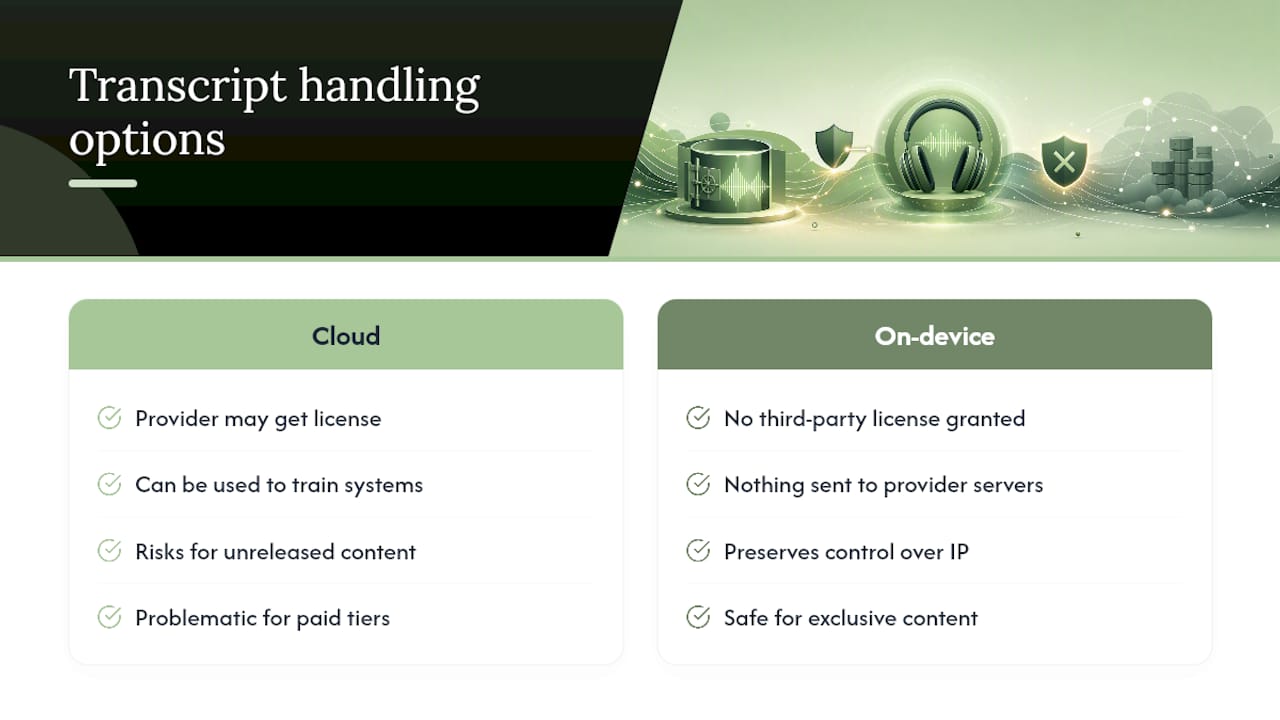
Copyright in your podcast's spoken content generally belongs to you as the creator, but the transcript generated from that audio can raise separate questions depending on your provider's terms of service. Some transcription platforms claim a license to use your content for service improvement, which is different from claiming ownership but still gives them rights you may not have intended to grant.
Read the terms of service specifically for language about derivative works and licensing, not just the privacy policy. A clause granting a provider "a worldwide, royalty-free license to use, reproduce, and improve services using your content" is common boilerplate, but it means your unreleased interview, your unpublished investigative piece, or your proprietary research could technically be used to train a system that later helps a competitor.
This matters most for podcasters who monetize exclusive content, run subscription tiers, or license their back catalog. If a transcript of an unreleased episode sits on a third-party server with a broad usage license attached, you've effectively lost some control over that intellectual property before you've even published it. The same logic applies to guest interviews: a guest who shares proprietary business information expects that information to stay within the scope of the interview, not to become training data for an unrelated AI product.
The practical fix is straightforward. Keep unreleased and exclusive content off cloud transcription tools entirely, or confirm in writing that the provider's terms exclude your content from any training or improvement use. On-device transcription removes the question altogether, since there's no license being granted to a third party in the first place.
How to Write a Privacy Policy That Covers Podcast Transcripts
If your podcast publishes transcripts alongside episodes, your privacy policy needs to say more than "we take your privacy seriously." Listeners and guests deserve specific answers about what happens to recorded audio and the text derived from it.
Cover these elements in plain language:
- What you collect: name whether you record video, audio, or both, and whether transcripts are generated automatically or reviewed by a human.
- Which tools you use: name your transcription provider (or state that transcription happens on-device) so readers understand where the data actually goes.
- Retention timeline: state how long raw audio and transcripts are kept, both on your own systems and with any third-party vendor.
- Guest rights: explain how a guest can request that a portion of their interview be removed or redacted before or after publication.
Update your policy any time you switch transcription providers, since the retention and training terms attached to your content change with the vendor. A policy that references a provider you stopped using two years ago is worse than no policy at all, because it actively misleads readers about where their data goes.
Pro Tip: Link your transcription-specific privacy language directly from your show notes page, not just buried in a general site-wide privacy policy. Guests appreciate being able to find it in one click before they agree to record.
Are Third-Party APIs and Integrations a Privacy Risk?
Most transcription platforms don't process everything in-house. They route audio through third-party speech-to-text APIs, storage providers, and sometimes separate AI models for punctuation or speaker labeling. Each additional service in that chain is another party with access to your recording, and each one has its own retention policy, security posture, and terms of service.
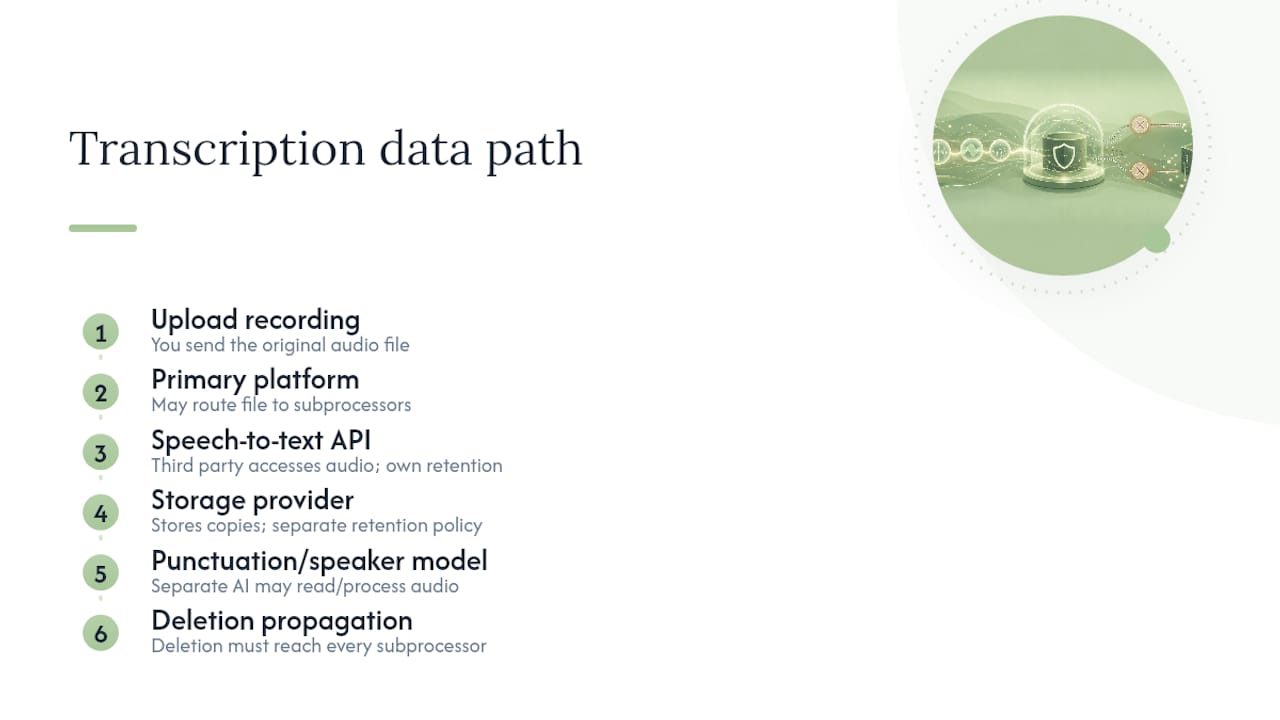
This is exactly what a subprocessor list is for, and it's why requesting one matters more than most podcasters realize. A transcription company might have excellent security practices internally while relying on a subprocessor with a weaker one. If a request to delete your file only reaches the primary vendor and not every subprocessor in the chain, a copy of your audio can persist somewhere you never agreed to.
Mitigating this risk comes down to three things: ask for the full subprocessor list before signing up, confirm that deletion requests propagate to every party in that chain, and favor providers who process audio in-house over ones assembling a stack of third-party APIs. Partner-level research from groups like OpenTranscription breaks down how voice data qualifies as personal data across different vendor architectures, which is useful reading if you manage transcription for a larger production team. On-device transcription eliminates this entire category of risk, since there's no chain of third parties to vet in the first place.
Human Transcriptionists vs. Automated Tools: Which Is More Private?
Automated transcription and human transcription carry different privacy risks, and conflating them leads to bad decisions. An automated system processes your audio through a model, and the privacy question is entirely about data handling: retention, encryption, and whether your file trains that model.
Human transcription introduces a different variable: a person actually listens to and reads your content. That person might work for a vetted, contracted service with confidentiality agreements in place, or they might be a freelancer with no formal privacy obligations at all. Manual review also shows up inside automated services themselves, since many companies use human reviewers to check transcript accuracy or investigate flagged content, meaning "automated" transcription often has a human-review layer you don't see in the marketing copy.
Neither approach is automatically safer. A well-vetted human transcriptionist bound by a confidentiality agreement can be more trustworthy than an automated tool with a vague model-training clause. But a human transcriptionist working through an unvetted freelance platform, with no contract and no audit trail, is arguably riskier than a reputable automated tool with SOC 2 Type II certification and a documented deletion policy. Ask any provider directly whether human reviewers ever access your audio or transcripts, and under what circumstances. If the answer is unclear, treat it the same way you'd treat a vague model-training clause: as a reason for caution.
Does GDPR or CCPA Apply to Your Podcast Transcripts?
HIPAA gets most of the attention in transcription privacy discussions, but it only applies to protected health information. Two broader frameworks matter for a much wider range of podcasters: the EU's General Data Protection Regulation (GDPR) and the California Consumer Privacy Act (CCPA).
GDPR applies if you record or process the voice of anyone in the EU, regardless of where your podcast is based. Since voice recordings of identifiable people qualify as personal data, a European guest's recorded interview can trigger GDPR obligations, including the right for that guest to request deletion of their data and clear disclosure of how it will be processed. CCPA applies more narrowly to businesses meeting certain revenue or data-volume thresholds, but it grants California residents similar rights to know what personal information is collected about them and to request its deletion.
The practical implication for both frameworks is the same: you need a documented, honest answer to "what happens to this recording" before you hit record with a guest who might live in the EU or California. Requesting deletion from your transcription vendor should actually work, not just remove a file from a dashboard while a backup or training copy persists elsewhere. That's the same gap that undermines a lot of "delete my data" promises across the industry, regardless of which regulation technically applies. Building your workflow around on-device transcription sidesteps most of this complexity entirely, since there's no processor relationship to disclose in the first place.
Why We Built Obsidian Ridge Labs Around On-Device Transcription
We started Obsidian Ridge Labs because we kept seeing the same tradeoff forced on Apple users: convenience in exchange for your audio living on someone else's server. On-device processing removes that tradeoff by default, since nothing leaves your iPhone or Mac unless you explicitly choose to share it. That said, we'll say plainly that large newsroom teams running high-volume, multi-language transcription may still find enterprise cloud contracts a better operational fit for now.
— Alex
Try On-Device Transcription Built for Privacy-Conscious Podcasters
Obsidian Ridge Labs builds transcription that runs entirely on your iPhone or Mac, so your interviews, guest calls, and unreleased episodes never touch a server you don't control.

The core difference is architectural, not a policy promise: audio is processed locally, and any cloud connection is something you turn on yourself, never something that happens by default. That matters most for the exact scenarios this article covers, health-related interviews, legal or investigative recordings, and unreleased content where a training-data clause in someone else's terms of service could quietly cost you control of your own material.
Getting started takes a few minutes. Download the app, check the in-app privacy documentation to confirm exactly what stays local, and run a test transcription on a short recording before you trust it with something sensitive. If you want to see how on-device tools compare across accuracy, speed, and privacy controls, read this breakdown of private and offline transcription apps. Visit Obsidian Ridge Labs to see the full lineup of privacy-first apps built for Apple devices.
Sources
- AI transcription tools: a time saver or security risk? (2026)
- Security guidance for automatic transcription services | Washington University in St. Louis
- We evaluated the data security of five transcription services for journalists (2025)
- HIPAA podcast compliance: Healthcare content creation guide