
For privacy-conscious Apple users, Trove from Obsidianridgelabs is the strongest Sortly alternative available today. It processes all inventory data on-device, meaning your records never leave your iPhone, iPad, or Mac to sit on a third-party server.
- Trove (Obsidianridgelabs): on-device, local-first home inventory for iPhone/iPad/Mac
- Wove (Obsidianridgelabs): on-device digital wardrobe and personal asset cataloging
- Kith (Obsidianridgelabs): on-device relationship and contact asset management
- Home Inventory (Binary Formations): Mac-native home inventory with local data storage
The trade-off is real: none of these apps offer scan-enforced picking, bin locations, or multi-site fulfillment workflows. If you need those, a cloud-based warehouse platform is the appropriate tool class. For internal asset accountability, though, on-device processing reduces external data custody and the breach and surveillance risks that come with cloud-first systems.
Table of Contents
- Which Sortly alternatives best fit your privacy model?
- How do you pick the right Sortly alternative for your workflow?
- Privacy vs. collaboration: what are the real feature trade-offs?
- How to migrate from a cloud-first app to an on-device alternative
- Why on-device inventory apps are the right choice for privacy-focused Apple users
- What kind of support do on-device inventory apps provide?
- How well do these apps integrate with accounting, ERP, and CRM tools?
- How well do these apps scale as your inventory grows?
- What do verified users say about these apps?
- Are there free tiers or trial periods available?
- Key Takeaways
- The privacy gap most inventory app comparisons miss
- Trove keeps your inventory data where it belongs: on your device
- Sources and further reading
Which Sortly alternatives best fit your privacy model?
| Option | Privacy model | Best for | Key features | Platform | Offline | Sync | Pricing |
|---|---|---|---|---|---|---|---|
| Trove (Obsidianridgelabs) | On-device, local-first | Home inventory, personal assets | Barcode/QR, batch photos, export, AI tagging | iPhone/iPad/Mac | Yes | None / iCloud optional | One-time or subscription, App Store |
| Wove (Obsidianridgelabs) | On-device, local-first | Digital wardrobe, personal catalog | Photo catalog, categories, tags, export | iPhone/iPad/Mac | Yes | None / iCloud optional | App Store |
| Home Inventory (Binary Formations) | Local, Mac-native | Home contents, insurance documentation | Room-based org, photos, reports, export | Mac, iPhone | Yes | iCloud | One-time purchase |
| Hybrid iCloud sync apps | iCloud-mediated | Small teams, shared household | Sync across devices, basic barcode | iPhone/iPad | Partial | iCloud | Subscription |
| Cloud-first lightweight apps | Cloud server | Small business, multi-user | Barcode, reporting, integrations | iOS/Web | Limited | Cloud server | Subscription |
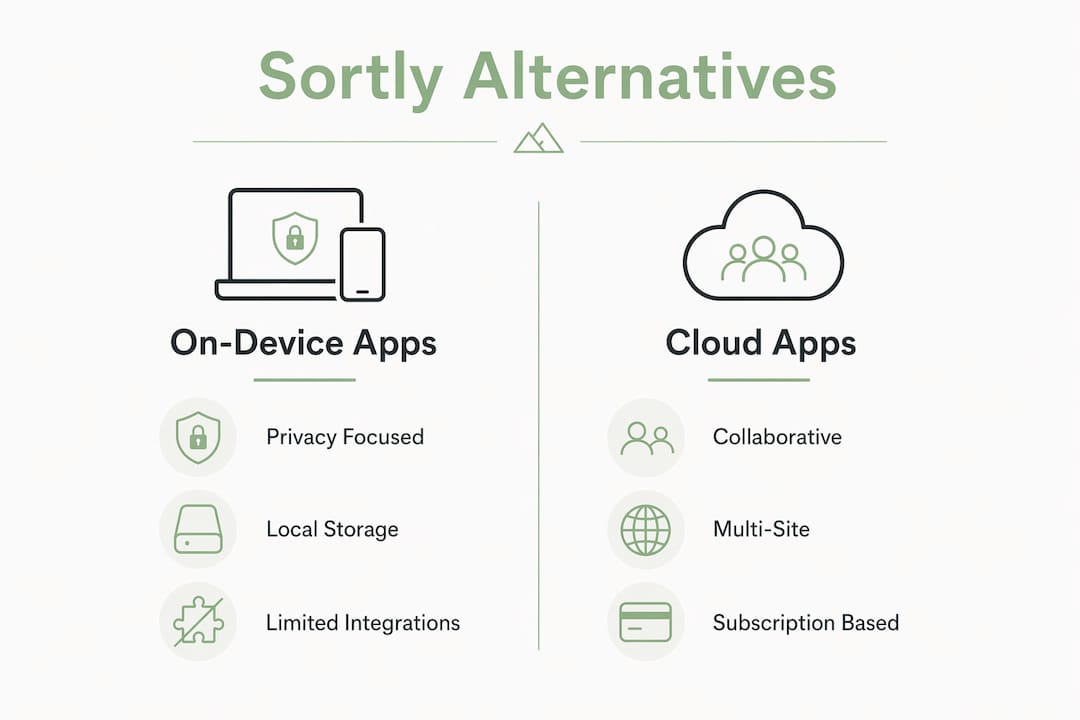
Photo-based cataloging and barcode scanning are standard expectations for apps in this category, but rising subscription costs have pushed many users to search for alternatives with more predictable licensing. The on-device options above offer App Store one-time purchases or annual subscriptions with no mandatory server account. For the next section's decision criteria, the key split is whether your workflow is internal asset tracking or customer order fulfillment.

How do you pick the right Sortly alternative for your workflow?
Start with two diagnostic questions. First: are you tracking internal assets (tools, home contents, equipment) or fulfilling customer orders? Second: do you need multiple users updating records in real time from different locations?
If both answers point to internal tracking and single-user or household use, an on-device app is the correct tool class. Upzone analysis finds that roughly 70% of warehouse teams require order-fulfillment capabilities that photo-based asset trackers simply do not provide, which means the reverse is also true: teams without fulfillment needs are paying for complexity they will never use.
Privacy and functional feature checklist for Apple users:
- On-device processing stated explicitly in the app's privacy policy or App Store listing
- Encryption at rest confirmed (or local-only storage with no server transmission)
- Local export in CSV or standard format, no account required to retrieve your data
- App Store distribution (verifiable; no sideloading required)
- Barcode and QR code scanning
- Batch photo import
- iCloud sync as an option, not a requirement
- Offline capability confirmed before purchase
Red flags: cloud-only processing with no offline mode, a privacy policy that does not mention on-device or local storage, mandatory server-side account creation before first use, and per-item limits with no export path.
Privacy vs. collaboration: what are the real feature trade-offs?
On-device local-first apps and cloud-first warehouse systems are architecturally different, and that difference shapes every downstream decision.
On-device apps (Trove, Wove, Home Inventory):
- Strong data sovereignty; no third-party server custody
- Offline by design; no uptime dependency on a vendor
- Fast deployment, often functional on day one
- Limited to single-user or household-scale workflows
Cloud-first warehouse platforms:
- Real-time multi-user sync and scan-enforced picking workflows
- Deep integrations with accounting, ERP, and e-commerce channels
- Setup timelines of 3–8 weeks for full warehouse ERP configurations
- Data custody transferred to the vendor; compliance posture depends on their practices
Manufacturing and mid-market operations genuinely need ERP-grade features: assemblies, multi-currency, and master production scheduling. For a home user cataloging tools and appliances, that complexity adds weeks of setup and zero practical benefit. Feature bloat in warehouse-grade systems is consistently flagged as a primary pitfall for internal asset tracking use cases.
Pro Tip: Start with an on-device app for internal accountability. Only add cloud integrations when you have a repeatable, multi-user fulfillment workflow that genuinely requires them. Phasing this way keeps adoption fast and data exposure minimal.
How to migrate from a cloud-first app to an on-device alternative
- Export your existing data. Download a full CSV export and all item photos from your current app before canceling or deprovisioning anything.
- Map your custom fields. Identify which field names in your export correspond to fields in the new app. Mismatched field names are the most common source of data loss.
- Run a scoped test import. Import 20–30 sample records on a test device. Confirm photos, barcodes, and custom fields all transfer correctly.
- Validate sample records. Spot-check at least 10% of imported items against the original export before proceeding.
- Enroll primary users. Complete App Store purchase or subscription, then configure iCloud sync preferences (on or off) per your privacy requirements.
- Finalize cutover. Move all records, confirm the full dataset, and set the old system to read-only.
Pro Tip: Run both systems in parallel for 7–14 days before deprovisioning the old account. Keep the original export file as a permanent offline backup. Confirm on-device encryption or local-only storage is active before you delete anything from the old platform.
Safety checklist: verify local export works from the new app, confirm the App Store receipt and licensing terms, and check that no background sync to an external server is enabled by default.
Why on-device inventory apps are the right choice for privacy-focused Apple users
The security rationale comes down to attack surface. When inventory data lives on a cloud server, it is subject to that server's security posture, the vendor's data-handling practices, and potential legal disclosure requests directed at the vendor. On-device storage eliminates that third-party custody entirely.
NIST's guidance on data minimization reinforces this: the least-privilege principle applied to data architecture means storing sensitive records only where they are needed, on the device that uses them. Obsidianridgelabs builds every app in its portfolio around this principle, with explicit on-device AI processing as the architectural baseline, not an optional setting.
Trove, Wove, and Kith all reflect this model. Obsidianridgelabs also publishes transparency documentation on optional external connections, so users know exactly when and whether any data path leaves the device. To verify any app's on-device claims: read the privacy policy for explicit language, check the App Store listing for "on-device processing" or "local storage" statements, and confirm that a local export format exists before purchase.
What kind of support do on-device inventory apps provide?
Support models for on-device Apple apps differ from cloud SaaS platforms. Obsidianridgelabs provides support through its website and App Store channels, consistent with its single-developer and small-team app model. Binary Formations, the developer behind Home Inventory, has a long track record on the Mac App Store and maintains documentation and email support.
Cloud-first platforms in this category typically offer tiered support: email for lower plans, live chat or a dedicated account manager at higher price points. For internal asset tracking, the support need is usually lower because the apps are simpler and deployment is faster.
How well do these apps integrate with accounting, ERP, and CRM tools?
On-device apps like Trove are not designed for deep third-party integrations. Their data path is intentionally local, which means connecting to QuickBooks, Salesforce, or an ERP requires a manual export step rather than a live API sync. For home users and privacy-focused professionals tracking internal assets, that is an acceptable trade-off.
Cloud-first alternatives in the inventory management software category offer native integrations with accounting platforms and e-commerce channels. If your workflow requires live sync between inventory counts and an accounting system, a cloud-based platform is the architecturally correct choice. The decision is not about which app is "better" in the abstract; it is about which data path matches your compliance and operational requirements.
How well do these apps scale as your inventory grows?
On-device apps scale with your device's storage capacity, which on modern iPhones and Macs is substantial. Trove and Home Inventory handle thousands of items without performance degradation in typical home and small-business use cases. Customization options include custom fields, categories, tags, and photo attachments per item.
Where on-device apps reach their ceiling is multi-user, multi-location workflows. A single person or household can manage a large inventory effectively. A team of five across two locations needs a sync layer, and at that point the privacy trade-off of cloud sync becomes a deliberate architectural choice rather than an oversight.
What do verified users say about these apps?
Home Inventory by Binary Formations holds a strong reputation on the Mac App Store, with users consistently citing its reliability, local data handling, and depth of reporting for insurance documentation purposes. Trove is newer but follows the same architectural principles and is available on the App Store for iPhone, iPad, and Mac.
Cloud-first apps in this category receive mixed reviews when users encounter pricing changes or data portability limitations. The pattern is consistent: users value photo-based UX and barcode scanning, but rising costs and limited export options drive searches for alternatives with clearer data ownership.
Are there free tiers or trial periods available?
Trove and other Obsidianridgelabs apps are available on the App Store with pricing listed at purchase. App Store apps do not universally offer free tiers, but the App Store's standard refund policy applies. Home Inventory by Binary Formations offers a free version with limited item counts, with a one-time upgrade to unlock full capacity.
Cloud-first inventory management platforms in this category vary: some offer free plans with item or order limits, others offer 14-day trials. For privacy-focused users, the more relevant question is whether a free tier requires creating a server-side account, which reintroduces the data custody concern the on-device model is designed to avoid.
Key Takeaways
For privacy-first Apple users, Trove from Obsidianridgelabs is the strongest on-device Sortly alternative, combining local data handling with iPhone, iPad, and Mac support and no mandatory cloud account.
| Point | Details |
|---|---|
| On-device vs. cloud split | Choose on-device apps for internal asset tracking; cloud platforms for multi-user fulfillment workflows. |
| Migration approach | Export CSV and photos first, run a parallel test for 7–14 days, then deprovision the old account. |
| Feature checklist priority | Confirm explicit on-device processing, local export, and App Store distribution before committing. |
| Scalability ceiling | On-device apps scale well for single-user or household use; multi-location teams need a sync layer. |
| Obsidianridgelabs recommendation | Trove delivers private, on-device home inventory for Apple devices with no third-party server custody. |
The privacy gap most inventory app comparisons miss
Most Sortly alternative guides compare feature counts. That framing misses the more consequential question: where does your data actually live, and who else can access it?
For a home user cataloging appliances and tools, or a professional tracking internal equipment, the inventory data is sensitive in ways that are easy to underestimate. Serial numbers, purchase values, and location details are exactly the kind of records that become valuable to bad actors if a cloud vendor is breached. The architectural choice to keep that data on-device is not a limitation of simpler apps. It is a deliberate security posture.
The conventional wisdom that "more integrations = more capable" is worth questioning for this use case. A minimal, private app with fast adoption and accurate local data often outperforms a complex cloud ERP where half the fields go unfilled because the interface is too cumbersome for daily use. The best inventory system is the one people actually update.
Trove keeps your inventory data where it belongs: on your device
If you have been tracking assets in a cloud-first app and wondering who else can see that data, Trove from Obsidianridgelabs gives you a concrete answer: nobody but you. All processing happens on your iPhone, iPad, or Mac. No server account is required, no background sync sends your records to a third party, and your data exports cleanly in standard formats whenever you need it.

Obsidianridgelabs builds every app in its portfolio around the same principle: private AI for Apple devices, with on-device processing as the default, not an upgrade. Trove is available now on the App Store for iPhone, iPad, and Mac. Visit the Trove product page to review features, pricing, and download options directly.
Sources and further reading
- Trove: Private AI Home Inventory App — product page with feature details, platform support, and App Store link
- On-Device AI on iPhone: A Privacy Verification Guide — how to verify on-device claims in any app's privacy policy and App Store listing
- Offline AI Apps in 2026: What Works Without Internet — practical guide to offline-capable Apple apps and sync models
- Sortly Alternatives for Warehouse Teams (2026) — analysis of when fulfillment platforms are required vs. simple asset trackers
- 5 Best Sortly Alternatives in 2026 — market overview covering pricing trends and barcode/photo UX expectations
- Home inventory apps for insurance: privacy comparison — comparison of home inventory apps with emphasis on local data handling and insurance documentation