
A contacts app is a directory: it tells you how to reach someone. A personal CRM is a memory system: it tells you why that person matters and when to follow up. Stick with contacts if reachability is your only need; upgrade to a personal CRM once you find yourself managing relationships you can't afford to forget, and weigh privacy carefully before you do.
TL;DR:
- A personal CRM is essential for maintaining complex relationships with notes and follow-up schedules, unlike a contacts app which focuses solely on reachability data.
- Relationship history features like interaction timelines and cadences help prioritize and personalize outreach, which contacts apps lack.
- Privacy is a major concern with cloud-based enrichment services, making on-device processing a safer choice for sensitive relationship data.
- Start small by tracking only a few key relationships and building a weekly routine for logging and follow-up to avoid burnout and data loss.
- Evaluate personal CRMs based on integration, privacy, portability, and cost, opting for solutions that clearly explain data storage and encryption practices.
Table of Contents
- Personal CRM vs Contacts App: A Fast Comparison
- What Features Actually Separate the Two Tools?
- Who Actually Needs a Personal CRM Instead of Just Contacts?
- How Do You Set Up a Personal CRM Without Losing Your Contacts?
- What Should You Know About Privacy Before You Start Logging Notes?
- How Should You Evaluate and Choose a Personal CRM?
- Why Privacy Should Be the Deciding Factor, Not an Afterthought
- Try a Personal CRM That Keeps Your Notes Off Someone Else's Server
- Sources
Personal CRM vs Contacts App: A Fast Comparison
The core difference comes down to what each tool is optimized to remember. A contacts app is optimized for accuracy of reachability data: current phone number, current email, maybe a birthday. A personal CRM is optimized for relationship continuity: what you talked about last time, what you promised to send, when you should check in again.
Consider two people meeting the same acquaintance for coffee. One has the contact saved in their phone with a number and a company name. The other has that same entry logged in a personal CRM with a note that the person just started a new job, mentioned wanting a book recommendation, and is due for a follow-up message in three weeks. After some time, the second person walks into the reunion already knowing what to ask about. The first person is starting from zero.
Contact-manager apps built for pure directory work, like the tools behind Google Contacts, lean hard into deduplication and two-way sync across accounts, keeping your address book clean and current rather than tracking a relationship's arc. That's a legitimate design choice. Most people genuinely just need a working phone number.
Where each option fits depends on scale and effort tolerance:
- A phone's native contacts app works fine if you have a stable circle and rarely need to recall context beyond a name and number.
- A spreadsheet or Notion database suits people who want lightweight tagging and manual reminders without buying dedicated software, though it demands more discipline to maintain.
- A personal CRM earns its keep once you're tracking follow-ups, notes, and cadences across dozens or hundreds of relationships that a spreadsheet would make tedious to search.
- A hybrid setup, contacts for reachability plus a CRM layered on top, tends to be what people land on once volume grows past casual.
The tradeoff is almost never about which tool is "better." It's about whether you need to recall on demand or just a working number when the phone rings.
What Features Actually Separate the Two Tools?
Several capabilities distinguish a personal CRM from a contacts app, each changing what's possible when maintaining relationships versus just locating someone.
Interaction timeline vs. a single notes field
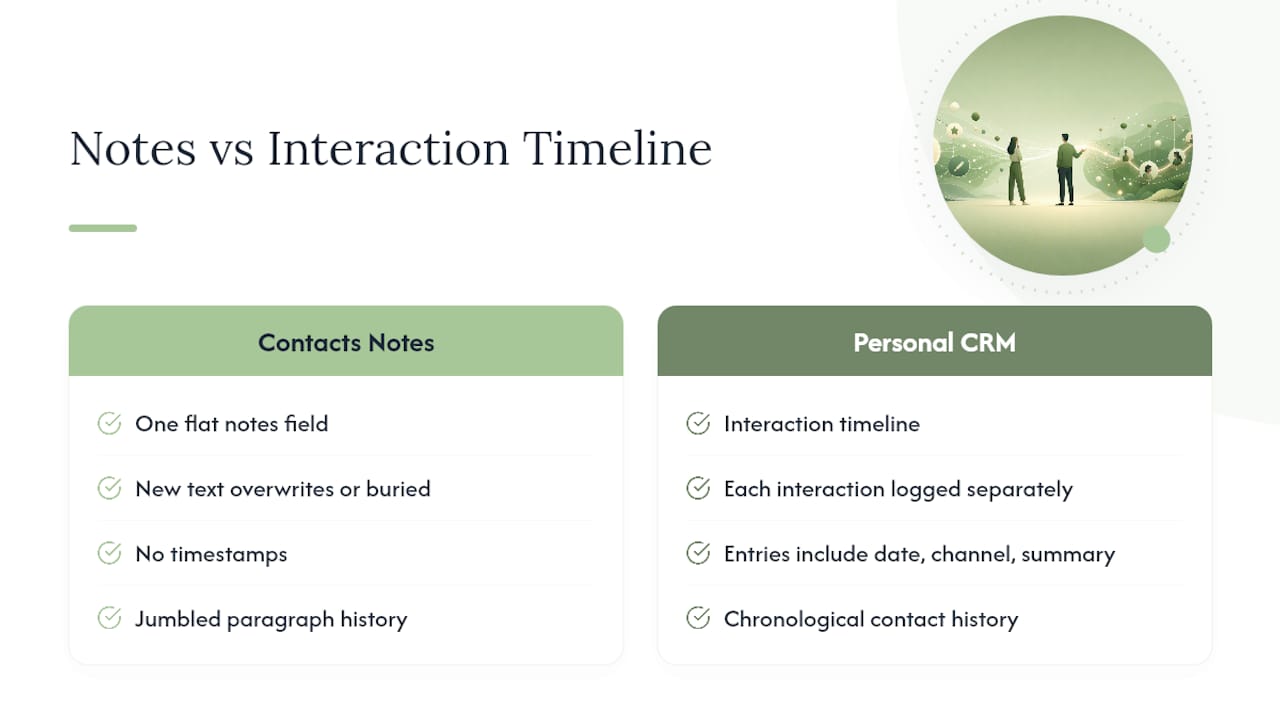
Most contacts apps give you one flat notes field, if that. Write something new, and it either overwrites the old note or gets buried underneath it with no timestamp. A personal CRM logs each interaction as a discrete entry: date, channel, summary. Scroll back through a contact's history and you see a chronological record instead of a jumbled paragraph you have to reread and mentally sort.
Follow-up reminders and cadences
This is arguably the single biggest functional gap. A contacts app has no concept of "when should I reach out again." A personal CRM lets you set a cadence, say, every six weeks for a close collaborator, twice a year for an old college friend, and it will surface that person when the window opens. Buyer guides consistently list cadence scheduling as a defining feature that separates dedicated relationship tools from address books.
Contextual fields and relationship graphs
A personal CRM can store how people connect to each other: who introduced you, who works together, who's related. That relationship graph matters more than it sounds. If you're prepping for a dinner and want to remember that two guests share a mutual friend, a flat contacts list won't surface that. A CRM built around relationships will.
Automatic enrichment, and its privacy cost
Several personal CRMs pull in contacts from email, calendar, and social accounts, then automatically enrich those entries with publicly available profile data pulled from the web. That consolidation genuinely speeds up setup, but it also means a third-party service is scraping and storing information about people who never agreed to be in your database. That's a real tradeoff, not a footnote.
Export, backup, and portability
Contacts apps have had decades to standardize around formats like vCard, so moving your address book between devices is close to friction-free. Personal CRMs vary widely here. Some export cleanly to CSV or vCard; others lock your relationship notes into a proprietary format that makes switching painful later.
Pro Tip: Before you commit real time to a personal CRM, export a test batch of five contacts on day one. If the export comes out garbled or incomplete, that's your answer before you've invested months of notes.
Who Actually Needs a Personal CRM Instead of Just Contacts?
Not everyone benefits from adding a relationship layer on top of their address book. The right tool depends less on your job title and more on how many relationships you're actively trying to maintain, and how badly you're currently failing to maintain them.
- The minimal user. Family, a handful of close friends, maybe a dozen work contacts. A native contacts app covers this completely. Adding a CRM here is overhead with no payoff.
- The casual networker. Someone who meets new people occasionally through hobbies or events but doesn't need structured follow-up. A simple spreadsheet or a tagging system inside the existing contacts app usually suffices.
- The active networker or professional. Consultants, salespeople, founders, recruiters, anyone whose income or opportunities depend on staying visible to fifty or more relationships. This is the profile where a personal CRM stops being a nice-to-have and starts closing real gaps.
- The family or caregiver organizer. People coordinating medical appointments, school contacts, or elder care across a dozen relationships that all carry time-sensitive details. Relationship context here isn't optional. Missing it has real consequences.
A few honest signs you've outgrown a contacts app: you keep meaning to follow up with someone and forget until it's embarrassingly late; you have relationship notes scattered across notes apps, email drafts, and your memory instead of one place; you've had the same "wait, how do I know them again?" moment more than twice this year.
The cost side is real too. A personal CRM demands a few minutes of logging after meaningful conversations, a habit that pays off only if you actually keep it. If you're not going to maintain the notes, the tool adds friction without adding memory.
How Do You Set Up a Personal CRM Without Losing Your Contacts?
The mistake most people make when adopting a personal CRM is trying to migrate everything at once, notes, tags, history, all in a weekend. That burns out the habit before it forms. A better approach treats your contacts app as the permanent source of truth for reachability, and the personal CRM as a memory layer added selectively on top.
- Keep your existing contacts app as-is. Don't duplicate phone numbers and emails into a new system. Sync or import from Google or iCloud rather than re-entering data by hand.
- Pick five to ten relationships that actually need tracking. Not your whole address book. Start with the people you've already dropped the ball on.
- Capture four fields per person, nothing more at first. Relationship type, date of last interaction, next action, and a rough cadence. A minimal schema like this keeps setup friction low enough that you'll actually finish it.
- Build a five-minute weekly routine. Review who's due for a follow-up, log any conversations from the past week, and schedule the next check-in.
- Export a backup monthly. Whatever platform you choose, confirm you can pull your notes out in a portable format before you rely on it for anything important.
A realistic weekly cycle looks like this: Monday morning, five minutes reviewing who's coming up for a cadence check. Whenever a real conversation happens, thirty seconds logging a one-line note the same day, while it's fresh. Friday, a quick triage of anyone who slipped through.
Dedicated contact-manager tools still matter in this setup. Their deduplication and two-way sync keep the underlying directory clean, which means your CRM notes stay attached to accurate, current contact information instead of drifting out of sync with an old phone number.
What Should You Know About Privacy Before You Start Logging Notes?
Relationship notes are a different category of sensitive data than a phone number. A note might mention someone's health situation, a divorce, a financial struggle, a confidential work detail they trusted you with. Monica's own guidance on personal CRMs flags this directly: the more useful the notes get, the more damaging a breach becomes.
Cloud-based enrichment is where this risk concentrates. When a service automatically pulls social profiles, job history, and public records into your contact entries, it's doing real work you'd otherwise do manually, but it also means a company somewhere holds a growing profile on every person in your network, most of whom never consented to that. The tradeoff is real: faster setup against wider exposure.

On-device processing changes the calculation. When notes, timelines, and reminders stay local to your device rather than syncing through a company's servers, there's no database to breach and no third party analyzing your relationship history to sell you something. The limitation is that cross-device sync and automatic enrichment get harder to deliver without some kind of network connection, so you're trading a convenience for a genuine reduction in exposure.
Before trusting any tool with relationship data, ask these questions:
- Where is my data actually stored, on my device, or on a server I don't control?
- What happens to my notes if I cancel or the company shuts down?
- Does the app enrich contacts using external data sources, and can I turn that off?
- Can I export everything in a standard format, and have I actually tested it?
- Is data encrypted at rest, and who holds the keys?
Pro Tip: If a personal CRM can't clearly answer "where does my data live" in one sentence, that's usually a sign the answer doesn't favor you.
How Should You Evaluate and Choose a Personal CRM?
Run any candidate through five dimensions before committing: integrations, reminders, portability, price, and privacy. A tool that excels at four of these but fails the fifth can still be the wrong choice, especially if the failure is privacy.
Ask vendors directly rather than relying on marketing copy:
- What exact format does export use, and can I test it before paying?
- How long is my data retained after I delete an entry or cancel?
- Is data encrypted, and is processing done locally or in the cloud?
- What third-party sources does the enrichment feature pull from?
- Can I use the core features with enrichment and cloud sync fully disabled?
Watch for a few red flags. Vague answers about "industry-standard encryption" without specifics. Export options that only work through a support ticket instead of a self-service button. Enrichment that can't be turned off. And free tiers with no clear business model, which usually means the product is your data, not your subscription fee.
Why Privacy Should Be the Deciding Factor, Not an Afterthought
Most comparisons of personal CRMs against contacts apps treat privacy as a footnote after the feature list. That ordering is backwards. You're not deciding whether to store a phone number differently. You're deciding whether to build a searchable archive of your friends' and colleagues' personal struggles, and where that archive lives.
The overlooked nuance is that cloud enrichment feels like a feature until you think through what it actually does: pulling public data about people who never opted into being profiled, then storing the result indefinitely on someone else's server. That's a reasonable tradeoff for some users. It's not one most people make consciously.
On-device processing isn't the answer for every use case. If you need real-time sync across five devices and a shared team view, local-only storage will frustrate you. But for the individual managing personal and professional relationships, which is most people using a personal CRM, the sync convenience rarely outweighs the exposure. Apple device owners in particular have a genuine option here that doesn't exist on every platform: local processing that never needs to phone home.
The honest recommendation is to start small, log the minimum useful fields, and pick a tool that can answer your privacy questions in plain language before you feed it a single sensitive note.
— Alex
Try a Personal CRM That Keeps Your Notes Off Someone Else's Server
Some companies build relationship tools with local processing first, cloud dependency only where you choose it. Instead of routing your notes, reminders, and contact history through a third-party server for enrichment, the on-device approach keeps that memory layer where it started, on your own iPhone.

That matters most for exactly the sensitive details a personal CRM tends to accumulate: health mentions, financial context, family situations you'd never want sitting in a breach report. If you want to verify what "on-device" actually means before trusting any app with that kind of information, the privacy verification guide walks through how to check those claims yourself rather than take a vendor's word for it. From there, visit the Obsidian Ridge Labs landing page to see the current lineup of private, on-device apps and decide which one fits how you actually manage your relationships.
Sources
The Mogul and Zapier guides both define the personal CRM category and its enrichment tradeoffs in detail. Intriq's comparison breaks down what a contacts app can and can't do structurally. Monica's practical guide is worth reading specifically for its privacy cautions, and organizations weighing broader CRM options may find the nonprofit CRM roundup a useful point of comparison.
- Personal CRM: Why and how to use one | Zapier
- What is personal CRM software, and why do you need it? | Jotform