There is no single winner. Pick on-device processing for privacy-sensitive, low-latency tasks, and pick cloud infrastructure for frontier-scale reasoning and heavy compute. The decision comes down to four factors: latency budget, data sovereignty requirements, cost structure, and the complexity of the model you actually need.
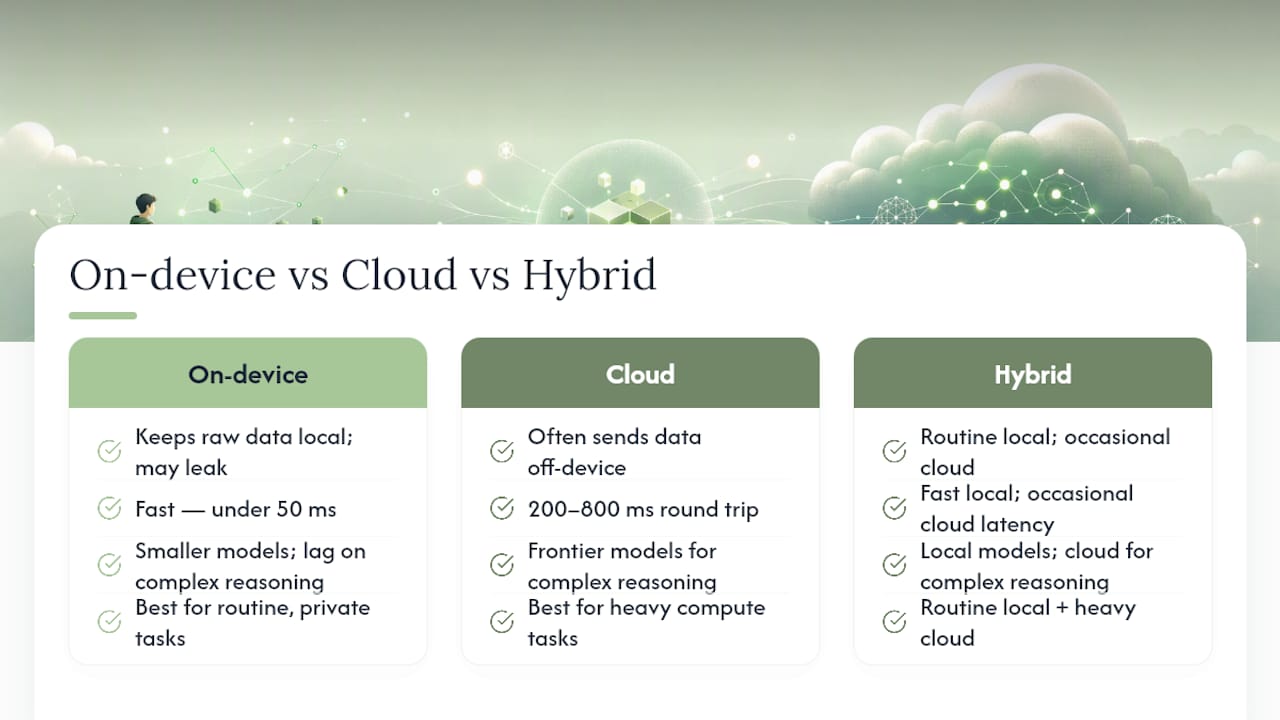
- Latency: on-device inference often lands under 50 milliseconds; cloud round trips typically run 200 to 800 milliseconds.
- Privacy: on-device processing keeps raw data local, which simplifies HIPAA and GDPR compliance by avoiding transmission entirely.
- Cost shape: on-device shifts spend to capex (hardware, engineering); cloud is opex, billed per call or per token.
- Capability: cloud still leads on the hardest multimodal and reasoning tasks, though the gap has narrowed.
Treat placement as a per-workload decision rather than an architectural religion. Most production systems that scale end up hybrid.
Key Takeaways
The strongest AI architecture routes routine, sensitive, or latency-critical work on-device and reserves cloud infrastructure for tasks that genuinely require frontier-scale compute.
| Point | Details |
|---|---|
| Decide per workload | Map latency, privacy, and volume requirements feature by feature rather than choosing one architecture for the whole product. |
| Local processing needs an audit | On-device does not guarantee privacy; check every telemetry endpoint and analytics SDK before making that claim. |
| Hybrid is the pragmatic default | Route routine requests locally and escalate only complex or low-confidence cases to the cloud. |
| Optimize before you ship | Quantization, pruning, and distillation make on-device models viable within power and memory limits. |
| Obsidianridgelabs builds this by default | Its Apple-only apps keep transcription, finance, and journaling data on-device, with cloud connections requiring explicit opt-in. |
Table of Contents
- On-Device vs Cloud AI: What's the Actual Difference?
- How Do On-Device and Cloud AI Compare Head-to-Head?
- When Should You Use Hybrid or Edge Architectures?
- Which Optimization Techniques Make On-Device AI Feasible?
- What Are the Security, Privacy, and Compliance Tradeoffs?
- How Do Cost and Operational Overhead Compare?
- Which Workloads Belong On-Device, in the Cloud, or Hybrid?
- What Tools and Frameworks Should You Actually Use?
- What Should You Benchmark Before Committing to a Placement?
- Get Private, On-Device AI Apps Built for Apple Devices
- Frequently Asked Questions About On-Device vs Cloud AI
- Sources
On-Device vs Cloud AI: What's the Actual Difference?
On-device AI means the model runs its inference on hardware you or the end user directly control: a phone's CPU, GPU, or a dedicated neural processing unit (NPU). No network call happens during inference. Cloud AI means inference, and usually training, happen on remote servers with elastic access to accelerators like GPUs or TPUs that no phone or laptop could hold.
Picture the difference as a routing diagram: device ↔ cloud, with a decision point in between. A voice command either resolves entirely on the device's NPU, or it travels over the network to a data center, gets processed, and returns. That single fork is the entire architectural question this guide addresses.
A few technical distinctions matter here:
- On-device models are typically compressed (quantized, pruned, or distilled) to fit memory and power constraints.
- Cloud models can be arbitrarily large because the provider controls the hardware, not the end-user device.
- Regulatory frameworks like HIPAA and GDPR treat data residency differently depending on whether processing happens locally or crosses a network boundary.
- NPUs, now standard in most modern smartphones and several laptop chipsets, exist specifically to make local inference power-efficient.
This is the standard industry framing behind what most people search casually as "local AI vs cloud AI." The terms are interchangeable with on-device versus cloud AI, though "edge computing AI" sometimes refers more specifically to inference on nearby servers rather than the end-user's own device.
How Do On-Device and Cloud AI Compare Head-to-Head?
The tradeoffs are not close on some axes and genuinely contested on others. Here's how the two approaches stack up across the dimensions that actually drive architectural decisions.
| Factor | On-Device | Cloud |
|---|---|---|
| Latency / responsiveness | Often under 50 ms | Commonly 200 to 800 ms round trip |
| Privacy / data sovereignty | Data stays local by default | Data leaves the device; residency depends on provider region |
| Compute & model size limits | Bound by device memory and thermal envelope | Effectively unbounded, provider-managed |
| Cost structure | Capex: hardware, engineering, optimization | Opex: per-call or per-token billing |
| Offline availability | Full functionality without a network | Requires connectivity |
| Manageability / updates | Owner manages patching, versioning, rollout | Provider centralizes patching and monitoring |
| Scalability / peak loads | Constrained by the single device's hardware | Elastic, scales with provider capacity |
A few things stand out. Local AI is strongest for low-latency, offline, and privacy-sensitive scenarios, while cloud AI wins for compute-intensive or centrally managed workloads — which is why the placement decision has to happen per feature, not once for the whole product.
Data sensitivity usually decides placement first, followed by latency budget, then expected volume. A photo-tagging feature that never touches personal identifiers can comfortably live in the cloud. A feature that transcribes therapy sessions cannot, regardless of how fast the cloud provider's network is.
Pro Tip: Running inference on-device is not the same as guaranteeing privacy. Audit every telemetry endpoint, crash reporter, and analytics SDK in your app. Plenty of "on-device" apps still phone home with usage logs, model metadata, or debug payloads that quietly undercut the privacy claim.
When Should You Use Hybrid or Edge Architectures?
Most production systems that need both speed and scale end up hybrid, not purely one or the other. Hybrid architectures route routine requests locally and escalate complex requests to the cloud, which preserves latency and privacy for the common case while still reaching cloud-scale compute when a request demands it.
Three patterns show up repeatedly in production systems:
- Local-first with cloud fallback: attempt inference on-device; escalate only if confidence is low or the task exceeds device capability.
- Split execution: preprocess or filter data locally (say, detecting speech before transcribing it), then send only the necessary payload to the cloud.
- Edge-server routing: run inference on a nearby edge node rather than either the device or a distant data center, useful for enterprise deployments with on-premises hardware.
Routing logic typically triggers on confidence score, task complexity, or a quota (route to cloud only after local capacity is exhausted). Done well, hybrid routing cuts cloud spend and preserves the privacy of the majority of requests, since only the hard cases ever leave the device.
Which Optimization Techniques Make On-Device AI Feasible?
Fitting a useful model onto a phone or laptop chip is a hardware-constrained engineering problem, not a research problem. A handful of techniques make the difference between a model that runs and one that stalls or drains the battery.
Quantization reduces the numerical precision of model weights, often from 32-bit floats to 8-bit integers, which can shrink model size and cut inference latency substantially with a modest accuracy tradeoff. Pruning removes redundant weights and connections that contribute little to output quality. Distillation trains a smaller "student" model to mimic a larger "teacher," recovering much of the bigger model's behavior at a fraction of the size. Operator fusion and kernel compilation target the NPU or GPU directly, combining computational steps so the chip executes them more efficiently.
Hardware choice matters as much as the model. NPUs are purpose-built for low-power inference and tend to win on battery life. GPUs handle heavier parallel workloads but draw more power and generate more heat. CPUs remain the fallback for compatibility but are rarely the fastest option for any of this.
- Quantization: smaller model, faster inference, small accuracy cost.
- Pruning: removes dead weight from the network.
- Distillation: smaller model trained to approximate a larger one.
- Kernel compilation for NPUs: matches computation to the chip's native operations.
Pro Tip: Never benchmark just the model's forward pass. Measure the full pipeline, including I/O, preprocessing, and postprocessing. A model that "runs in 20 milliseconds" can still deliver a 300 millisecond user-perceived delay if the surrounding code is sloppy.
What Are the Security, Privacy, and Compliance Tradeoffs?
Local processing supports data residency requirements directly. Because the raw input never leaves the device, on-device processing simplifies compliance with frameworks like HIPAA and GDPR by removing the transmission and third-party storage step entirely.
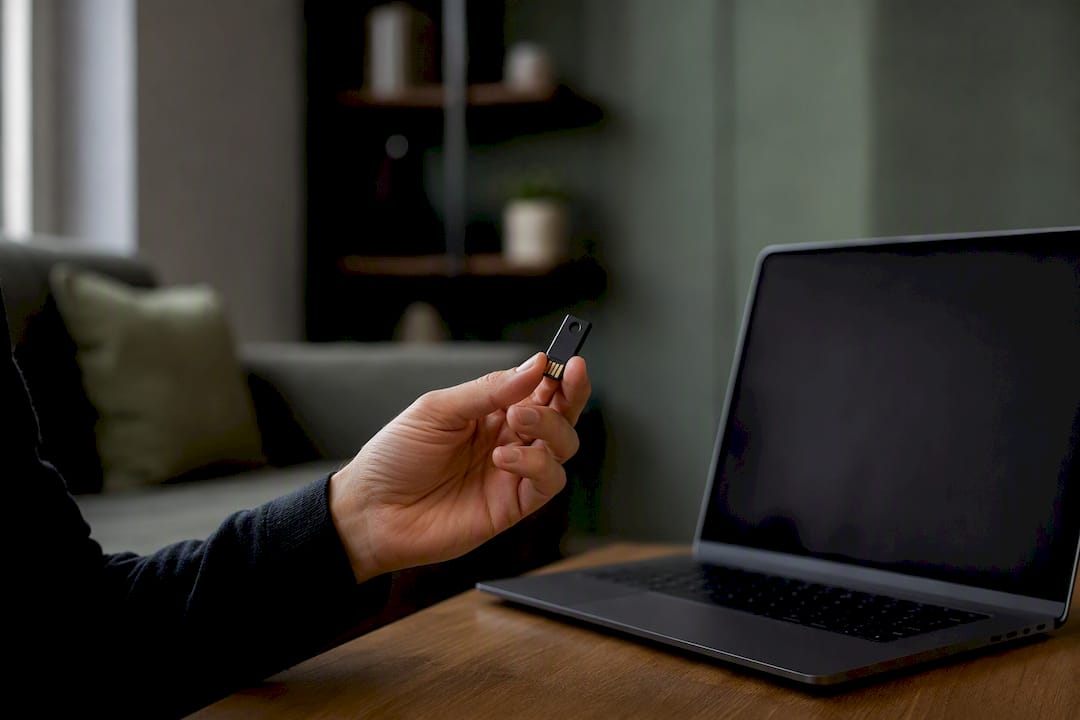
That said, on-device does not mean private by default. Official platform documentation has repeatedly stressed that developers must independently confirm telemetry behavior and any optional cloud interactions before making a privacy claim to users. An app can run its core model locally and still upload usage analytics, error logs, or model update pings that carry more information than the developer intended.
A working audit checklist should cover:
- Encryption at rest for any locally stored model output or user data.
- Secure boot and runtime integrity checks on the device.
- An explicit inventory of every telemetry and analytics endpoint the app calls.
- Opt-in (not opt-out) controls for any optional cloud connection.
- Key management practices for locally stored credentials or tokens.
Cloud deployment flips the tradeoff: centralized logging, auditing, and patching become easier, because providers handle security updates and monitoring on the owner's behalf rather than distributing that responsibility across thousands of individual devices. The cost is that sensitive data now has to leave the endpoint to get there.
How Do Cost and Operational Overhead Compare?
On-device shifts spending toward capex: hardware, engineering time for optimization, and the fixed cost of shipping a model inside an app bundle. Cloud shifts spending toward opex: a bill that scales with usage. At steady, high volume, local hardware can pay for itself against cumulative per-call cloud billing, while cloud tends to stay cheaper for low-volume, experimental, or highly variable workloads.
Operational burden differs too. On-device deployment means managing device compatibility across chip generations, distributing model updates through app store review cycles, and staging rollouts carefully since a bad update can't be rolled back with a single server-side flag. Cloud deployment centralizes updates but requires ongoing spend and constant monitoring for drift as usage patterns shift.
- Capex (on-device): hardware costs, optimization engineering, app-store distribution overhead.
- Opex (cloud): per-call billing, provider infrastructure fees, ongoing monitoring costs.
- Hybrid systems carry both: dual monitoring stacks and routing logic that itself needs maintenance.
Which Workloads Belong On-Device, in the Cloud, or Hybrid?
Mapping a feature to a placement decision gets easier once you run it through a short checklist: how sensitive is the data, does it need to work offline, what's the latency budget, how much volume do you expect, and can the device realistically run the model complexity you need?
- Real-time transcription (voice memos, meeting notes): on-device. Latency and privacy both favor local processing, and round-trip delays of 200 to 800 milliseconds would make cloud transcription feel sluggish for live captioning.
- Privacy-sensitive health or financial data: on-device by default, cloud only with explicit, informed opt-in.
- Generative media (image or video synthesis at high fidelity): cloud, since the model size usually exceeds what a device can hold.
- Enterprise analytics on large datasets: cloud, because the compute and storage scale requirements outstrip any single device.
- Conversational assistants with occasional deep research: hybrid. Handle routine turns locally, escalate to cloud only for complex queries.
The pattern across all five: data sensitivity and latency tolerance predict placement more reliably than raw model capability does.
What Tools and Frameworks Should You Actually Use?
For on-device deployment, the practical toolchain runs through Core ML on Apple platforms, TensorFlow Lite and ONNX Runtime for cross-platform mobile and embedded targets, and platform-specific NPU compilers for kernel-level optimization. These handle model conversion, quantization, and packaging into a shippable app bundle.
For cloud deployment, managed inference services handle hosting, autoscaling, and retraining pipelines, paired with model monitoring tools that track drift and latency in production. Orchestration layers sit on top to manage versioning across many concurrent model deployments.
- Prototyping: cloud-hosted inference is faster to iterate on since there's no device packaging step.
- Production, privacy-first: Core ML or ONNX Runtime, with quantization applied before shipping.
- Platform constraints: Apple devices favor Core ML; cross-platform teams often standardize on ONNX Runtime or TensorFlow Lite instead.
- Model updates: on-device apps typically ship updates through app store releases or, where platforms allow, server-hosted model files fetched and cached on first launch.
Choose the toolchain based on your platform constraint first, and your iteration speed second. A cloud-first prototype that eventually needs to ship on-device will need re-optimization regardless of which framework you started with.
What Should You Benchmark Before Committing to a Placement?
Before locking in an architecture, run a short battery of tests that actually reflect production conditions rather than a lab benchmark.
- Latency: end-to-end response time including I/O, plus 95th and 99th percentile figures, not just the average.
- Resource use: peak memory, battery drain per session, and cold-start time on the oldest device you plan to support.
- Security: a full data-flow audit, a list of every telemetry endpoint, and verification that encryption at rest is actually enabled.
- Operations: a staged rollout test, a rollback plan for a bad model update, and monitoring coverage for both accuracy drift and cost.
- Cost forecasting: run sample volume through projected cloud pricing to catch surprises before they hit production billing.
Skipping the percentile latency numbers is the most common mistake. An average latency of 80 milliseconds can hide a 99th percentile of 900 milliseconds, and that tail is exactly where users notice.
How Does Obsidian Ridge Labs Route Workloads on Apple Devices?
Obsidianridgelabs builds privacy-first apps for Apple devices around a local-first routing rule: core processing, including transcription, stays on-device by default, with any cloud connection requiring explicit opt-in rather than happening silently in the background.
- No server-side transcript logs by default.
- Model updates ship as device-resident packages rather than requiring constant cloud calls.
- Optional connections are disclosed, not buried in a settings menu nobody visits.
- Auditability is treated as a feature, not an afterthought, in line with the privacy verification approach described in the company's own documentation.
Why We Still Believe in Privacy-First, Pragmatic Hybrid
Local-first isn't dogma here. It's a default that changes only when a user explicitly asks for cloud capability they understand they're opting into. The technical case for hybrid is real, but the default matters more than the exception. Readers who want to see this philosophy applied can look at our product philosophy directly.
Get Private, On-Device AI Apps Built for Apple Devices
Obsidianridgelabs builds the apps this guide describes rather than just writing about them: private transcription, finance tracking, and journaling tools that run their core processing locally on your iPhone or Mac, with no server-side transcript logs by default.

If you've read this far, you already know why that matters: local processing removes the round-trip latency and data-exposure risk that cloud-based apps accept as a tradeoff for scale. For personal tools like transcription, journaling, and budgeting, that scale rarely matters. Your privacy does. Echo Chamber, our on-device transcription app, is a concrete example: audio never leaves your device unless you explicitly choose to connect a cloud service.
If the architecture in this guide convinced you that on-device is the right default for sensitive personal data, the next step is straightforward. Visit Obsidian Ridge Labs and try one of the apps built around exactly that principle.
Frequently Asked Questions About On-Device vs Cloud AI
Is on-device AI always more private than cloud AI? Not automatically. On-device processing keeps raw data local, but apps can still leak information through telemetry, analytics, or optional cloud features. Always audit what actually leaves the device before trusting a privacy claim.
Does on-device AI perform worse than cloud AI? It depends on the task. On-device models are usually smaller and can lag behind frontier cloud models on complex reasoning, but they typically win decisively on latency, often responding in under 50 milliseconds versus a cloud round trip of 200 to 800 milliseconds.
When does hybrid AI make more sense than a single approach? Hybrid fits when you need both fast, private handling of routine requests and occasional access to heavier cloud compute for complex cases. Most production apps with meaningful scale end up here rather than committing entirely to one side.
What's the biggest mistake developers make when choosing AI placement? Treating it as a single, product-wide decision instead of a per-feature one. A transcription feature and an image-generation feature in the same app can reasonably use opposite architectures.
Do NPUs make on-device AI significantly faster? Yes. NPUs are built specifically for efficient low-power inference, which is why most modern smartphones now include one rather than relying solely on the CPU or GPU for AI tasks.