
For privacy-focused Apple users, the only truly safe route for HIPAA compliant transcription is an on-device workflow that never transmits protected health information (PHI) off the device. Echo Chamber by Obsidianridgelabs is built precisely for this: local processing on Apple hardware, no cloud data transfer, and optional Biometric Access.
Start here before anything else:
-
Stop iCloud sync for any transcription app immediately
-
Enable Face ID or Touch ID with a strong passcode on your device
-
Confirm the app stores transcripts locally and supports auto-deletion
-
Disable cloud backups for folders containing PHI
Pro Tip: Before you install any transcription app, open its privacy policy and search for “third party.” If audio or text is routed to any external processor, that vendor must sign a BAA before you use it for PHI.
Table of Contents
-
How to run a HIPAA-conscious on-device transcription session on Apple devices
-
What does on-device transcription cost, and how long does deployment take?
What does HIPAA require for electronic transcription?
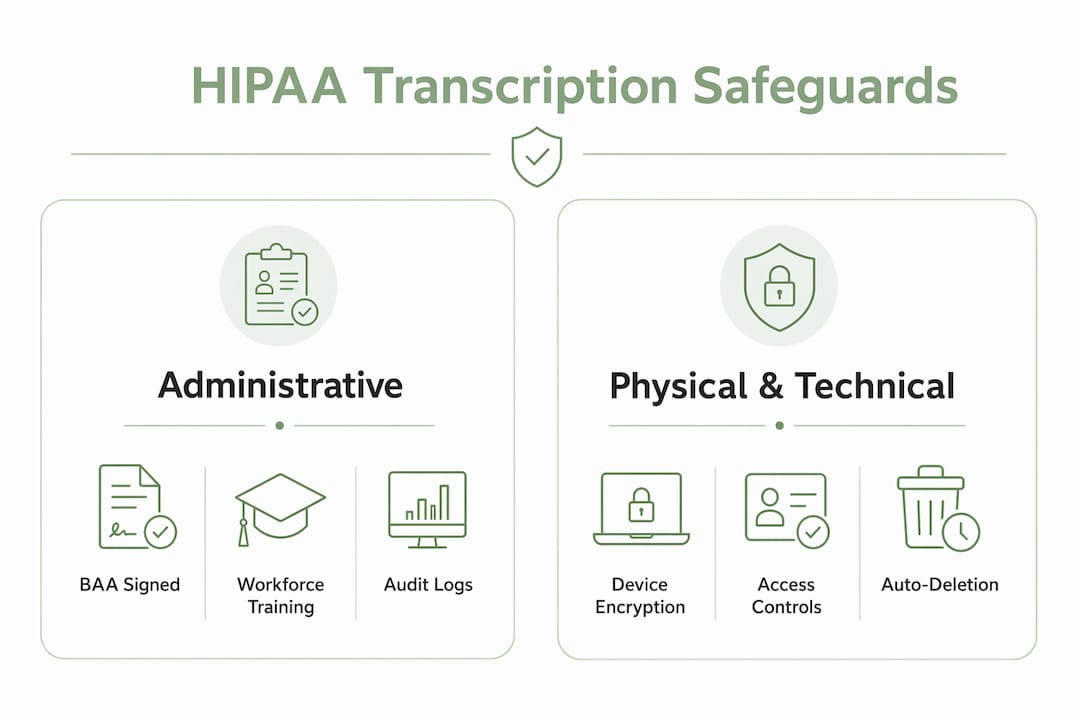
HIPAA’s Security Rule divides requirements into three safeguard categories, all of which apply when you transcribe PHI electronically. On-device processing that does not connect to a server means that there is no unencrypted data in transit. Optional security features including AES-256 encryption at rest and Biometric / Face ID also ensure your data is secure.
Technical safeguards are the most concrete to verify in a transcription app:
-
Access controls: unique user authentication, automatic session timeout
-
Audit logs: timestamped records of who accessed or exported a transcript
-
Encryption at rest (AES-256) and in transit (TLS 1.3)
-
Integrity controls: tamper-evident storage so transcripts cannot be silently altered
-
Transmission security: no unencrypted export paths
Administrative safeguards require a signed BAA with any third party that handles PHI, a workforce training program, a minimum-necessary policy, and documented retention and disposal procedures. Obsidian Ridge Labs does not host or own any servers that could possibly transmit sensitive information, and our apps (Including Echo Chamber) are designed for maximum privacy and security.
Physical safeguards for device-based workflows include keeping the device in a secure location, using encrypted local backups, and having a lost-device response plan with remote wipe enabled.
| HIPAA safeguard | What to verify in a transcription app |
|---|---|
| Encryption at rest | AES-256 with documented key management |
| Encryption in transit | TLS 1.3 for any network call |
| Audit logging | Exportable, timestamped access and export log |
| Access controls | Biometric or PIN lock; session timeout |
| BAA | Signed agreement on file before PHI is shared |
| Data retention | Configurable auto-deletion; certified deletion option |
| Incident response | Written breach notification policy from vendor |
Why on-device processing changes your risk profile
Local on-device processing removes network transmission of PHI entirely, which materially reduces exposure to cloud breaches and eliminates third-party human access to audio. When audio never leaves the device, the attack surface shrinks to the device itself.
The practical advantages are real:
-
No cloud data retention by a third-party processor
-
No human transcriptionist ever hears the audio
-
Faster operation in offline or low-connectivity environments
-
Reduced dependency on vendor security posture for the core data path
The limits are equally real. Device theft or loss becomes the primary threat vector, so full-disk encryption and remote wipe are non-negotiable. Local backups, if enabled, must themselves be encrypted. On-device models may also produce lower accuracy on specialized medical vocabulary compared with cloud services that use larger, continuously updated models.
True on-device AI transcription eliminates the need to transmit audio to cloud servers where humans or external systems could access it. That said, even a fully local app still requires organizational policies, and documented retention schedules for any ancillary processors in the workflow.
Pro Tip: Enable auto-deletion of source audio immediately after transcription is complete, and confirm the setting persists across app updates. Auto-deletion of source audio after local processing is an established safeguard that limits retained PHI.
For readers evaluating the broader tradeoff between on-device and HIPAA-compliant AI deployment models, the core question is always: where does PHI travel, and who can access it there?
How to run a HIPAA-conscious on-device transcription session on Apple devices
Run transcription with an on-device app that never transfers audio off-device and that provides a BAA where applicable. The checklist below covers device preparation through post-session cleanup.
Device preparation:
-
Update to the latest iOS or macOS version — security enclave improvements ship with OS updates
-
Enable full-disk encryption (on by default on modern Apple devices; verify in Settings)
-
Set a strong alphanumeric passcode and enable Face ID or Touch ID
-
Enable Find My and configure remote wipe via iCloud.com or MDM
-
Disable iCloud Drive sync for the transcription app’s document folder
App configuration:
-
Set storage to local-only in the app’s settings
-
Enable auto-delete for source audio after transcription
-
Require local authentication (biometric or PIN) to open the app
-
Turn off any optional cloud backup or sync toggle within the app
Per-session workflow:
-
Open the transcription app and confirm local-only mode is active
-
Start recording; keep the session to the minimum necessary PHI
-
Run transcription locally; do not share the audio file before deletion
-
Confirm auto-delete of the source audio file
-
Label the transcript with the minimum identifying information required
Operational practices: Audit logs and role-based access controls are essential to satisfy HIPAA’s accountability and minimum-necessary principles. Test your audit-log export at least quarterly. For corrections, maintain a versioned correction log rather than overwriting the original transcript — this preserves the record trail HIPAA requires.
Pro Tip: Use a hardware-backed keychain entry (available on Apple Silicon and A-series devices) for any encryption keys the app exposes. This ties key access to the device’s Secure Enclave and survives neither jailbreak nor unauthorized transfer.
What should you ask any vendor claiming HIPAA compliance?
Require written attestation and a signed BAA before sending PHI to any vendor. That single requirement filters out most non-compliant options immediately.
Vendor checklist:
-
Signed BAA provided before service begins
-
Clear data-flow diagram showing every node PHI touches
-
On-device processing attestation (written, not just marketing copy)
-
Encryption specification: AES-256 at rest, TLS 1.3 in transit
-
Exportable audit log with timestamps and user identifiers
-
Configurable auto-deletion and certified deletion option
-
SOC 2 Type II or ISO 27001 evidence if available
Questions to ask in writing:
-
“Do you transmit any data to servers either you control, or any third party servers? If so do you have a BAA?”
-
“Does any audio or transcript text ever leave the device or your servers?”
-
“How are encryption keys managed, and who holds them?”
-
“Can I disable cloud sync and backups by default for all users?”
-
“What does your incident response process look like, and what is your breach notification timeline?”
Store the BAA, data-flow diagram, security whitepaper, and retention policy together in your procurement records. Vendor documentation for HIPAA procurement should include all four of these items; a vendor that cannot produce them is not ready for PHI workflows.
Pro Tip: Ask for a sample audit-log export before signing. A vendor that cannot show you what the log looks like in practice has likely not tested it.
Legal edge cases and when you need formal compliance review
Transcription can usually be made HIPAA-compliant, but certain content categories require extra controls that standard vendor assurances alone cannot cover.
Edge cases requiring special handling:
-
42 CFR Part 2: Substance use disorder (SUD) records carry stricter consent and disclosure rules than standard HIPAA. A general BAA does not cover Part 2 obligations.
-
State mental health confidentiality laws: Many states impose confidentiality requirements beyond HIPAA for psychiatric records.
-
Minors: Transcripts involving patients under 18 may trigger additional consent requirements depending on the state and the type of care.
-
Forensic transcripts: Court-ordered or law enforcement contexts introduce chain-of-custody requirements that standard transcription workflows do not address.
-
Inter-jurisdictional records: Records that cross state lines may be subject to multiple state laws simultaneously.
For behavioral health and SUD content, 42 CFR Part 2-compatible workflows require trauma-aware handling, single-transcriber assignment, and explicit consent controls that go beyond a standard HIPAA BAA. Always get a written legal assessment from counsel familiar with both HIPAA and the relevant state laws before deploying any transcription workflow for these categories.
Keep a one-line log for each transcript that falls under heightened confidentiality, noting the applicable regulation and the controls applied.
Pro Tip: This article is general information, not legal advice. Confirm current requirements with a qualified HIPAA attorney or compliance officer for your specific situation.
What does on-device transcription cost, and how long does deployment take?
Pricing for on-device transcription apps follows three general shapes, each with different tradeoffs for scale, support, and BAA availability.
| Pricing model | Typical cost shape | Deployment timeline | BAA availability |
|---|---|---|---|
| One-time app purchase | Low upfront, limited enterprise support | Hours (individual user) | Often limited or on request |
| Consumer subscription | Monthly or annual fee, faster updates | Hours to days | Available from larger vendors |
| Enterprise licensing | Higher cost, includes procurement support | 2–8 weeks with MDM rollout | Standard, negotiated |
Compatibility notes for Apple devices:
-
Verify the app’s stated minimum iOS and macOS versions before purchasing
-
On-device model performance scales with Apple Silicon (M-series Macs, A15 and later iPhones)
-
Secure Enclave support for key management requires A-series or M-series chips
-
Enterprise-grade medical dictation apps commonly publish minimum OS versions and Apple Silicon compatibility on their product pages
Deployment timeline by scope:
-
Individual user setup: a few hours (app install, device configuration, BAA request)
-
Small practice (2–10 users): 1–2 weeks including policy documentation and training
-
Enterprise rollout with MDM and formal procurement: 2–8 weeks
Echo Chamber by Obsidianridgelabs meets the checklist
Echo Chamber is an on-device transcription app built by Obsidianridgelabs to keep all processing and storage local to Apple devices, with no audio or transcript data routed to external servers.
How Echo Chamber maps to the compliance checklist:
-
On-device processing: audio is transcribed locally; nothing is transmitted to Obsidianridgelabs servers
-
Cloud sync disabled by default: no iCloud or third-party sync in the core data path
-
Auto-deletion: source audio can be deleted immediately after transcription
-
Local authentication: app access requires device biometrics or PIN
Echo Chamber is available on the App Store via the product page. For readers comparing offline transcription options across the Apple ecosystem, Echo Chamber’s local-first architecture is the differentiating factor for PHI workflows.
Pro Tip: Before your first PHI session, run a test transcript with non-sensitive audio, export the audit log, and confirm auto-delete fired. This 10-minute verification step creates a documented baseline for your compliance records.
Key Takeaways
On-device transcription that never transmits PHI off the device, combined with a signed BAA and documented operational controls, is the most defensible HIPAA-compliant transcription setup for Apple users.
| Point | Details |
|---|---|
| On-device processing reduces risk | Local processing removes network transmission of PHI, cutting third-party access vectors. |
| BAA is non-negotiable for any data that is being transported | A signed BAA is legally required before any third party handles PHI; no BAA means no compliant workflow. |
| Auto-deletion limits retained PHI | Deleting source audio immediately after transcription is an established safeguard against lingering PHI. |
| Device security is the remaining threat | Full-disk encryption, biometric lock, and remote wipe address the primary risk when audio stays local. |
| Echo Chamber for Apple users | Obsidianridgelabs’s Echo Chamber keeps processing local and does not transmit any data to any servers; ever. |
Why local-first matters more than the marketing says
The phrase “HIPAA compliant” appears on nearly every transcription product page, but the underlying architectures vary enormously. Most cloud-based services route audio through external servers, require trust in the vendor’s security posture, and create a data path that a BAA can govern but cannot eliminate. On-device processing takes a structurally different approach: it removes the external data path rather than just governing it.
That distinction matters most for individual practitioners and small practices that lack the procurement infrastructure to continuously audit a cloud vendor’s controls. A local-first app shifts the compliance burden back to the device and the user’s own operational practices, which are more directly controllable. The tradeoff is real — on-device models may not match cloud accuracy on dense medical vocabulary — but for many workflows, the privacy gain outweighs the accuracy delta.
Obsidianridgelabs builds from this premise across its entire private AI app suite: keep processing local, be transparent about optional connections, and give users the documentation they need to make informed decisions. That approach is particularly well-suited to PHI workflows where the cost of a data breach is not just financial.
Echo Chamber is available now for Apple devices
PHI should not travel further than it has to. Echo Chamber by Obsidianridgelabs gives you on-device transcription that keeps audio and text local to your Apple device, with no cloud routing in the core data path and enterprise assurances available for covered entities.

Download Echo Chamber directly from the App Store via the Echo Chamber product page, where you can also find subscription and one-time purchase options. To request a BAA, data-flow diagram, or security whitepaper for procurement, use the enterprise contact form on the product page. For organizations evaluating air-gapped or fully isolated AI deployments, the same local-first principles apply at a larger scale.
Start with a single test session: install Echo Chamber, run a non-PHI transcript, verify auto-delete, and export the audit log. That 10-minute check gives you a documented baseline before any PHI touches the app. Then request your BAA and you have the foundation of a defensible on-device transcription workflow.