Use percent-based set-asides, three separate bank accounts, and local-first tools or manual CSV imports instead of bank-linked apps. This structure keeps your tax, buffer, and pay decisions sound while limiting how much of your financial life gets copied into someone else's cloud. Open the accounts, schedule the transfers, and pick a tool that never needs your bank password.
TL;DR:
- Separating income, tax, and buffer accounts physically limits sensitive client and payment data from being visible to third-party tools.
- Running three income scenarios quarterly helps freelancers manage cash flow risks without sharing detailed bank login information.
- Local-first, encrypted tools that process data on the device drastically reduce exposure by avoiding ongoing bank account connections.
- Manual reconciliation, encrypted exports for CPA use, and anonymized data maintain privacy while ensuring compliance and record-keeping.
- Using unique passwords, two-factor authentication, and regular review of app connections minimizes breach risks and preserves financial confidentiality.
Table of Contents
- Budgeting for Freelancers' Privacy: A Checklist That Actually Works
- Forecasting Irregular Income Without Handing Over Your Bank Login
- Choosing Tools That Don't Leak Your Financial Life
- Invoicing, Receipts, and Reconciling Without Giving Away the Keys
- Why On-Device Tools Change the Privacy Equation
- Your First Week: Accounts, Transfers, and One Test Run
- What Federal and State Rules Actually Require
- The Real Cost of a Financial Data Breach
- Talking to Clients About Money Without Oversharing
- Keeping Your Numbers Useful Without Keeping Them Identifiable
- Why I Care About This Beyond the Obvious
- Private, On-Device Budgeting Built for This Exact Problem
- Sources
Budgeting for Freelancers' Privacy: A Checklist That Actually Works
Percent-based budgeting solves two problems at once. It smooths the feast-or-famine cycle every freelancer knows, and it keeps sensitive numbers out of systems designed to aggregate them. The two goals reinforce each other more than most people realize: the discipline of moving money into separate accounts is also what keeps your financial footprint small.
A workable starting split looks like this, based on freelancer financial planning guidance that emphasizes separating accounts by function:
- Taxes: A reasonable percentage to cover federal, state, and self-employment tax obligations, set aside promptly when a payment clears.
- Buffer or runway: A portion set aside to build a multi-month cushion for slow periods.
- Retirement: A steady contribution amount that fits your budget, recognizing consistent saving is better than waiting for ideal months.
- Owner pay: the remainder, transferred to your personal checking account on a fixed schedule, not whenever you feel like it.
- Operating costs: carved out separately if your expenses are heavy or unpredictable month to month.
The privacy logic behind physical account separation is easy to miss. When taxes, buffer, and pay sit in one commingled account, any tool you connect to check your balance sees everything: client payment amounts, timing, patterns that reveal who your biggest clients are. Separate the accounts and a glance at your "pay" account tells a bank aggregator nothing about your tax liability or your buffer size. Compartmentalizing money physically compartmentalizes what any single service can infer about you.
Pro Tip: Set your tax transfer to trigger automatically the day a client payment lands, before you've had a chance to "borrow" from it mentally. Automating the decision removes the temptation and the record-keeping burden in one move.
Your first-week checklist:
- Open three accounts at your bank: operating, tax, and buffer (most banks let you do this without new account numbers going to third parties).
- Set a recurring transfer rule, or manually move funds within 24 hours of each deposit.
- Start a private ledger, a spreadsheet or local app, not a service that requires linking your bank login.
- Log this week's actual numbers before you forget the context behind them.
None of this requires new software spending. It requires fifteen minutes and a decision to stop treating "budgeting" as something that happens automatically inside an app you never inspect.
Forecasting Irregular Income Without Handing Over Your Bank Login
Freelance income does not arrive in straight lines, so forecasting has to account for the shape of the mess, not an imaginary average. The most reliable method is running three scenarios side by side rather than trusting a single projected number.
- Pessimistic scenario. Use your worst realistic month from the past year: lowest billable hours, slowest-paying clients, and your full tax percentage. This tells you your minimum runway.
- Realistic scenario. Use your trailing six-month average rate and hours, adjusted for any known upcoming gaps (holidays, a client contract ending).
- Optimistic scenario. Model a busy stretch: your best rate, full capacity, and a client or two you're actively pursuing.
Run all three through the same formula: (hours × rate) minus tax percentage minus fixed expenses equals net available. Do this on a rolling 12-month basis, updating each month rather than rebuilding from scratch, and you get a genuine runway figure: how many months you could cover fixed costs at the pessimistic rate before your buffer runs dry.
The privacy question is where you run these numbers. A client-side income simulator that operates entirely in the browser, with no account creation and no server-side storage, can model progressive tax brackets and multi-currency billing while your income data never leaves your device. That is a meaningfully different privacy posture than a cloud dashboard that stores your projected earnings on someone else's server indefinitely. A local spreadsheet works just as well if you're comfortable with formulas; the point is that the inputs, your rate, your hours, your client names, stay local either way.
Adjust your pricing or your buffer target when the pessimistic scenario gets uncomfortably close to your actual runway. If your worst-case month would drain your buffer in under two months, that's the signal to raise rates, diversify clients, or push the buffer target toward 20 percent rather than 10. Seasonal freelancers (tax preparers, event photographers, holiday-driven retail contractors) should run this exercise quarterly, not annually, since their pessimistic scenario shifts with the calendar.
Choosing Tools That Don't Leak Your Financial Life
Not all "budgeting app" architectures carry the same privacy cost, and the differences matter more than most feature comparisons suggest.
Local-first tools store your data on your device by default, syncing only if you explicitly opt in, often to your own cloud storage rather than the vendor's servers. Zero-knowledge systems encrypt data client-side before it ever reaches a server, so even the provider can't read your transactions. Aggregator-based sync, the model used by most mainstream budgeting apps, connects to your bank through a third-party service that holds your credentials or a persistent token and pulls your full transaction history on an ongoing basis.
That third model is where privacy budget tips matter most. The concept of a privacy budget, originally developed to limit how much identifying information a browser exposes to websites, applies just as well to your financial life: every service you connect spends a little more of your total exposure, and that spending is cumulative. Snowflake's documentation on differential privacy describes managing that cumulative loss with administrative controls, a useful mental model even outside enterprise data systems. Every aggregator you connect adds to a running total of exposure you rarely see itemized anywhere.
Before adopting any tool, run this checklist:
- Exportability test: can you get your data out as CSV or JSON in one click, or is it locked in?
- Aggregator disclosure: does the privacy policy name the third-party aggregator it uses (Plaid, MX, Finicity), or does it stay vague?
- Encryption claims: does "end-to-end encrypted" apply to data at rest, in transit, or both, and does the vendor still see metadata like login times and device IDs?
- Policy clarity: can you find the data-retention policy in under two minutes, or is it buried in legal boilerplate?
Even encrypted systems often collect metadata, IP addresses, login timestamps, device fingerprints, that reveal patterns about you regardless of transaction content. A thorough breakdown of budgeting apps by their bank-data privacy practices walks through exactly which mainstream tools disclose this and which don't. Manual CSV import or a read-only, revocable token beats a persistent aggregator connection nearly every time convenience isn't the deciding factor.
Invoicing, Receipts, and Reconciling Without Giving Away the Keys
Every financial workflow you run as a freelancer is a chance to either minimize or multiply your data exposure. The three biggest offenders, invoicing, receipt capture, and reconciliation, all have privacy-safer alternatives that cost you almost nothing in convenience.
- Invoicing. Choose tools that don't require you to store client banking details or store your own payment credentials long-term. A simple invoice generator that exports PDFs locally beats a platform that keeps a permanent record of every client's contact and payment information on its servers.
- Receipt capture. Photograph receipts and process them with local OCR (many phones now do this on-device) rather than uploading images to a cloud expense-tracking service. If you need a searchable archive, an encrypted local vault does the job without a third party indexing your spending habits.
- Reconciling. Skip the bank API connection. Download your monthly statement as a CSV and reconcile manually or with a local spreadsheet formula. If a tool insists on a live bank link, check whether it offers a read-only token with a defined expiration instead of persistent access.
- Backups. Export encrypted backups on a monthly cadence, at minimum, so a device failure doesn't cost you a year of financial history.
Pro Tip: When your CPA needs data at tax time, send a single encrypted export covering exactly the date range they need, not an ongoing live login. It's faster for them and it closes the exposure window the moment the return is filed.
This approach does mean a little more manual work than clicking "connect my bank" once and forgetting about it. Most freelancers find that ten minutes a week reconciling manually is a fair trade for not having a persistent, revocable-only-in-theory connection sitting in an aggregator's database indefinitely.
Why On-Device Tools Change the Privacy Equation
On-device processing removes the step most budgeting apps depend on: shipping your transaction data to a server for analysis. When categorization, forecasting, and tax estimation happen locally, there's no metadata trail (login times, IP addresses, device identifiers) accumulating on a company's infrastructure somewhere. That distinction sounds abstract until you consider what "encrypted" actually protects. Encryption in transit doesn't stop a provider from logging when you checked your balance, from where, and how often.
On-device AI categorization means your spending patterns get sorted into "client payment" or "software expense" without a single byte leaving your phone. No telemetry, no training data pipeline, no account required.
Obsidianridgelabs builds specifically toward this model: a private income simulator that runs scenario forecasts locally, transaction categorization handled on-device, and exports you control rather than exports the vendor decides to allow. The philosophy behind that approach treats local-first architecture as the default, not a premium feature bolted onto a cloud product.
Your First Week: Accounts, Transfers, and One Test Run
Start with structure, not software. Here's the sequence that gets you operational within seven days.
- Day 1 to 2: Open your operating, tax, and buffer accounts if you don't already have them separated.
- Day 3: Set your transfer rule, move your tax percentage the day a payment clears, either through your bank's automatic rule or a standing calendar reminder.
- Day 4: Build your local ledger, a spreadsheet with columns for gross payment, tax set-aside, buffer contribution, and net pay works fine to start.
- Day 5 to 6: Run one scenario in a privacy-first income calculator using your actual trailing six-month numbers.
- Day 7: Decide if you need a CPA this year. If so, ask upfront how they store client files and whether they require live bank access or accept encrypted exports.
That last question matters more than most freelancers realize when picking an accountant.
What Federal and State Rules Actually Require
Freelancers don't face a single unified privacy law the way EU residents do under GDPR. Instead, financial data protection in the United States comes from a patchwork: the Gramm-Leach-Bliley Act governs how financial institutions (including some fintech platforms) handle consumer data, while state-level laws like the California Consumer Privacy Act give residents specific rights to know what data companies collect and to request deletion.
None of these laws require you as a freelancer to follow a specific budgeting protocol. What they do is set the ground rules for what the tools you choose are allowed to do with your data, and how much recourse you have if they mishandle it. When a budgeting app connects to your bank through an aggregator, that aggregator is typically bound by the same institution's obligations under Gramm-Leach-Bliley to safeguard nonpublic personal information. But "bound by law to safeguard it" and "will never have a breach" are different guarantees entirely.
For freelancers specifically, the more practical compliance concern is 1099 reporting and record retention. The IRS requires you to keep financial records supporting your tax filings for at least three years, sometimes longer if you underreport income. That retention requirement is exactly why an encrypted local export, rather than a live account connection, works better for compliance: you get a defensible audit trail without a continuously growing exposure surface. If a client operates in a regulated industry (health care, legal services), they may also expect you to sign a basic confidentiality or data-handling agreement before sharing invoices or project files, worth having a simple boilerplate version ready rather than improvising when it's requested.
The Real Cost of a Financial Data Breach
Financial information carries a different risk profile than most other data types because it compounds. A leaked email address is an annoyance. A leaked bank statement, tax estimate, or client payment history can enable targeted phishing, business email compromise, or straightforward fraud against your clients.
Freelancers are attractive breach targets precisely because they're under-defended relative to the value of what they hold. You likely have direct access to client payment details, invoicing history, and sometimes banking information, without the security team a mid-size business would have protecting that same data. Aggregator platforms that connect to your bank represent a concentration risk: if that single service is breached, every freelancer whose credentials or tokens it stored is exposed simultaneously, not just you.
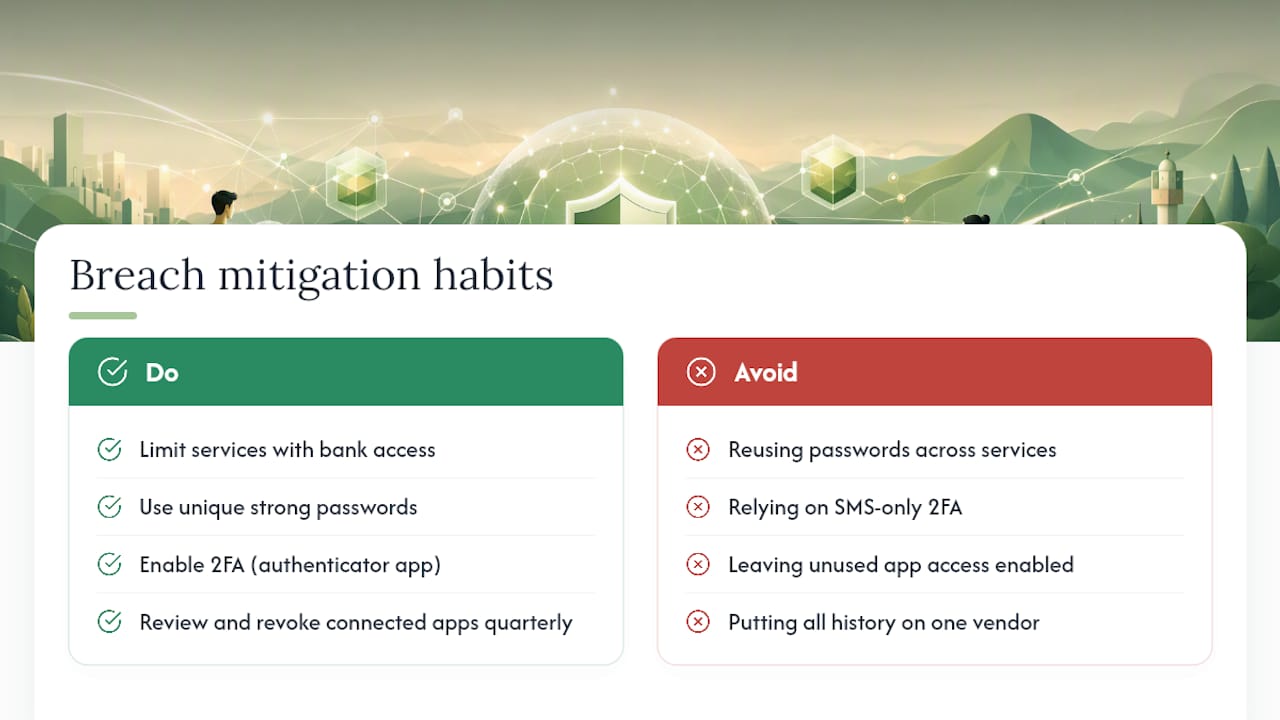
Mitigation comes down to a few concrete habits. Limit the number of services with standing access to your bank; each one is a door that has to be defended, and doors nobody uses can simply be closed. Use unique, strong passwords per financial service, not the same password reused across your invoicing tool and your bank. Enable two-factor authentication everywhere it's offered, and prefer an authenticator app over SMS codes, which can be intercepted through SIM-swapping. Review connected apps in your bank's security settings quarterly and revoke access for anything you no longer actively use. And keep encrypted local backups so a breach at any single vendor never costs you your entire financial history, only whatever that one vendor happened to have.
Talking to Clients About Money Without Oversharing
How you communicate about payments and budgets with clients is its own privacy surface, one freelancers often overlook entirely. Sending an invoice through a generic email attachment, unencrypted, with your full banking details visible, exposes more than most freelancers realize until something goes wrong.
A few habits reduce that exposure meaningfully. Send payment details through a dedicated invoicing tool's secure link rather than pasting your bank routing number into a plain email. If a client needs your W-9 or tax information, use an encrypted file-sharing method rather than a standard email attachment sitting in both inboxes indefinitely. When discussing budget specifics, project rates, retainer terms, keep the conversation to what's relevant to that engagement; you don't owe a client visibility into your overall financial picture, your other clients' rates, or your buffer strategy.
It also helps to set expectations early. A short line in your contract or onboarding email, stating how you'll send invoices and how you expect payment confirmation, prevents the back-and-forth that often leads to sensitive details getting pasted into a casual message thread. Clients generally respect a freelancer who handles money matters with visible structure; it reads as professionalism, not evasiveness.
Keeping Your Numbers Useful Without Keeping Them Identifiable
Anonymizing or pseudonymizing your own financial data sounds like overkill until you consider how many tools ask for more identifying detail than they actually need to function. A budgeting spreadsheet doesn't need a client's full legal name in every row; a shorthand code (Client A, Client B, or a project number) preserves the tracking value without creating a document that, if ever exposed, hands over your entire client roster.
The same logic applies to any tool that offers categorization or analysis. If you're testing a new budgeting app before committing to it, feed it sanitized or placeholder numbers first rather than your real transaction history, a useful habit for evaluating any service, private-first or not, before trusting it with the real thing. For tools that require some form of account, use a dedicated email alias rather than your primary business address, so a breach at that vendor doesn't cascade into your main inbox.
Pseudonymization works best as a layered habit rather than a single tool feature: strip identifying names from your working ledger, keep the mapping between codes and real client names in a separate, more tightly secured file, and only reunite the two when you genuinely need to, at tax time, for instance, or when preparing a specific client-facing report.
Why I Care About This Beyond the Obvious
I've watched freelancers treat financial privacy as a luxury concern, something to worry about after the bigger problems (clients, cash flow, taxes) are solved. That ordering is backwards. The data exposure happens quietly, in the background, every time a new tool gets bank access, long before any breach makes headlines. Adopt one habit this week, separate accounts or a local ledger, and build from there. None of this requires giving up convenience entirely, just being deliberate about which conveniences are worth the trade.
— Alex
Private, On-Device Budgeting Built for This Exact Problem
Obsidianridgelabs builds the tool the earlier sections describe in theory: a budgeting app where categorization, tax forecasting, and scenario planning all run on your iPhone, not on a server somewhere logging your login times.

That maps directly onto the workflows covered above. Income simulation happens locally, so testing a pessimistic-versus-optimistic scenario never touches a network call. Categorization uses on-device AI rather than shipping transaction descriptions to a cloud model for sorting. Exports are yours to trigger, encrypted CSV or JSON, whenever you need to hand something to a CPA, with no persistent aggregator connection sitting active in the background the rest of the year. Network calls are optional and disclosed, never a default you have to dig through settings to find.
If you want to see how the on-device claims hold up under scrutiny before committing to anything, the privacy verification guide for Apple devices walks through what "processed locally" actually means at the system level. From there, the Vault budgeting app is the practical next step: open it, connect nothing, and run your first scenario the same way you would in a spreadsheet, just faster.
Sources
The Freelance Income Planner demonstrates client-side tax and multi-currency forecasting. Google's Privacy Budget proposal explains fingerprinting exposure limits. Snowflake's differential privacy documentation covers cumulative privacy-loss controls. FinHelp's freelancer financial planning glossary grounds the percent-allocation checklist, and Savings Grove's part-time income budgeting guide offers additional forecasting examples for irregular earners.
This article is general information, not a substitute for advice from a qualified financial advisor. Consult a qualified financial professional about your own circumstances before acting on anything here.
- RCushmaniii/freelance-income-planner
- Privacy Budget (Privacy Sandbox)
- Snowflake documentation — differential privacy / privacy budgets
- Financial planning for freelancers and gig workers — FinHelp