
The fastest way to turn what you learn on your iPhone or iPad into lasting memory is to pair active recall with a spaced-repetition schedule inside a privacy-first, on-device app. This combination, built on the SM-2 scheduling logic that powers most flashcard software and delivered through an app like Memora that keeps processing local, beats passive re-reading on nearly every retention measure researchers have tested. Start there, and adjust the details as you learn your own weak spots.
TL;DR:
- Using active recall combined with spaced repetition reduces study time and improves long-term retention compared to passive re-reading, especially with local, privacy-first apps.
- Creating specific, production-based prompts from source material is crucial for effective recall, and short, focused review sessions yield better results for most learners.
- Choose iOS study apps that process data on your device, support multiple media types, and allow transparent review interval adjustments to protect privacy and optimize learning.
- AI-generated flashcards are quick but require careful editing to ensure they test recall rather than recognition, making manual review and refinement essential.
- Memora offers private, on-device flashcard creation and review on iOS, ideal for students prioritizing data privacy without sacrificing AI-assisted efficiency.
Table of Contents
- Why Active Recall Plus Spaced Repetition Actually Works
- How Do You Practice Active Recall on iPhone or iPad?
- How Do You Choose the Right Active Recall App for iOS?
- What Study Routines Work Best for Different Learners?
- Why Privacy-First, On-Device Study Apps Matter
- What Should You Expect From AI Card Generation?
- An Honest Take on the Active Recall Hype
- Study Privately With Memora on iOS
- Sources
Why Active Recall Plus Spaced Repetition Actually Works
Re-reading a textbook chapter feels productive. It rarely is. The cognitive science behind active recall shows that forcing your brain to produce an answer, rather than simply recognizing one on a page, builds a stronger and more durable memory trace. Recognition tasks like multiple choice let you skate by on partial familiarity. Production tasks like typing or speaking an answer expose exactly what you don't know, which is the entire point of studying.
Spaced repetition solves a different problem: timing. Left alone, human memory decays on a predictable curve, and the SM-2 algorithm (and its many modern variants) schedules each flashcard for review right before you're likely to forget it. That's the same scheduling logic behind ZapCards' AI-assisted card generation, and it's why apps built around spaced intervals consistently outperform static study sessions.
Here's what combining the two methods typically delivers:
- Fewer total review sessions needed to hit the same retention level compared to cramming or re-reading
- Faster identification of weak cards, since production-based answers surface gaps immediately
- Retention that holds up weeks later, not just on the next quiz
- Less time spent reviewing material you already know cold
The efficiency math matters more than students often realize. With the average cost of a college credit hour running into the hundreds of dollars, every hour spent on low-yield re-reading is an hour (and a fraction of tuition) you can't get back. Studying smarter isn't just a grade issue. It's a time and money issue.
How Do You Practice Active Recall on iPhone or iPad?
The workflow below assumes you're starting from scratch with a lecture, a chapter, or a stack of PDFs. Follow it in order the first few times, then adapt once you know your rhythm.
- Capture your source material fast. Snap a photo of handwritten notes, import a PDF, or paste typed notes directly into your study app. If you're capturing a live lecture, a dedicated transcription tool can turn speech into clean text before it ever touches your flashcard app, which keeps the whole pipeline private and searchable, an approach outlined in this comparison of offline transcription apps.
- Turn source material into recall-first cards. Skip yes/no and multiple-choice formats. Write short, specific prompts that force a typed or spoken answer, or use cloze deletions that blank out one key term per sentence. One concept per card. Dense paragraphs crammed onto a single card produce vague, low-quality prompts that slow down every future review.
- Run review sessions in short, focused blocks. Fifteen to thirty minutes is the sweet spot. Prioritize typed or spoken free recall over tapping a multiple-choice option, since production-based answers expose real gaps that recognition tasks hide. Let the app resurface your worst-performing cards more often.
- Shift modes as the exam approaches. In long-term mode, let the spacing algorithm stretch intervals out over days or weeks. Inside the final week, switch to an exam-countdown mindset: increase review frequency on your weakest cards, drill anything you've missed twice, and stop adding brand-new material 1 to 2 days before the test.
- Run a two-minute setup check before every session. Charge your device, silence notifications, and do a thirty-second warm-up on cards you already know well to get into rhythm before hitting the harder material.
Pro Tip: Batch your card creation right after class or right after finishing a reading, while the material is still fresh. Cards written from memory hours later tend to test recognition of your notes, not recall of the actual concept.
How Do You Choose the Right Active Recall App for iOS?
Not every flashcard app on the App Store treats your notes, your recordings, or your study data the same way. Before you commit to one, run it through these six checks.
- Privacy and data flow. Does the app process cards on your device, or does everything route through a cloud server? Look for explicit language about optional connections versus mandatory ones.
- Algorithm transparency. Ask whether the spacing engine is a documented method like SM-2, and whether you can see or adjust review intervals rather than trusting a black box.
- Card and media support. Confirm it handles typed answers, cloze deletions, images, audio clips, and PDF import, since heavy-text courses need more than plain text cards.
- Sync and offline behavior. Some apps rely on local caching with optional iCloud sync, as seen in StudyFi's offline-first design, while others require a live connection to function at all. Check which model you're getting before your material is offline on a train or in a library basement.
- iOS compatibility. App Store listings typically show minimum OS requirements, and Qsets' listing is a good example of the kind of version detail you should confirm before installing on an older iPhone or iPad.
- Cost model and trial strategy. Look at whether the app is a one-time purchase, a subscription, or free-to-start with limits, and test it on a real study set before committing to anything long-term.
A quick reading of the app's privacy page, before you ever import a single note, tells you more than the marketing screenshots ever will. If the developer can't clearly explain what leaves your device and when, treat that as a real signal to keep looking.
What Study Routines Work Best for Different Learners?
A generic "study 20 minutes a day" recommendation ignores how differently people actually work. Match your routine to your situation instead.
For steady, ongoing coursework, aim for daily micro-sessions of 10 to 15 minutes rather than one long weekly cram. Spaced intervals do their best work when reviews are frequent and short, not occasional and long.
- ADHD-friendly approach: break sessions into 5 to 10 minute bursts, use audio prompts to reduce screen fatigue, enforce a hard stop with a timer, and set small, countable goals like "review 15 cards" instead of open-ended time blocks.
- Language learning and heavy-memorization subjects: mix typed recall with audio playback so you're training both recognition of sound and production of the answer, and lean on tighter spacing intervals since vocabulary decays faster than conceptual knowledge.
- Exam cram windows (MCAT-style or final exams): shift to targeted gap drilling, pull up only your lowest-scoring cards, and raise review frequency on those items daily rather than weekly. If your app has an exam-mode feature that compresses scheduling toward a set date, similar to what Recallity's exam-focused mode offers, this is when to switch it on. Students building subject-specific micro-cards, like these IB geography case study cards, often find the same gap-drilling logic applies well outside standard test prep too.
Pro Tip: If you only have one week before an exam, spend the first two days building tight, one-concept cards on your weakest topics before you touch review mode at all. A well-written card reviewed three times beats a sloppy one reviewed ten.
Why Privacy-First, On-Device Study Apps Matter
Your class notes, lecture recordings, and exam prep often contain more sensitive material than people assume: professor commentary, personal health information in a nursing or medical course, financial case studies, or simply a semester's worth of your own thinking. Where that data gets processed, and who can see it, is not a small detail.
Obsidianridgelabs builds its private AI apps for Apple devices around a straightforward principle: sensitive processing happens on your device, not in a remote server you can't inspect. The company documents its on-device approach explicitly, including how optional cloud connections work and what stays local by default.
What that looks like in practice for a study app:
- Card generation and grading run locally rather than sending your notes to an external server for processing
- Offline behavior is predictable, since a local model doesn't depend on network conditions to function
- Optional sync features are documented clearly, so you know exactly what leaves your device and when
- Performance stays consistent on-device rather than fluctuating with server load elsewhere
This matters most for students juggling sensitive coursework, whether that's clinical case notes, personal journaling tied into study reflection, or just a general discomfort with sending private academic material to a cloud service you didn't choose to trust. On-device processing removes that tradeoff from the equation entirely.
What Should You Expect From AI Card Generation?
AI-assisted card generation has become close to standard on iOS study apps. Point the app at a PDF, a photo of handwritten notes, or a block of pasted text, and it drafts flashcards automatically, often in seconds. Several apps in this category, including ZapCards, build their entire pitch around this speed.
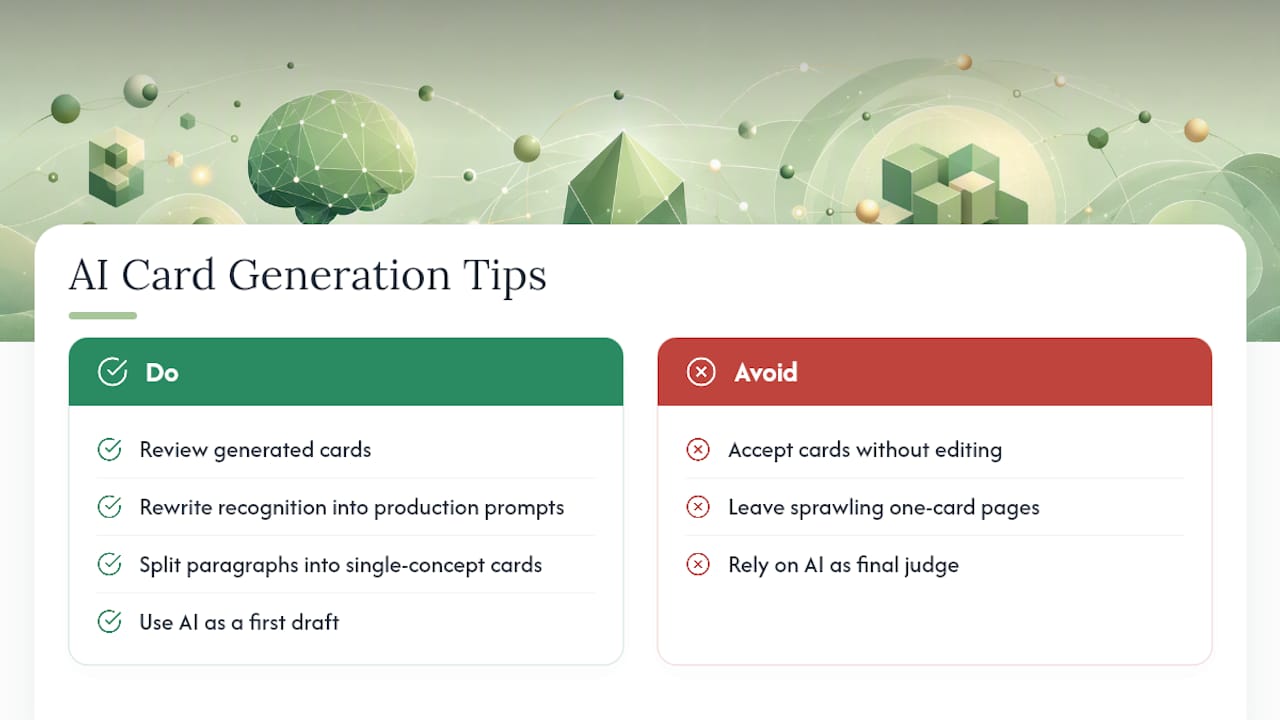
The catch is quality control. AI-generated cards frequently default to recognition-style prompts, questions that are easy to answer if you skim the source material but don't actually force recall. A card that asks "Which of these best describes mitosis?" tests something very different from a card that asks you to explain mitosis from memory in your own words.
Treat AI generation as a first draft, not a finished product. Read through what the app produces and rewrite anything that feels like it's testing recognition instead of production. Break dense paragraphs into single-concept cards rather than accepting one sprawling card per page. This single editing pass is often the difference between a card set that actually builds recall and one that just feels like it does. For a closer look at how different apps handle this step, the comparison of AI flashcard apps for PDFs and notes breaks down where automated generation tends to fall short and where it earns its keep.
Good AI generation saves you the tedious first pass of turning raw notes into question format. It doesn't replace your judgment about what actually needs testing.
An Honest Take on the Active Recall Hype
Most advice on active recall stops at "test yourself instead of re-reading," as if the method alone guarantees results. It doesn't. The quality of your cards matters more than the technique. A deck full of vague, recognition-style prompts wrapped in a fancy spaced-repetition engine still produces shallow learning. The algorithm just tells you when to review garbage, not how to fix it.
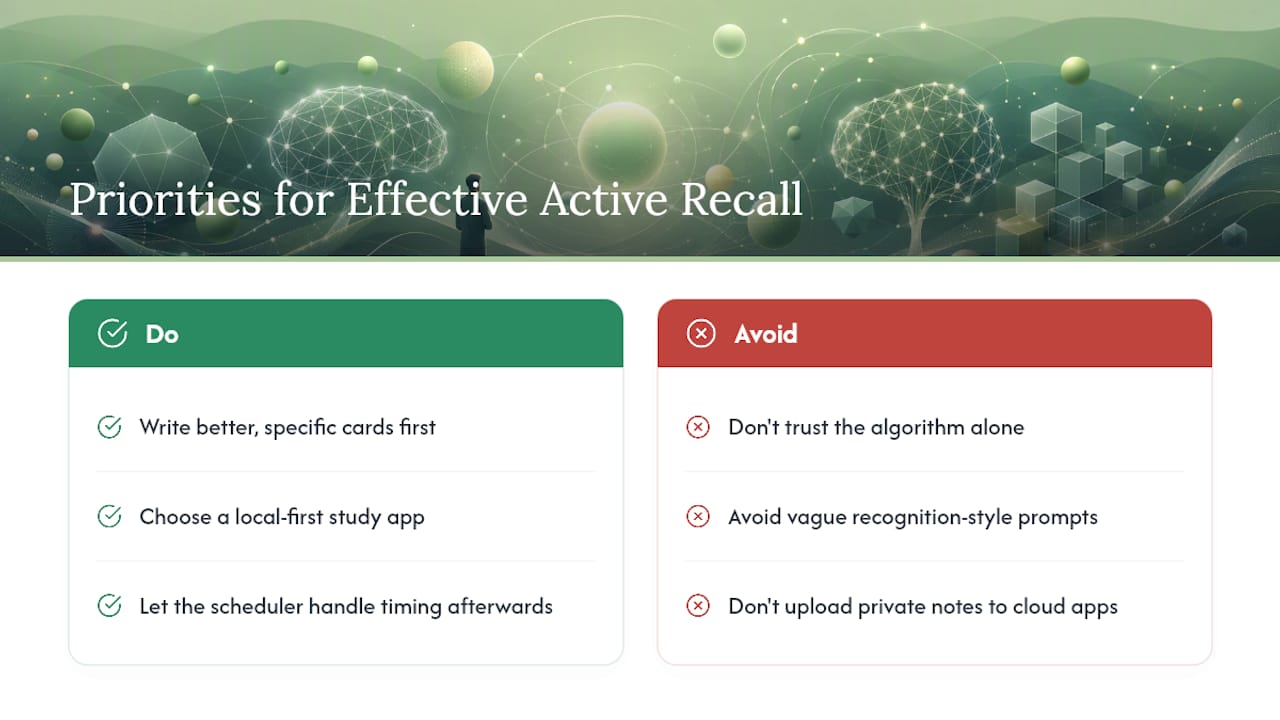
The conventional advice also underweights privacy, treating it as a nice-to-have rather than a practical concern. Students routinely feed lecture recordings, clinical notes, and personal reflections into cloud-based apps without asking where that data actually goes. That's a real gap in how this topic usually gets covered.
What I'd prioritize first: write better cards before you chase a better algorithm, and choose a study app that keeps your material on your device by default rather than treating cloud sync as the assumed norm. Get those two decisions right, and the scheduling algorithm does the rest of the work for you.
— Alex
Study Privately With Memora on iOS
Everything in the workflow above, capturing notes, generating recall-first cards, and running spaced-repetition reviews, works best when the app doing it keeps your material off someone else's server. Memora is an on-device card generation app for iOS that handles optional sync transparently and performs without requiring a network connection.

Memora fits students who want the study benefits of AI-generated flashcards without handing lecture recordings or exam notes to a cloud platform. Visit the app's store page for current purchase options. If you're comparing it against other flashcard tools, the breakdown of Memora against Anki, Quizlet, RemNote, and Knowt walks through the feature differences in detail. Visit the Obsidianridgelabs homepage to see current app details and start your first private study session today.